Umbrel Pro Review: The Premium, Privacy-Focused 16TB Home Cloud Server You’ve Been Waiting For
16TB home cloud server. Run OpenClaw, store files, and more.
Published: 2/9/2026
The move toward digital sovereignty and data privacy has accelerated dramatically in recent years. For users tired of handing over their precious photos, documents, and personal data to centralized giants, the self-hosting movement offers a compelling alternative. Enter Umbrel Pro, the latest hardware offering from the team behind the popular self-hosting operating system, umbrelOS. This device isn't just another network-attached storage (NAS); it’s a meticulously crafted, high-performance home cloud server designed to put you firmly back in control of your digital life.
Product Overview: Premium Hardware Meets Seamless Software
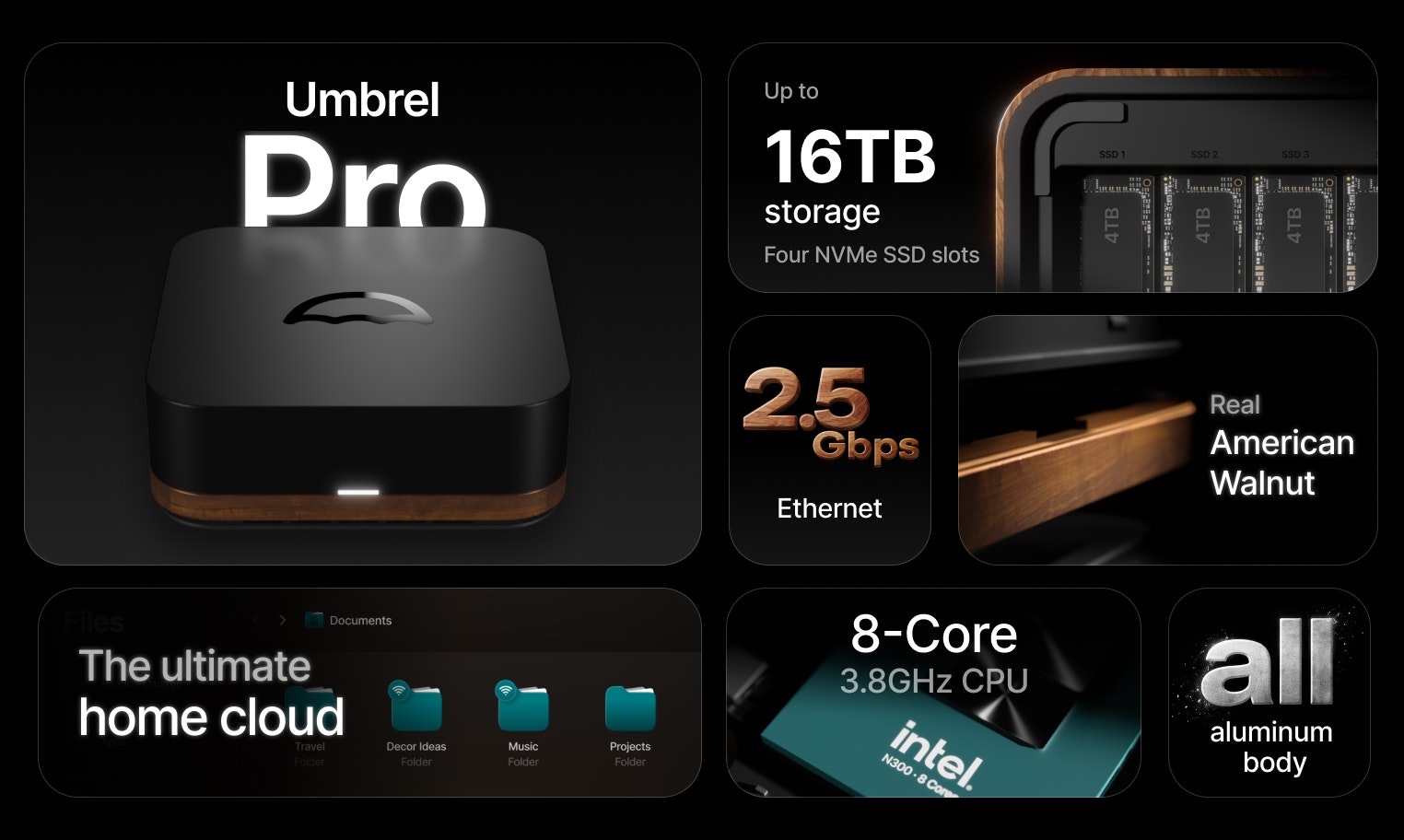
Umbrel Pro is positioned squarely at the intersection of elegant industrial design and powerful, user-friendly self-hosting. At its core, this is a dedicated home cloud server featuring four NVMe SSD slots, capable of supporting up to 16TB of lightning-fast, local storage. What sets the Umbrel Pro apart immediately is its stunning physical construction: milled from a single block of aluminum and tastefully framed with genuine American Walnut. It looks less like a piece of tech and more like a high-end piece of modern furniture, perfect for any contemporary home office or living space.
The true power of the Umbrel Pro hardware is unlocked by its integrated software layer: umbrelOS. This operating system is designed for simplicity, allowing users to run sophisticated, privacy-focused applications with just a few clicks. It targets tech enthusiasts, privacy advocates, and families who need reliable, high-capacity local storage without the complexity traditionally associated with setting up a home server from scratch. Its core value proposition is delivering enterprise-grade functionality—like private photo backup and data syncing—within a beautiful, accessible consumer package.
Solving the Self-Hosting Dilemma: Privacy Without the Pain
The primary problem Umbrel Pro addresses is the friction inherent in self-hosting. Historically, achieving a robust, aesthetically pleasing, and high-performance home cloud required deep technical knowledge: sourcing compatible components, configuring RAID arrays, troubleshooting networking issues, and manually installing Linux packages. This complexity deterred the vast majority of users who simply want a private alternative to Google Photos or Dropbox.
The Umbrel Pro brilliantly solves this by providing a turnkey solution. It eliminates the hardware guesswork by offering a curated, high-specification box. More importantly, umbrelOS abstracts away the Linux command line. Users can deploy powerful applications like Immich (a popular, open-source alternative to Google Photos) or OpenClaw directly from a user-friendly app store interface. This dramatically lowers the barrier to entry, filling a crucial market gap for a premium, aesthetically motivated, and hassle-free private cloud experience.
Key Features and User Experience Highlights
The feature set of the Umbrel Pro is focused on speed, capacity, and application diversity. The integration of four NVMe slots promises significantly faster read/write speeds compared to traditional spinning hard drives often found in entry-level NAS systems, making tasks like large video backups or accessing massive media libraries feel instantaneous.
The software ecosystem provided by umbrelOS is arguably the most compelling highlight:
- One-Click App Installation: Access hundreds of self-hosted applications, moving beyond simple file storage into media servers, password managers, and more.
- Immich Integration: Seamlessly run and back up your device photos and videos privately on your own hardware.
- Premium Build Quality: The aluminum and walnut chassis is a significant differentiator, making this a device you want to display, not hide in a closet.
- Future-Proof Capacity: Up to 16TB allows users to consolidate local storage needs for years to come.
The user experience is defined by its simplicity. Setting up the hardware is straightforward, and once connected to the network, the web interface guides the user through storage configuration and application deployment. For those transitioning from cloud services, the experience feels familiar yet empowering.
Potential Drawbacks and Areas for Improvement
While the Umbrel Pro excels in its core mission of delivering premium, easy self-hosting, potential users should be aware of a few considerations. The primary limitation is the initial investment cost associated with premium hardware (NVMe SSDs are not included). While the speed is fantastic, this solution caters to users who value performance and design over the absolute lowest possible entry price point typical of DIY NAS builds.
Secondly, while umbrelOS supports hundreds of apps, users are still limited to those available within the Umbrel ecosystem. While robust, advanced users accustomed to full Docker or command-line control might occasionally find the abstraction layer slightly restrictive for highly customized deployments. Future iterations could benefit from offering a "Pro Mode" that allows for advanced container management without compromising the simplicity of the default setup. Expanding partnerships for more complex business-grade productivity suites within the app store would also enhance its utility for remote workers.
Bottom Line & Recommendation
The Umbrel Pro is an outstanding piece of technology that successfully merges elite industrial design with accessible, powerful self-hosting software. It is the ideal solution for the discerning user, creative professional, or privacy-conscious family looking to move away from dependency on major tech companies without sacrificing speed or elegance. If you are ready to take control of your digital footprint and want a device that performs like a server but looks like a piece of modern art, the Umbrel Pro is highly recommended. It sets a new benchmark for what a home cloud server should be.
Featured AI Applications
Discover powerful tools to enhance your productivity
MindMax
New Way to Interact with AI
Beyond AI chat, transforming conversations into an infinite canvas. Combining brainstorming, mind mapping, critical and creative thinking tools to help you visualize ideas, solve problems efficiently, and accelerate learning.
AI Slides
AI Slides with Markdown
Revolutionary slide creation fusing AI intelligence with Markdown flexibility - edit anywhere, optimize anytime, iterate easily. Turn every idea into a professional presentation instantly.
AI Markdown Editor
Write Immediately
Extremely efficient writing experience: AI assistant, slash commands, minimalist interface. Open and write, easy writing. ✍️ Markdown simplicity + 🤖 AI power + ⚡ Slash commands = Perfect writing experience.
Chrome AI Extension
AI Assistant Anywhere
Transform your browsing experience with FunBlocks AI Assistant. Your intelligent companion supporting AI-driven reading, writing, brainstorming, and critical thinking across the web.