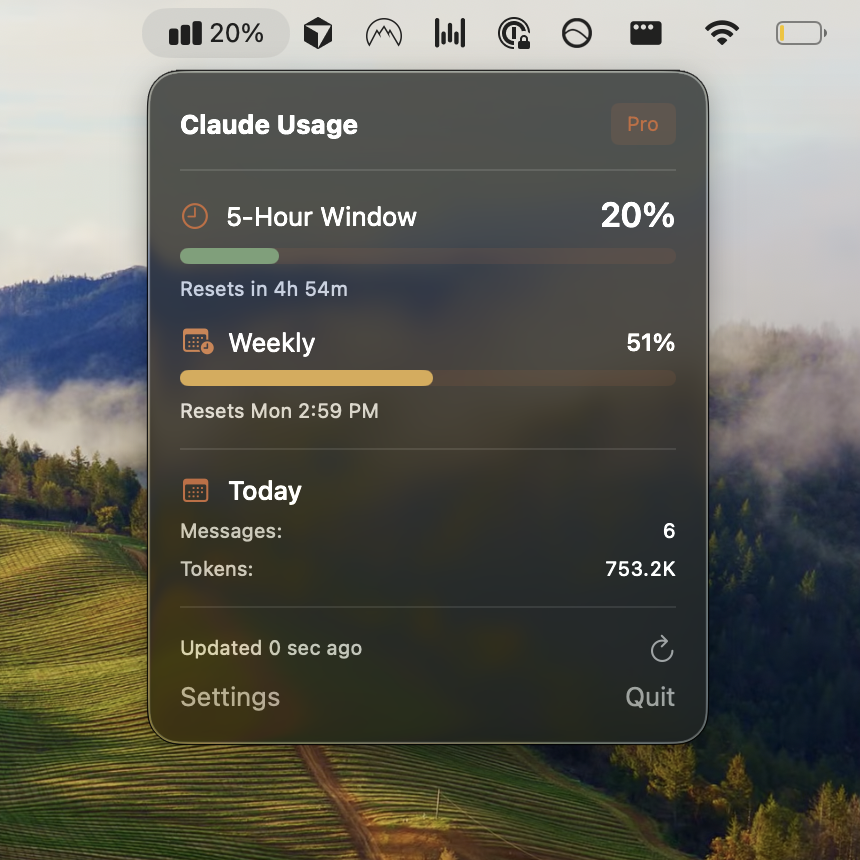
Usagebar: Essential Claude Code Usage Tracking Right on Your macOS Menu Bar
Track Claude Code Usage from your Menu Bar
Published: 1/23/2026
Product Overview: Staying Ahead of Your AI Limits
Usagebar is a thoughtfully designed macOS utility that tackles a surprisingly common pain point for developers and power users relying heavily on Anthropic’s Claude Code models: confusing and opaque usage quotas. In the fast-paced world of AI coding assistance, knowing exactly where you stand with your usage limits—especially for newer, specialized models like Claude Code—is crucial for uninterrupted productivity. Usagebar steps in as the dedicated solution, embedding critical usage metrics directly into the user's workflow via the menu bar.
This application is clearly aimed at the developer community and AI enthusiasts who utilize Claude Code frequently for tasks like code generation, debugging, and architectural planning. Its core value proposition is simple yet powerful: transparency and proactive management of resource consumption. Instead of constantly navigating to Anthropic’s dashboard or relying on delayed email notifications, users get real-time visibility into their 5-hour and weekly usage limits, ensuring they can plan their intensive coding sessions without fear of sudden throttling or hitting the wall unexpectedly.
Problem & Solution: Eliminating Interruption Anxiety
The primary problem Usagebar solves is usage quota anxiety and unexpected downtime. When working on complex projects, hitting an arbitrary usage limit mid-flow can derail focus and cost significant time while waiting for limits to refresh. For models tied to specific time windows (like the 5-hour limit mentioned), manual tracking becomes tedious and error-prone. Existing solutions often require users to leave their primary coding environment or rely on less precise third-party tracking methods.
Usagebar addresses this by acting as a lightweight, dedicated AI usage monitor. It integrates seamlessly into the macOS environment, constantly polling usage data and presenting it instantly. It moves usage tracking from an active chore to a passive monitoring system. By providing clear countdown timers until the next reset, Usagebar transforms potential frustration into predictable scheduling, allowing developers to maximize their access to the powerful Claude Code API efficiently.
Key Features & Highlights: Simplicity Meets Utility
The strength of Usagebar lies in its focused feature set, designed for immediate utility. It avoids feature bloat, concentrating entirely on actionable usage data.
The most notable capabilities include:
- Real-Time Limit Display: Immediate visibility into both the rolling 5-hour limit and the standard weekly limit for Claude Code.
- Automated Reset Timers: Visual countdown clocks clearly indicate when usage windows will refresh, which is invaluable for planning.
- Proactive Notifications: Users receive timely alerts before hitting critical thresholds, preventing abrupt service interruption when working on time-sensitive tasks.
The user experience is exceptionally clean, adhering to macOS design principles. Once installed, the app operates silently in the background. Tapping the menu bar icon provides an instant status check, offering the fastest possible way to verify current usage levels without interrupting the deep work state required for coding. This focused utility makes Usagebar a compelling addition to any developer’s toolkit for managing AI service consumption.
Potential Drawbacks & Areas for Improvement
While Usagebar delivers excellently on its core promise, there are a few areas where future iterations could significantly enhance its value proposition. Currently, the focus seems entirely on Claude Code. As developers often utilize multiple large language models (LLMs) simultaneously (e.g., GPT, Gemini, and Claude), adding multi-model support would elevate this utility into a universal AI usage dashboard.
Another area for potential refinement is deeper customization. While notifications are helpful, offering granular control over when and how these alerts are triggered (e.g., "Alert me when I reach 80% of my weekly limit") would be highly beneficial for advanced users managing stricter budgets. Furthermore, integrating basic historical data or usage logging—even a simple graph showing usage spikes over the last 24 hours—could provide better insights into daily work patterns beyond just the current countdown.
Bottom Line & Recommendation
Usagebar is an excellent, highly focused utility that solves a very real, yet often overlooked, productivity challenge for dedicated Claude Code users on macOS. If you frequently rely on Anthropic’s model for coding tasks and find yourself constantly checking usage dashboards, this application is an absolute must-try.
It’s a perfect example of a niche tool done right: unobtrusive, fast, and delivering exactly the necessary information at the critical moment. For developers looking to streamline their AI workflow and eliminate unexpected usage bottlenecks, Usagebar earns a strong recommendation as an essential monitoring utility.
Featured AI Applications
Discover powerful tools to enhance your productivity
MindMax
New Way to Interact with AI
Beyond AI chat, transforming conversations into an infinite canvas. Combining brainstorming, mind mapping, critical and creative thinking tools to help you visualize ideas, solve problems efficiently, and accelerate learning.
AI Slides
AI Slides with Markdown
Revolutionary slide creation fusing AI intelligence with Markdown flexibility - edit anywhere, optimize anytime, iterate easily. Turn every idea into a professional presentation instantly.
AI Markdown Editor
Write Immediately
Extremely efficient writing experience: AI assistant, slash commands, minimalist interface. Open and write, easy writing. ✍️ Markdown simplicity + 🤖 AI power + ⚡ Slash commands = Perfect writing experience.
Chrome AI Extension
AI Assistant Anywhere
Transform your browsing experience with FunBlocks AI Assistant. Your intelligent companion supporting AI-driven reading, writing, brainstorming, and critical thinking across the web.