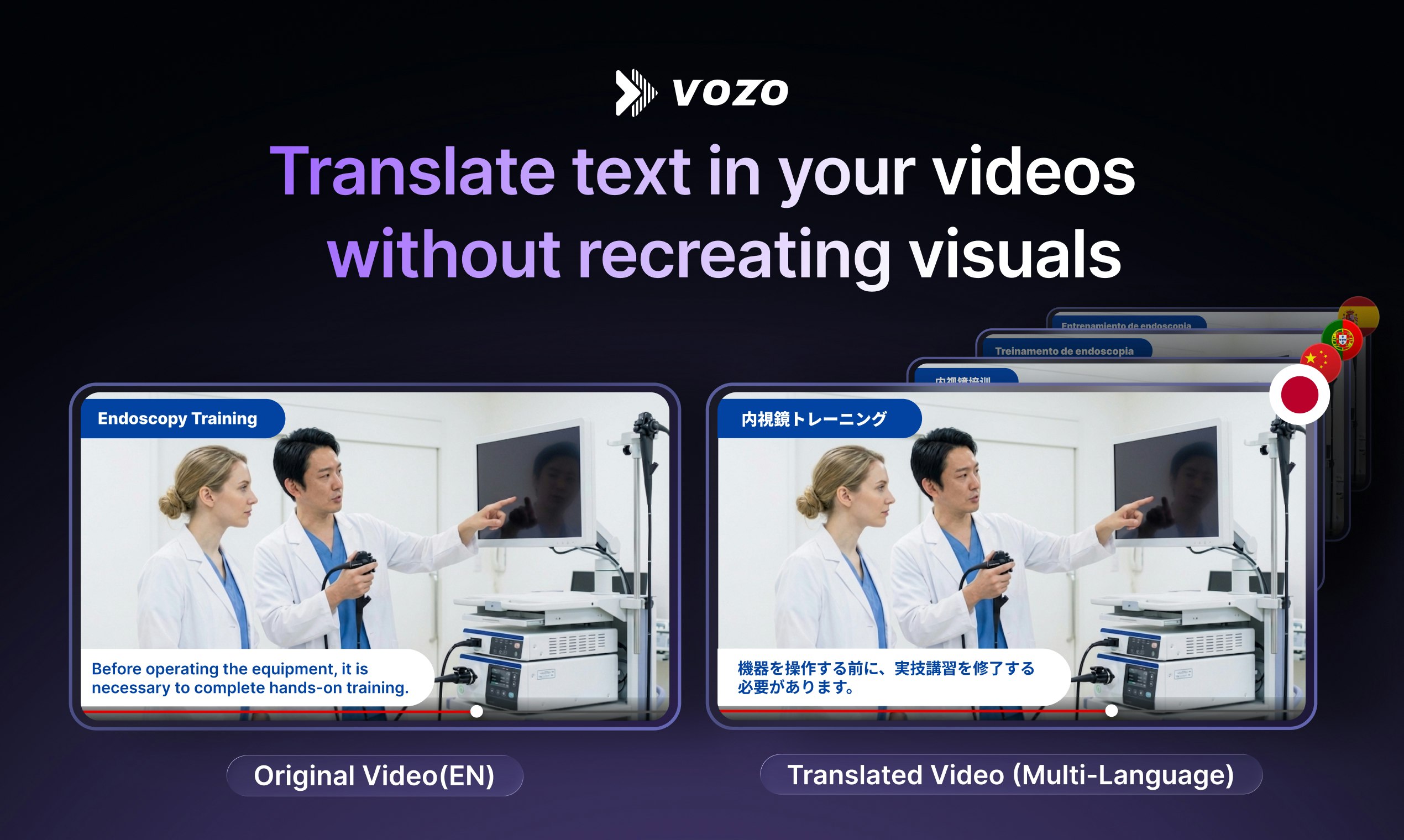
Visual Translate by Vozo: The Missing Piece in Multilingual Video Localization
Translate text in your videos without recreating visuals
Published: 3/10/2026
Product Overview: Revolutionizing On-Screen Text Translation
Visual Translate by Vozo steps into a crucial gap within the booming video localization market. While sophisticated AI tools have mastered voice dubbing, lip-sync correction, and subtitle generation, translating the static or dynamic on-screen text within videos remained a tedious, manual nightmare—often requiring graphic designers and hours of tedious recreation. Visual Translate tackles this head-on, positioning itself as the essential "final layer" in comprehensive video globalization.
This innovative tool is designed for content creators, marketing teams managing global campaigns, e-learning developers, and corporations needing to quickly localize explainer videos, training modules, and presentations. By automating the detection, translation, and re-rendering of text embedded directly within the visual frames, Visual Translate by Vozo promises fully localized video assets without the need for complex video editing workflows or starting entirely from scratch.
Its core value proposition is efficiency and fidelity: delivering high-quality, culturally relevant translated videos while maintaining the precise visual integrity, layout, and animation style of the original source material.
Problem & Solution: Bridging the Visual Localization Chasm
The primary problem Visual Translate by Vozo addresses is the inefficiency of visual text replacement in localized videos. Traditionally, if an English explainer video contained PowerPoint slides, on-screen diagrams, or text callouts, translating that video meant:
- Dubbing the audio.
- Syncing new subtitles.
- Exporting the video to an editor.
- Manually isolating every text overlay.
- Translating the text externally.
- Re-creating the graphics in the new language, ensuring fonts, sizes, and positions match the original perfectly.
Visual Translate solves this by integrating advanced visual recognition technology. It detects the text within the video frames—whether it’s static text on a slide or dynamic text appearing via animation—translates it instantly, and then seamlessly overlays the translated text back into the video timeline, preserving the original look and feel. This dramatically collapses a multi-hour or multi-day localization step into an automated process, filling a significant market gap for rapid, high-fidelity multilingual content deployment.
Key Features & Highlights: Precision in Visual Rendering
The capabilities offered by Visual Translate by Vozo are centered around preserving visual quality while delivering accurate translation. This is where the product truly shines compared to simple subtitle additions.
The most notable capabilities include:
- Automatic Text Detection & Extraction: The AI intelligently scans frames to identify text elements across various formats, including titles, labels, charts, and animated graphics.
- Layout and Style Preservation: This is the killer feature. Unlike simple text replacement, Visual Translate retains the original font family, color scheme, size, and—crucially—the original placement and animation paths of the on-screen text.
- Integrated Localization Pipeline: It works cohesively with other localization elements like voice dubbing and lip-sync, ensuring that the entire video experience feels native, not just the spoken words.
- Multi-Language Support: Enabling content creators to scale their reach quickly across numerous target markets simultaneously.
The user experience highlight is undoubtedly the "set-it-and-forget-it" nature for these complex visual edits. Creators can now upload a complex training video and receive a fully localized version ready for global distribution, a significant step forward in automated video production workflows.
Potential Drawbacks & Areas for Improvement
While Visual Translate by Vozo introduces transformative technology, as with any early-stage automation tool, there are inherent limitations to consider.
One potential drawback lies in handling highly stylized or heavily obscured text. If the original video uses extremely niche, custom fonts, or if the text is animated in a complex, overlapping manner, the detection or accurate re-rendering might occasionally falter, requiring minor manual cleanup. Furthermore, while the feature set is strong on text translation, users might eventually wish for deeper integration with regional stylistic preferences (e.g., automatically swapping imperial measurements for metric systems if the context dictates it).
To enhance its offering, I would suggest future development focus on:
- Contextual Style Inference: Developing a feature that allows users to input a simple style guide so the AI can better match non-standard fonts or complex visual backgrounds.
- Batch Processing for Large Libraries: Offering robust enterprise features for managing and translating hundreds of assets concurrently.
Bottom Line & Recommendation
Visual Translate by Vozo is a mandatory consideration for any business serious about scaling its video content globally without ballooning localization budgets or timelines. It successfully automates the most cumbersome part of video localization—the on-screen text replacement—while maintaining high visual fidelity.
If your organization relies on instructional videos, marketing explainers, or slide-based presentations that need to be accessible in multiple languages, you should try Visual Translate by Vozo immediately. It is a powerful, feature-rich tool that lives up to its promise of delivering fully translated videos without visual recreation, making it a standout product launch.
Featured AI Applications
Discover powerful tools to enhance your productivity
MindMax
New Way to Interact with AI
Beyond AI chat, transforming conversations into an infinite canvas. Combining brainstorming, mind mapping, critical and creative thinking tools to help you visualize ideas, solve problems efficiently, and accelerate learning.
AI Slides
AI Slides with Markdown
Revolutionary slide creation fusing AI intelligence with Markdown flexibility - edit anywhere, optimize anytime, iterate easily. Turn every idea into a professional presentation instantly.
AI Markdown Editor
Write Immediately
Extremely efficient writing experience: AI assistant, slash commands, minimalist interface. Open and write, easy writing. ✍️ Markdown simplicity + 🤖 AI power + ⚡ Slash commands = Perfect writing experience.
Chrome AI Extension
AI Assistant Anywhere
Transform your browsing experience with FunBlocks AI Assistant. Your intelligent companion supporting AI-driven reading, writing, brainstorming, and critical thinking across the web.