ZoneShare Review: Mastering Ultrawide Screen Sharing and Privacy on macOS
Perfect screen sharing for ultrawide monitors | macos app
Published: 12/19/2025
Product Overview: Reclaiming Control Over Your Display
ZoneShare is a dedicated macOS application engineered to solve a frustrating, yet increasingly common, modern workflow problem: how to effectively share a portion of an ultrawide monitor during video calls without exposing sensitive information. In an era where remote collaboration is standard, standard screen sharing often forces users to awkwardly zoom out their entire display or, worse, switch to a secondary, less ideal monitor setup just to protect private data.
This application targets professionals, developers, designers, and educators who rely on large, high-resolution, or ultrawide displays (like 21:9 or 32:9 monitors) for productivity but require precise control over what their audience sees. ZoneShare’s core value proposition is delivering surgical precision in screen selection combined with robust privacy features directly within your existing meeting platforms (Zoom, Meet, Teams, etc.). It transforms the cumbersome act of selective sharing into a seamless, controllable process, ensuring you only broadcast the necessary content.
The Problem & Solution: Cutting Through the Clutter
The fundamental issue ZoneShare addresses is the inherent lack of granularity in native macOS screen sharing options. When you have multiple windows open across a massive 34-inch or 49-inch display—perhaps code on one side, Slack notifications in the middle, and the presentation material on the right—sharing everything is a privacy nightmare. Conversely, sharing only a 16:9 window often crops critical context or introduces unnecessary black bars when working on an ultrawide canvas.
ZoneShare solves this by acting as an intelligent overlay layer. Instead of relying on basic window selection, it allows users to draw, size, and precisely position a custom sharing zone. More importantly, it introduces powerful obfuscation tools. Instead of just sharing a box, you can blur specific, non-essential applications or browser tabs that remain visible to you but are completely opaque to meeting participants. This innovative approach fills a significant market gap for high-fidelity, privacy-conscious screen casting on Mac.
Key Features & Highlights: Precision Meets Protection
ZoneShare packs a suite of features that elevate selective sharing beyond basic cropping. The customization options are immediate highlights:
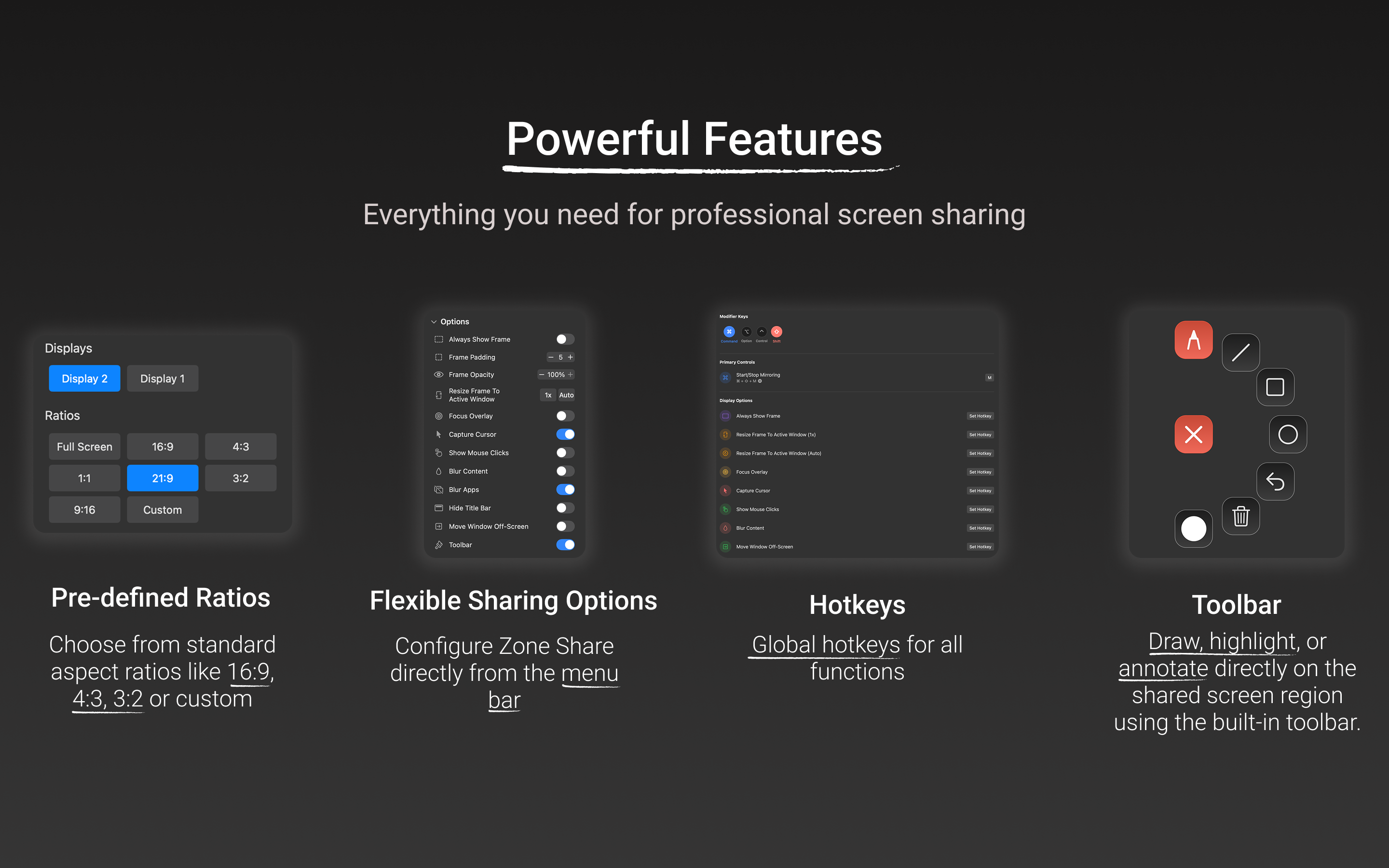
- Custom Area Selection: Users can manually define the exact pixel area to be shared, offering unparalleled flexibility compared to fixed window sharing.
- Predefined Aspect Ratios: For users who need to fit their shared content neatly into standard meeting formats (like 16:9 or 4:3), ZoneShare offers quick presets, simplifying alignment instantly.
- Dynamic Privacy Shielding: This is arguably the standout feature. The ability to blur selected apps, browser tabs, or the entire shared zone is crucial for security. Imagine presenting a Google Doc while keeping your personal Gmail tab blurred in the shared region—ZoneShare handles this effortlessly.
- Integrated Annotation Toolbar: The built-in toolbar allows presenters to quickly draw, highlight, or add notes directly onto the shared portion of the screen without needing external software, keeping the focus on the content.
- Efficiency Tools: Global hotkeys ensure that setting up or toggling the sharing zone is fast and interrupt-free, crucial for fast-paced demonstrations.
The user experience is designed for speed; once the zone is set, it remembers its position, allowing for quick deployment across multiple meetings.
Potential Drawbacks & Areas for Improvement
While ZoneShare excels in its core mission, a few areas could enhance its appeal further. Currently, the focus is heavily geared toward macOS, which is excellent for Mac users but limits accessibility for cross-platform teams.
Constructive feedback points include:
- Windows Compatibility: Expanding ZoneShare to Windows would unlock a massive new user base facing identical ultrawide sharing frustrations.
- Advanced Blurring Control: While blurring is excellent, offering different levels of obfuscation (e.g., pixelation vs. heavy Gaussian blur) or perhaps a "smart reveal" feature where blurring lifts only when the cursor hovers over the designated area for a split second, could add next-level interactivity.
- Integration Depth: Deepening integration with major meeting platforms could allow for one-click activation directly from the Zoom or Teams interface, rather than solely relying on the ZoneShare hotkey setup.
Bottom Line & Recommendation
ZoneShare is an essential utility for any macOS professional utilizing high-resolution or ultrawide monitors for remote work. It effectively eliminates the awkward dance of managing window placement and privacy concerns during video conferences. If you frequently find yourself wrestling with native screen sharing settings to protect sensitive data while presenting complex workflows, ZoneShare is highly recommended. It transforms an unreliable, stressful process into a precise, professional operation. It’s a niche tool, but for those in that niche, it delivers exceptional value and peace of mind.
Featured AI Applications
Discover powerful tools to enhance your productivity
MindMax
New Way to Interact with AI
Beyond AI chat, transforming conversations into an infinite canvas. Combining brainstorming, mind mapping, critical and creative thinking tools to help you visualize ideas, solve problems efficiently, and accelerate learning.
AI Slides
AI Slides with Markdown
Revolutionary slide creation fusing AI intelligence with Markdown flexibility - edit anywhere, optimize anytime, iterate easily. Turn every idea into a professional presentation instantly.
AI Markdown Editor
Write Immediately
Extremely efficient writing experience: AI assistant, slash commands, minimalist interface. Open and write, easy writing. ✍️ Markdown simplicity + 🤖 AI power + ⚡ Slash commands = Perfect writing experience.
Chrome AI Extension
AI Assistant Anywhere
Transform your browsing experience with FunBlocks AI Assistant. Your intelligent companion supporting AI-driven reading, writing, brainstorming, and critical thinking across the web.