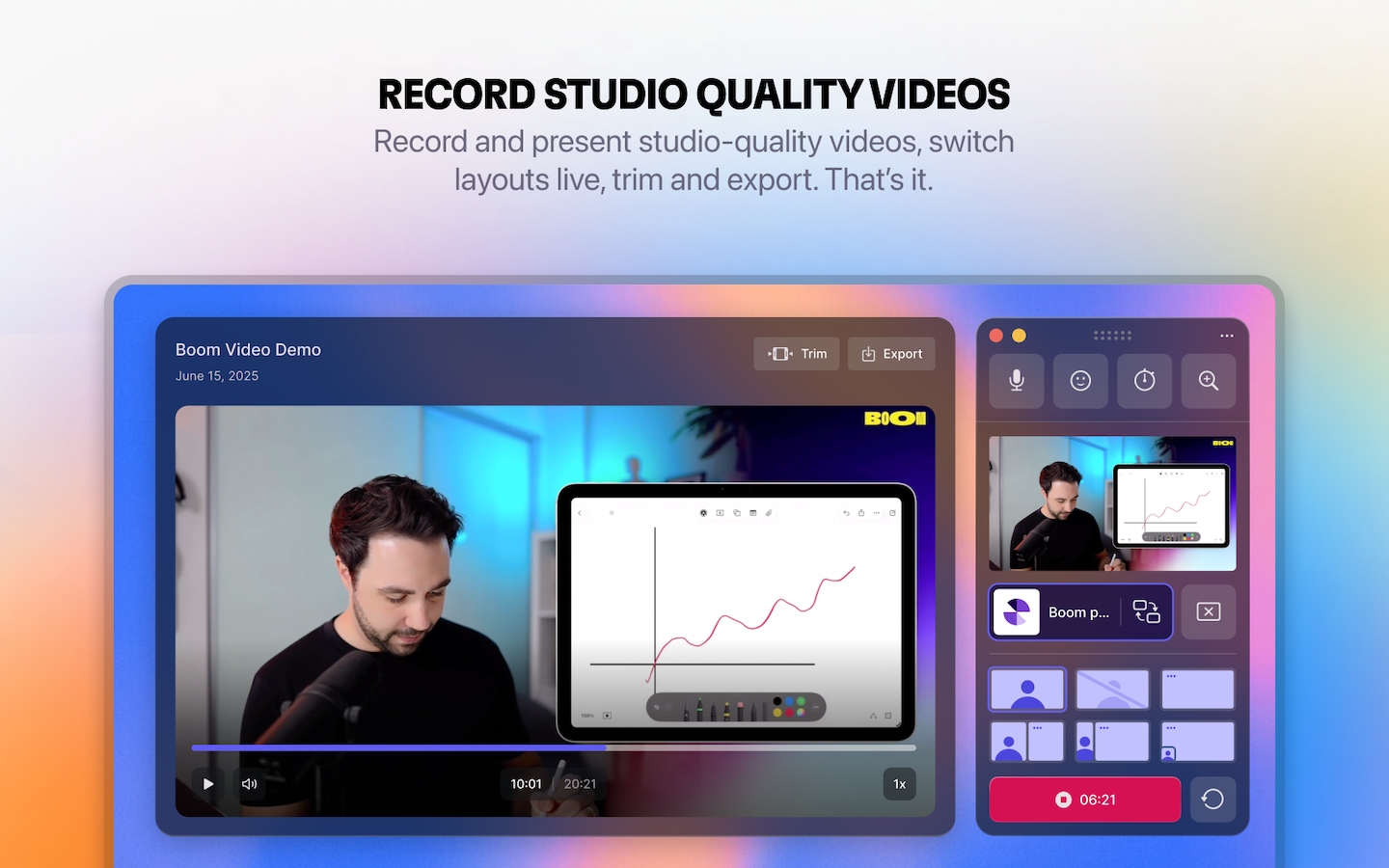
Boom Video for Mac Review: Present Live, Record Pro Content Without Post-Production Hassle
Present live, record your screen, look pro on camera
发布时间: 1/16/2026
Product Overview
Boom Video for Mac arrives on the scene promising to revolutionize how coaches, creators, and founders handle their on-camera presentations and video recording. Tagged as the ultimate tool to "Present live, record your screen, look pro on camera," Boom positions itself squarely against the complexity of traditional live streaming software and the limitations of standard recording tools like Loom. At its core, Boom Video for Mac is a streamlined video application designed specifically for the Mac ecosystem, focusing on delivering polished, ready-to-share video content directly from your recording session or live call.
This application is built for professionals whose credibility often hinges on their on-camera performance—think sales demos, online course creation, live consulting sessions on Zoom or Google Meet, and internal video updates. The core value proposition of Boom Video for Mac is radical simplification: enabling users to achieve cinematic quality results live or during recording, eliminating the time-consuming, often frustrating necessity of post-production editing.
Problem & Solution: Eliminating the Editing Treadmill
The primary pain point Boom Video for Mac addresses is the "editing treadmill." Professionals often spend hours stitching together screen captures, fixing lighting issues, cutting out "ums" and pauses, and awkwardly swapping between presentation slides and their webcam feed. Existing solutions are often overkill (like OBS, which is powerful but has a steep learning curve) or too basic (like native screen recorders, which offer no dynamic control).
Boom Video for Mac solves this by integrating professional production elements—like cinematic transitions, pro layouts, and virtual camera enhancements—directly into the recording pipeline. It acts as a simple yet powerful OBS alternative and a significantly enhanced Loom alternative. The key differentiator is its "no editing required" philosophy: what you record is what you publish. This immediate, finished-product delivery saves significant time and reduces technical friction for high-volume content creators.
Key Features & Highlights
The functionality packed into Boom Video for Mac is heavily weighted toward live performance enhancement and immediate output quality. The feature set is tightly focused on making the user look and sound professional instantly.
The most notable capabilities include:
- Pro Layouts and Cinematic Transitions: Users can seamlessly switch between customized scenes during a live call or recording, giving their presentations a dynamic, broadcast-quality feel that standard meeting apps simply cannot match.
- Virtual Camera Integration: Crucially, Boom functions as a virtual camera input, allowing its enhanced output to be natively used within major platforms like Zoom, Google Meet, and Microsoft Teams.
- Stream Deck Support: For power users who need instantaneous control over scene changes and effects, built-in support for the Stream Deck transforms live presentation management into a tactile, muscle-memory operation.
- Zero Post-Production Workflow: The promise of "no editing, no timeline, no post-production" is central. Content creators can record tutorials or demos and have a final file ready the second they stop speaking.
The user experience seems intentionally minimalist, built around the idea that complex controls detract from performance. This focus on immediate, polished output sets Boom Video for Mac apart from its more complex competitors.
Potential Drawbacks & Areas for Improvement
As an indie-built, Mac-only application, there are natural limitations to consider. The most immediate drawback is its exclusivity to macOS; Windows users are entirely excluded from this workflow, limiting its potential market reach for cross-platform teams.
While the focus on "no editing" is a strength, it might also be a constraint for some users. If a critical mistake is made during a long recording, the current design implies that the entire segment must be re-recorded, as there are no built-in editing tools to trim small errors. Future iterations might benefit from introducing a very lightweight, non-timeline trimming feature for minor cleanup without breaking the core philosophy. Furthermore, while the description hints at webcam enhancements, more detail on specific capabilities like background replacement or intelligent lighting correction would be welcome for prospective users evaluating it against dedicated webcam utility apps.
Bottom Line & Recommendation
Boom Video for Mac is a highly compelling tool for a specific, demanding demographic: Mac-based coaches, online educators, sales professionals, and founders who frequently present live or record short-form, high-quality tutorials. If your main goal is to stop wasting time in post-production and start delivering polished video content immediately through your preferred conferencing software, this app is well worth investigating.
For those looking for a sophisticated yet simple alternative to wrestling with OBS or upgrading the basic features of Loom, Boom Video for Mac delivers on its promise of professional, zero-editing video creation right on your desktop. It’s a significant quality-of-life improvement for the modern remote communicator.
Featured AI Applications
Discover powerful tools to enhance your productivity
MindMax
与AI互动的新方式
超越 AI 聊天,将对话转化为无限画布。结合头脑风暴、思维导图、批判性与创造性思维工具,帮助你可视化想法、高效解决问题、加速学习。
AI Slides
AI 驱动幻灯片,Markdown 魔法加持
革命性幻灯片创作,融合 AI 智能与 Markdown 灵活性 - 随处编辑,随时优化,轻松迭代。让每个想法,都能快速变成专业演示。
AI Markdown Editor
打开即写 - AI驱动的Markdown编辑器
极其高效的写作体验:AI助手、斜杠命令、极简界面。打开即用,轻松写作。✍️ Markdown简洁 + 🤖 AI强大 + ⚡ 斜杠命令 = 完美写作体验
FunBlocks AI Extension
🚀 AI驱动的浏览器扩展
用FunBlocks AI助手改变您的浏览体验。您的智能伴侣,为网络上的AI驱动阅读、写作、头脑风暴和批判性思维提供支持。