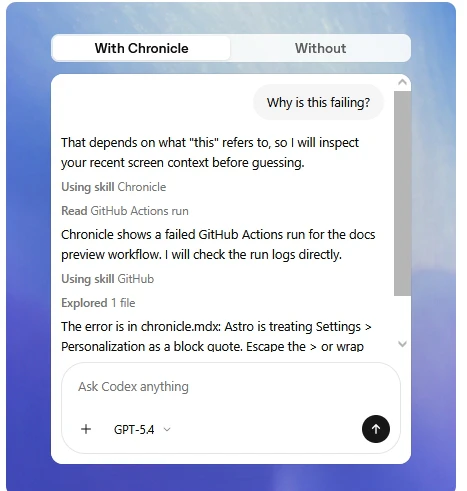
Chronicle Review: A Smart Approach to Contextual Memory
Build Codex memories from recent screen context.
发布时间: 4/21/2026
In an age of information overload, the biggest challenge for knowledge workers isn’t finding information—it’s retrieving the specific context of what we were looking at, reading, or working on just hours or days ago. Chronicle enters the market as a solution to this fragmentation. By leveraging your recent screen context, Chronicle creates a "Codex" of your digital activity, effectively turning your fleeting screen interactions into a searchable, structured database of memories.
At its core, Chronicle is a productivity tool designed for researchers, developers, writers, and power users who switch between dozens of tabs and applications daily. Instead of relying on manual bookmarking or fragmented browser history, Chronicle works in the background to capture the essence of your workflow. It bridges the gap between passive browsing and active knowledge management, ensuring that when you need to reference a specific piece of information from a past session, it’s already indexed and ready to recall.
Bridging the Gap in Workflow Continuity
The problem with standard browser history or "Recent Apps" lists is that they are purely chronological and lack depth. They tell you what you opened, but not why it mattered or how it connected to your broader project. When you switch contexts, that thread of thought is often lost.
Chronicle solves this by transforming raw screen data into meaningful "Codex memories." By focusing on the context of your activity, it fills the market gap left by traditional bookmark managers and note-taking apps that require manual input. It acts as an ambient cognitive assistant, capturing the "when" and "what" so you don’t have to expend mental energy trying to backtrack through a chaotic digital trail.
Key Features and Highlights
Chronicle distinguishes itself through a focus on intelligent capture and retrieval. While many tools aim to organize your files, Chronicle prioritizes the state of your screen as the primary data point.
- Contextual Capture: Rather than just logging URLs, Chronicle understands the context of your screen activity, making search results far more relevant than a basic history log.
- Codex Memory Building: The platform organizes these snapshots into a structured "Codex," allowing you to curate and retrieve memories with semantic awareness.
- Seamless Integration: The tool is designed to work in the background, minimizing friction so you can focus on your actual work rather than managing the tool itself.
- Privacy-First Architecture: By focusing on local context, Chronicle provides a secure way to manage your digital breadcrumbs without requiring excessive manual tagging or data entry.
The user experience is clean and unobtrusive. By removing the burden of manual documentation, Chronicle allows users to stay in their "flow state," trusting that the system is building a reliable reference guide for their future selves.
Potential Drawbacks and Areas for Improvement
As with any product that sits on your machine to monitor activity, the biggest hurdle for Chronicle will be trust and resource management. Users are naturally cautious about tools that "watch" their screen, so providing clear, transparent controls regarding what data is stored and where it is processed (locally vs. cloud) will be essential for mass adoption.
From a functional perspective, the current iteration could benefit from more robust search filters. As your Codex grows over months or years, finding a specific memory will require advanced querying capabilities—perhaps even AI-powered natural language searching that allows you to ask, "What was that article I was reading about API integration last Tuesday?" Additionally, integrating with existing note-taking apps like Notion or Obsidian would provide a massive value-add for users who want to export their "memories" into their permanent knowledge base.
Bottom Line: Should You Use Chronicle?
Chronicle is a must-try for power users, digital researchers, and anyone who feels the constant frustration of "losing their place" in a digital workspace. If you find yourself constantly searching through browser history or cluttered desktop tabs to find that one elusive piece of information, this tool will likely feel like a superpower.
While it is still evolving, Chronicle offers a compelling vision for the future of personal knowledge management: one where your computer learns your habits and preserves your context, allowing you to focus on the work that actually matters. For those willing to integrate it into their workflow early, it provides a unique advantage in staying organized and efficient in an increasingly noisy digital environment.
Featured AI Applications
Discover powerful tools to enhance your productivity
MindMax
与AI互动的新方式
超越 AI 聊天,将对话转化为无限画布。结合头脑风暴、思维导图、批判性与创造性思维工具,帮助你可视化想法、高效解决问题、加速学习。
AI Slides
AI 驱动幻灯片,Markdown 魔法加持
革命性幻灯片创作,融合 AI 智能与 Markdown 灵活性 - 随处编辑,随时优化,轻松迭代。让每个想法,都能快速变成专业演示。
AI Markdown Editor
打开即写 - AI驱动的Markdown编辑器
极其高效的写作体验:AI助手、斜杠命令、极简界面。打开即用,轻松写作。✍️ Markdown简洁 + 🤖 AI强大 + ⚡ 斜杠命令 = 完美写作体验
FunBlocks AI Extension
🚀 AI驱动的浏览器扩展
用FunBlocks AI助手改变您的浏览体验。您的智能伴侣,为网络上的AI驱动阅读、写作、头脑风暴和批判性思维提供支持。