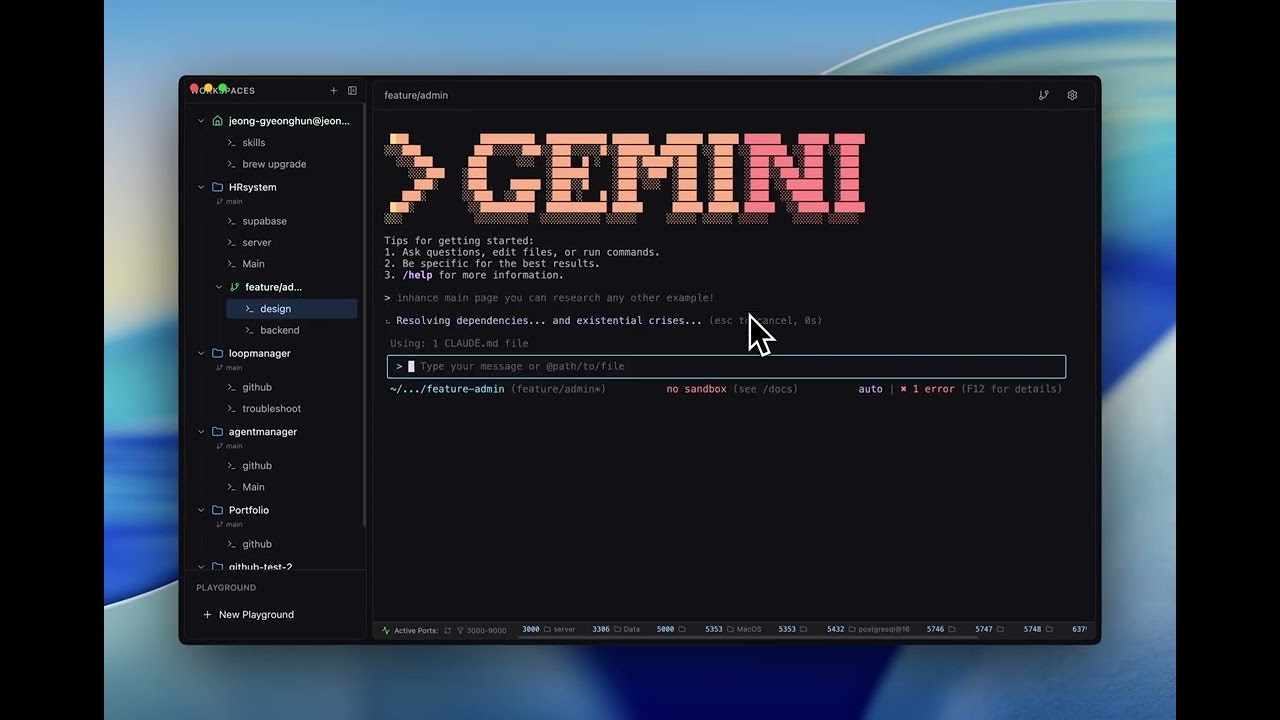
CLI Manager: Your Central Hub for AI CLI Agents
One dashboard to run and organize multiple AI CLI agents
发布时间: 12/16/2025
CLI Manager emerges as a timely solution for developers navigating the increasingly complex landscape of AI-powered command-line interface (CLI) tools. It positions itself as "one dashboard to run and organize multiple AI CLI agents," aiming to simplify the workflow for anyone leveraging tools like Claude Code, Codex CLI, and Gemini CLI. By centralizing these powerful agents, CLI Manager promises to streamline AI-powered development, offering a unified environment that enhances productivity and control.
This product targets developers, AI engineers, and potentially even data scientists or technical users who frequently interact with various AI CLI agents for tasks such as code generation, debugging, problem-solving, and system administration. The core value proposition lies in its ability to abstract away the individual complexities of managing diverse AI CLIs, offering a single point of control for renaming agents, switching editors, and generally organizing an AI-driven development workflow.
Problem & Solution
The proliferation of AI coding assistants and CLI tools, while beneficial, introduces a management overhead. Developers often find themselves juggling multiple terminal windows, remembering distinct commands and configurations for each AI agent, and switching contexts frequently. This fragmented approach can hinder efficiency, lead to inconsistencies, and make it challenging to maintain a holistic view of AI-assisted projects.
CLI Manager directly addresses this pain point by providing a consolidated dashboard. Instead of being "locked into any single AI or tool," users can manage their various AI CLIs from a single interface. This approach tackles the problem of scattered tools and inconsistent workflows by offering a dedicated management layer. It differentiates itself by focusing specifically on the management of these agents, rather than developing another AI agent itself. This fills a market gap for a centralized control panel for the growing ecosystem of AI CLI tools, helping users avoid the friction of switching between different interfaces.
Key Features & Highlights
The CLI Manager boasts a set of features designed for efficient AI agent orchestration:
- Unified Dashboard: The standout feature is the single dashboard for managing multiple AI CLI agents, including popular ones like Claude Code, Codex CLI, and Gemini CLI. This centralization is crucial for a streamlined workflow, enabling developers to oversee all their AI interactions in one place.
- Agent Organization: Users can easily rename and organize their agents, bringing order to what could otherwise be a chaotic collection of tools. This seemingly simple feature contributes significantly to a more manageable and personalized development environment.
- Instant Editor Switching: The ability to "switch editors instantly" within the dashboard suggests a fluid and adaptable workflow, allowing developers to choose the most suitable editing environment for their current task without disruption.
- Streamlined AI Development Workflow: Beyond individual features, the overarching highlight is the promise of a "streamlined AI-powered development workflow." This implies improved efficiency, reduced context switching, and a more cohesive experience when integrating AI into coding and problem-solving tasks.
- Vendor Agnostic Approach: The maker's comment hints at a desire not to be "locked into any single AI or tool," which suggests a vendor-agnostic philosophy. If fully realized, this would be a significant advantage, ensuring the CLI Manager remains relevant as new AI agents emerge.
Potential Drawbacks & Areas for Improvement
While the concept is compelling, some potential areas for improvement and questions arise:
- Undefined Maker Review: The lack of a detailed maker review on Product Hunt leaves some initial questions unanswered about the product's genesis, specific technical implementation details, and the maker's vision.
- Persistence and State Management: A key question from a potential user on Product Hunt highlights concerns about how CLI Manager handles restarts, preserves environment variables ("env"), and shares command history across tabs. For a tool managing long-running processes and complex commands, robust state management is critical.
- Integration Depth: While it organizes agents, the depth of integration with each specific AI CLI agent is important. Does it merely provide a wrapper, or does it offer deeper hooks for configuration, logging, and advanced control unique to each agent?
- Customization and Extensibility: As developers often have highly customized CLI environments, the ability to extend CLI Manager with personal scripts, aliases, or integrations with other non-AI CLI tools would add significant value.
- Security and Permissions: Managing multiple AI agents, especially those with access to codebases, raises questions about security, authentication, and permission management within the CLI Manager. Ensuring secure communication and access control is paramount.
Bottom Line & Recommendation
CLI Manager is a promising tool that addresses a growing need for organization and efficiency in the world of AI-assisted development. For developers, AI engineers, and technical users who regularly interact with multiple AI CLI agents like Claude Code, Codex CLI, and Gemini CLI, this product offers a compelling solution to consolidate and streamline their workflows. Its focus on a unified dashboard, agent organization, and instant editor switching could significantly reduce friction and boost productivity.
While certain aspects of state management and the depth of integration would benefit from further clarification and potential enhancement, the core concept is strong. I recommend developers who feel overwhelmed by managing disparate AI CLI tools to give CLI Manager a try. It has the potential to become an indispensable part of an AI-powered development toolkit, helping users gain better control and a more cohesive experience across their various intelligent agents.
Featured AI Applications
Discover powerful tools to enhance your productivity
MindMax
与AI互动的新方式
超越 AI 聊天,将对话转化为无限画布。结合头脑风暴、思维导图、批判性与创造性思维工具,帮助你可视化想法、高效解决问题、加速学习。
AI Slides
AI 驱动幻灯片,Markdown 魔法加持
革命性幻灯片创作,融合 AI 智能与 Markdown 灵活性 - 随处编辑,随时优化,轻松迭代。让每个想法,都能快速变成专业演示。
AI Markdown Editor
打开即写 - AI驱动的Markdown编辑器
极其高效的写作体验:AI助手、斜杠命令、极简界面。打开即用,轻松写作。✍️ Markdown简洁 + 🤖 AI强大 + ⚡ 斜杠命令 = 完美写作体验
FunBlocks AI Extension
🚀 AI驱动的浏览器扩展
用FunBlocks AI助手改变您的浏览体验。您的智能伴侣,为网络上的AI驱动阅读、写作、头脑风暴和批判性思维提供支持。