Doco Agent Mode: Your Autonomous AI Teammate for Microsoft Word
Autonomous AI agent for Microsoft Word
发布时间: 11/15/2025
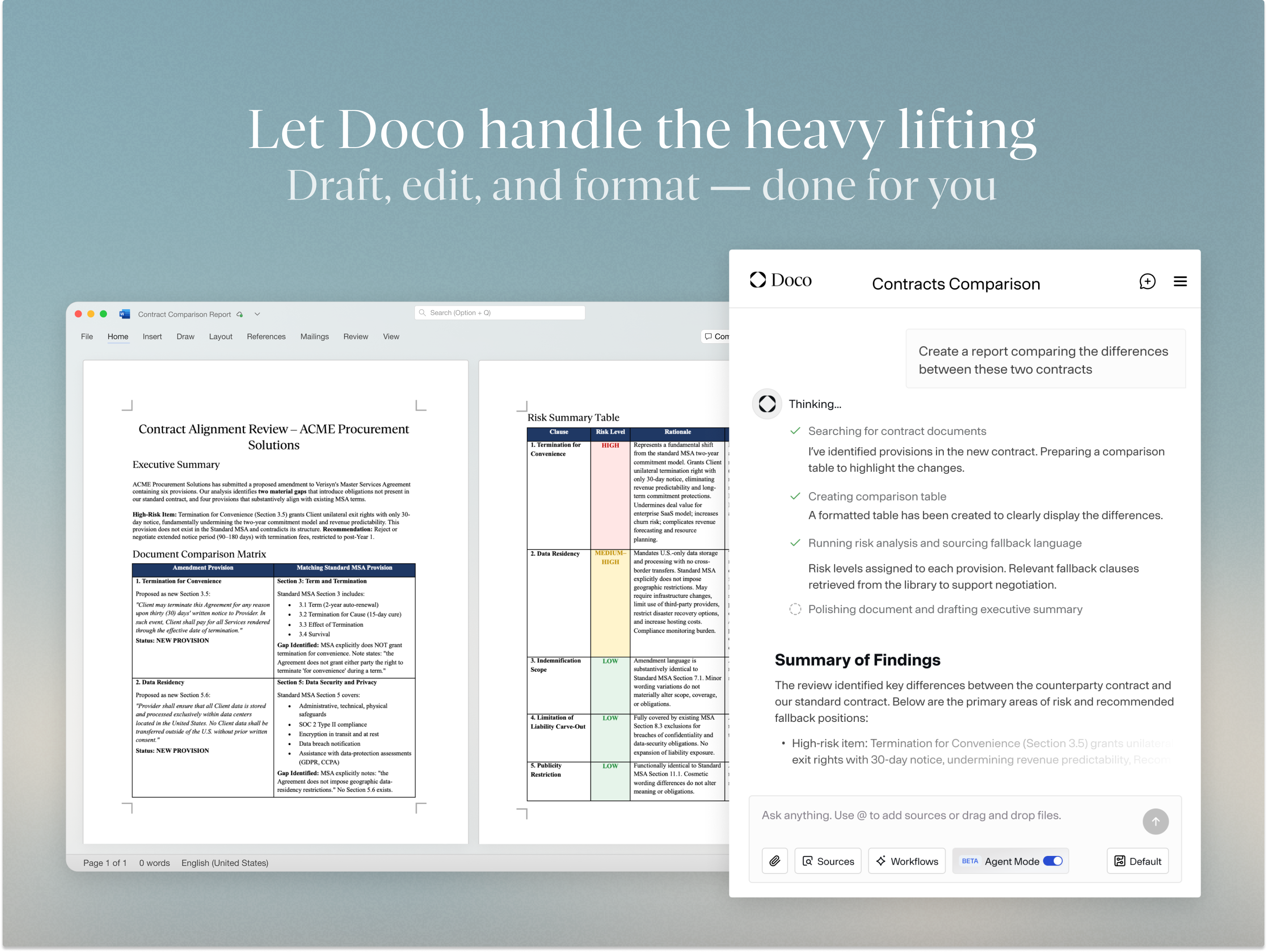
Doco Agent Mode heralds a significant advancement in how we interact with Microsoft Word, transforming it from a static document editor into a dynamic, AI-powered collaborative workspace. This product introduces an autonomous AI agent that operates directly within Word, taking on comprehensive document workflows from initial drafting to final formatting. It aims to streamline and simplify the often tedious and time-consuming aspects of document creation and refinement.
Targeted at anyone who regularly uses Microsoft Word for complex, multi-step document tasks—from professional writers and legal experts to students and government officials—Doco Agent Mode promises to be an invaluable AI teammate. Its core value proposition lies in its ability to understand and execute intricate instructions, making direct edits with track changes, and learning from existing workflows and documents to provide personalized assistance.
Problem & Solution
The traditional document creation process in Microsoft Word, while powerful, often involves repetitive tasks like formatting, editing, and revising, which can be a significant time sink. Existing AI writing assistants primarily focus on generating nuanced content or basic grammar checks. The real challenge, Doco identifies, isn't just writing, but the entire lifecycle of a document, including meticulous formatting, editing, and revision.
Doco Agent Mode steps in to solve this by providing an AI agent that can be delegated high-level, multi-step tasks. Instead of merely suggesting edits, Doco's AI directly modifies the document, complete with track changes for transparency and control. This approach differentiates it from more basic AI writing tools and even some functionalities within Microsoft 365 Copilot, which often require more human oversight for iterative changes. Doco also leverages your existing files and company library to create an "AI-ready knowledge base," ensuring that its assistance is highly relevant and tailored to your specific context and style.
Key Features & Highlights
Doco Agent Mode boasts several compelling features that make it a standout AI solution for Microsoft Word:
- Autonomous In-Word Editing with Track Changes: This is arguably Doco's most significant highlight. The AI doesn't just offer suggestions; it directly edits your document, and crucially, all changes are made with track changes enabled. This provides users with complete visibility and control over the AI's modifications, allowing them to accept, reject, or further refine changes.
- Complex, Multi-Step Task Execution: Users can assign Doco Agent Mode intricate tasks that involve multiple steps, such as "Redo my paper according to the attached document's instructions." The AI then works through these tasks sequentially within the document, rewriting, reformatting, and refining as needed.
- Grounded in Your Data & Personalized Workflows: Doco differentiates itself by understanding your existing knowledge base. It can reference any file (SharePoint, local files) to draft content, ensuring relevance and even providing citations. Furthermore, it learns your individual work style to tailor personalized workflows.
- Comprehensive Document Workflow Automation: Beyond just writing, Doco aims to handle your entire workflow, from drafting and editing to formatting. This includes native Word formatting capabilities (fonts, styles, tables, bullets, numbers) and one-click accurate citations.
- Enterprise-Grade Security: Doco emphasizes security with SOC 2 Type II certification, data encryption in transit and at rest, and a commitment to never training its models on proprietary user data.
Potential Drawbacks & Areas for Improvement
While Doco Agent Mode offers a powerful solution, there are a few areas for consideration and potential improvement:
- Agent Response Speed: One user review noted that the "Agent response speed is not satisfied yet, need some improvements on this aspect." For an autonomous agent, quick turnaround is crucial for a seamless workflow.
- Initial Setup Complexity: For new users, the initial setup and customization of workflows might present a learning curve. Clearer onboarding and intuitive guides could help mitigate this.
- Cost for High Usage: Doco offers a freemium model, with a Starter Plan at $19/month and a Pro Plan at $250/month. While the Pro plan offers unlimited credits, the cost for high-volume individual users or smaller teams might be a consideration.
- Platform Limitation: Currently, Doco is integrated specifically with Microsoft Word. While this is its core strength, users who frequently work with other document processors might desire broader compatibility in the future.
Bottom Line & Recommendation
Doco Agent Mode represents a significant leap forward in AI-powered document processing within Microsoft Word. For professionals, academics, legal experts, and anyone who spends a substantial amount of time crafting and refining documents in Word, this tool offers a compelling path to increased productivity and efficiency. Its ability to autonomously tackle complex, multi-step tasks with full transparency via track changes is a game-changer.
If you're looking to offload the more tedious aspects of document creation, leverage your existing knowledge base for contextually relevant AI assistance, and maintain ultimate control over the editing process, Doco Agent Mode is definitely worth trying. While acknowledging potential initial setup complexities and the need for continued improvement in response speed, the overall value proposition for streamlining intricate document workflows is substantial. Doco is poised to become an indispensable AI teammate for serious Word users.
Featured AI Applications
Discover powerful tools to enhance your productivity
MindMax
与AI互动的新方式
超越 AI 聊天,将对话转化为无限画布。结合头脑风暴、思维导图、批判性与创造性思维工具,帮助你可视化想法、高效解决问题、加速学习。
AI Slides
AI 驱动幻灯片,Markdown 魔法加持
革命性幻灯片创作,融合 AI 智能与 Markdown 灵活性 - 随处编辑,随时优化,轻松迭代。让每个想法,都能快速变成专业演示。
AI Markdown Editor
打开即写 - AI驱动的Markdown编辑器
极其高效的写作体验:AI助手、斜杠命令、极简界面。打开即用,轻松写作。✍️ Markdown简洁 + 🤖 AI强大 + ⚡ 斜杠命令 = 完美写作体验
FunBlocks AI Extension
🚀 AI驱动的浏览器扩展
用FunBlocks AI助手改变您的浏览体验。您的智能伴侣,为网络上的AI驱动阅读、写作、头脑风暴和批判性思维提供支持。