ExtraBar Review: Turning Your Mac Menu Bar into a Hyper-Efficient Command Center
Build precise Mac actions and trigger them from the bar
发布时间: 12/29/2025
Product Overview
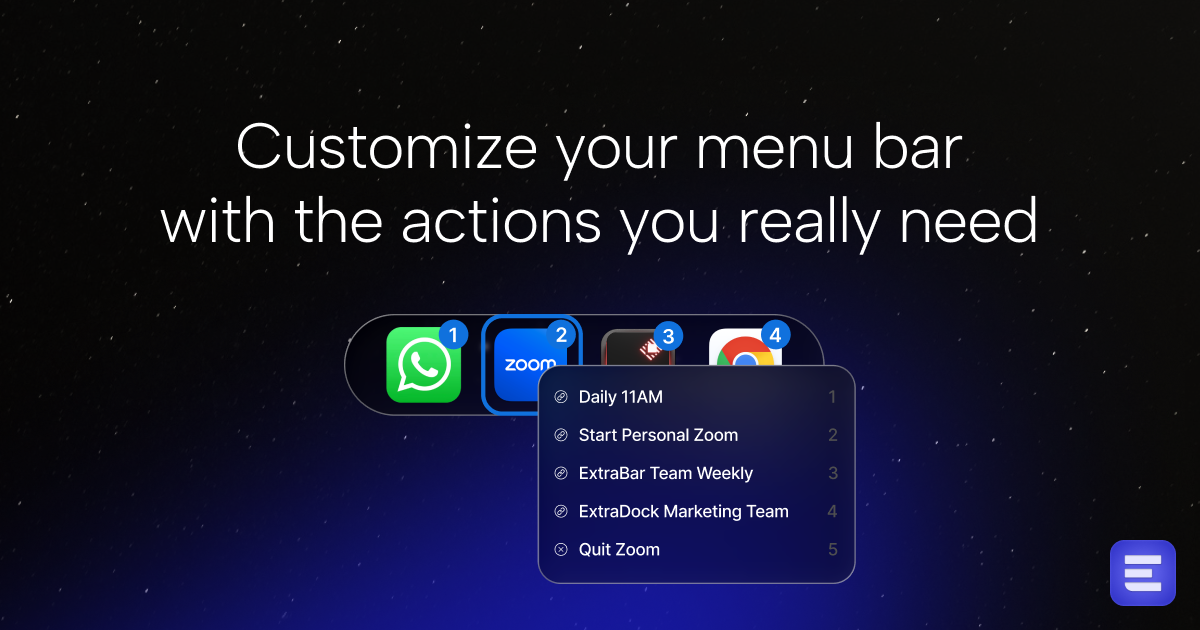
ExtraBar is a compelling new utility designed to reclaim lost productivity by radically reimagining the humble macOS menu bar. Far more than just a notification hub, ExtraBar transforms this often-underutilized space into a fully customizable command center. Its core function is to allow users to create precise, deep-linked actions that launch immediately from the top of the screen, effectively eliminating context switching and tedious navigation within complex workflows.
This tool is explicitly engineered for power users—the designers, developers, and knowledge workers who juggle dozens of applications, projects, and communication channels daily. Whether you need instant access to a specific Slack channel, the current VS Code repository you’re working on, or your next scheduled Zoom meeting, ExtraBar promises one-click execution right where your eye naturally rests. The value proposition is clear: maximizing efficiency by minimizing the friction inherent in jumping between disparate digital environments.
Problem & Solution: Eliminating Menu Fatigue
The modern digital workspace is fragmented. Developers bounce between terminals, IDEs, Git clients, and documentation sites. Designers move between design software, asset libraries, and client feedback tools. The conventional solution—dock icons, Spotlight searches, or keyboard shortcuts managed by third-party launchers—still requires users to recall a specific command or visually scan a crowded dock.
ExtraBar addresses this specific pain point: menu fatigue and navigational inefficiency. It solves this by providing a dedicated, persistent, and easily accessible strip above the desktop where your most critical, context-aware actions live. Unlike traditional launchers that pop up transiently, ExtraBar keeps your customized "quick-jumps" visible and ready. It fills a market gap by blending the permanence of a dock item with the deep-linking precision of a dedicated automation script, all housed in the native macOS interface layer.
Key Features & Highlights: Precision Through Deep Linking
The power of ExtraBar lies in its ability to execute highly specific commands, not just open applications. This "precision action" capability is its defining feature.
Key highlights include:
- Deep Linking Capabilities: Instantly jump directly into specific Zoom meetings, dedicated Slack channels, or individual Figma design files without wading through main application windows.
- Script Execution: For developers and automation enthusiasts, the ability to trigger custom scripts directly from the menu bar offers unparalleled on-the-fly utility management.
- Keyboard Shortcut Integration: Actions built within ExtraBar can be tied to specific keyboard shortcuts, creating a fast, hybrid interaction model.
- Customizable Interface: Users can tailor the bar to display exactly the actions they need, reducing visual clutter and focusing only on high-value workflows.
The user experience feels streamlined because the barrier to action is lowered to a single click on a persistent element. For someone constantly switching between a main design project and a secondary client support channel, having those two links constantly available in the bar radically improves workflow continuity.
Potential Drawbacks & Areas for Improvement
While ExtraBar offers significant productivity gains, there are a few areas where refinement could enhance its appeal and utility.
Currently, the heavy reliance on deep linking means the setup process might require a steeper initial learning curve, especially for users unfamiliar with URL schemes or specific application integration methods. While the power is there, making the process of creating these precise links more intuitive through pre-built templates for popular apps (like linking to the "Unread" tab in Slack or a specific project folder in VS Code) would be beneficial.
Furthermore, while customization of actions is strong, better visual feedback or state management within the bar itself could be useful. For instance, an indicator showing if a specific linked item (like a running script or a meeting currently in progress) is "active" would enhance its status-monitoring capabilities beyond simple launching. Considering integration with system-wide productivity frameworks like Shortcuts or Alfred workflows could further expand its reach.
Bottom Line & Recommendation
ExtraBar is an exceptional utility that delivers on its promise to make the macOS menu bar a functional powerhouse. If you are a designer, developer, or professional whose daily tasks involve rapid context switching across numerous deep-linked resources—such as project files, specific communication threads, or meeting links—this product is an absolute must-try. It effectively bridges the gap between quick-launching and deep automation, providing a persistently visible layer of control over your digital environment. For those seeking to squeeze every ounce of efficiency from their Mac setup, ExtraBar is a powerful investment in streamlined workflow management.
Featured AI Applications
Discover powerful tools to enhance your productivity
MindMax
与AI互动的新方式
超越 AI 聊天,将对话转化为无限画布。结合头脑风暴、思维导图、批判性与创造性思维工具,帮助你可视化想法、高效解决问题、加速学习。
AI Slides
AI 驱动幻灯片,Markdown 魔法加持
革命性幻灯片创作,融合 AI 智能与 Markdown 灵活性 - 随处编辑,随时优化,轻松迭代。让每个想法,都能快速变成专业演示。
AI Markdown Editor
打开即写 - AI驱动的Markdown编辑器
极其高效的写作体验:AI助手、斜杠命令、极简界面。打开即用,轻松写作。✍️ Markdown简洁 + 🤖 AI强大 + ⚡ 斜杠命令 = 完美写作体验
FunBlocks AI Extension
🚀 AI驱动的浏览器扩展
用FunBlocks AI助手改变您的浏览体验。您的智能伴侣,为网络上的AI驱动阅读、写作、头脑风暴和批判性思维提供支持。