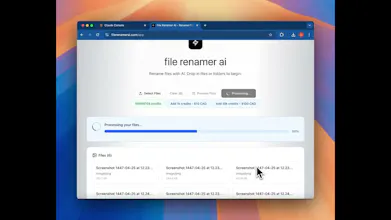
file renamer ai: Batch Rename 1000s of Files in Minutes with AI
rename 100 files in under 2 minutes
发布时间: 10/25/2025
File Renamer AI is an AI-powered tool designed to automate the often tedious and time-consuming task of renaming digital files. Its core promise is to rename hundreds or even thousands of files, including videos, photos, audio, and PDFs, in a matter of minutes, leveraging artificial intelligence for smart, automatic organization. This solution targets anyone overwhelmed by disorganized digital assets, from individual users with messy download folders to professionals managing large collections of media or documents. The product aims to streamline digital workflows by providing descriptive, content-aware names, moving beyond simple rule-based renaming to actually understand the file's content.
Problem & Solution
The pervasive problem File Renamer AI addresses is the digital clutter caused by generic and uninformative file names (e.g., "IMG_2847.jpg" or "Document1.pdf"). Manually renaming files, especially in large quantities, is a significant drain on productivity and often leads to inconsistent naming conventions, making files difficult to find and manage.
File Renamer AI tackles this by employing advanced AI and OCR (Optical Character Recognition) technology. Unlike traditional batch renamers that rely solely on predefined rules, File Renamer AI analyzes the actual content of the files—reading text from documents and scanned images, and potentially analyzing image content—to generate meaningful and searchable names. This approach transforms chaotic folders into organized systems, saving users hours of manual effort and improving searchability. For example, it can rename "IMG_2847.jpg" to "invoice-acme-corp-2024-03-15.pdf" or "team-meeting-notes-march-2024.docx" based on the internal data.
Key Features & Highlights
File Renamer AI boasts several compelling features that make it a powerful tool for digital organization:
- AI-Powered Content Analysis: The most significant highlight is its ability to "understand" file content. Using AI and OCR, it extracts metadata, dates, names, invoice numbers, and topics from various file types, including PDFs, DOCX, JPG, and PNG, to generate contextually relevant names. This moves beyond simple pattern matching for truly intelligent naming.
- Batch Renaming and Speed: The tool is optimized for efficiency, promising to rename thousands of files in just minutes. This bulk processing capability is crucial for users with extensive digital libraries.
- Wide File Type Support: It supports a broad range of file formats, including documents (PDF, DOC, DOCX, TXT), images (JPG, JPEG, PNG, GIF, HEIC), presentations (PPT, PPTX), and even design files (EPS, SVG, AI).
- "Magic Folders" Automation: This feature allows users to designate specific folders for continuous monitoring. As new files arrive, they are automatically renamed in the background according to chosen naming patterns, making it ideal for automating download folders or client document drops.
- Cross-Platform Desktop Application: File Renamer AI offers a desktop application compatible with both Windows and Mac, ensuring a seamless user experience across different operating systems.
- Multilingual Support: The AI can detect and process content in over 20 languages, making it suitable for international teams and multilingual document management.
- Customizable Naming Patterns: Users can define their own naming conventions and rules, giving them control over the output while still benefiting from AI automation. A real-time preview feature allows users to verify changes before applying them.
- Privacy-Focused Options: Some iterations of AI Renamer offer a "Local Mode" which allows users to rename files directly on their device without uploading them to cloud services, ensuring complete privacy.
Potential Drawbacks & Areas for Improvement
While File Renamer AI offers substantial benefits, there are a few areas that could be considered for improvement or that might present limitations for certain users:
- Reliance on Cloud for Some Functionalities: While a local mode exists, certain advanced features or higher processing capacities might depend on an internet connection and cloud-based AI, which could be a concern for users with strict privacy requirements or unreliable internet access.
- Pricing Tiers and File Limits: The pricing structure is often credit-based or subscription-based with limits on the number of files per month. While there's a free tier for basic usage (e.g., 15 files/month), heavy users will need to opt for pricier plans, which could become a significant cost for individuals or small businesses with massive, ongoing renaming needs.
- Maximum File Size: Some versions of AI Renamer have a maximum file size limit (e.g., 100MB per file for Renamer.ai, 10MB for AI Renamer's cloud mode). This could be a limitation for very large video files or high-resolution images.
- Clarity on AI Model Use: While "AI-powered" is a key selling point, more transparent details about the specific AI models used (especially in cloud mode) could build greater trust and understanding among tech-savvy users.
Bottom Line & Recommendation
File Renamer AI is a significant step forward in file management, moving beyond basic batch renaming to offer intelligent, content-aware organization. It's an excellent tool for individuals, photographers, academics, developers, and businesses alike who are struggling with digital clutter and the inefficiencies of manual file renaming. The "Magic Folders" and multi-language support are particularly strong differentiators.
If you regularly deal with large volumes of unsorted files and want to save considerable time and effort in organizing them, File Renamer AI is definitely worth trying. The free tier provides an opportunity to test its capabilities before committing to a paid plan. While potential users should be mindful of pricing tiers and file size limits, the overall value proposition of automated, intelligent file organization makes File Renamer AI a highly recommended tool for anyone seeking to bring order to their digital life.
Featured AI Applications
Discover powerful tools to enhance your productivity
MindMax
与AI互动的新方式
超越 AI 聊天,将对话转化为无限画布。结合头脑风暴、思维导图、批判性与创造性思维工具,帮助你可视化想法、高效解决问题、加速学习。
AI Slides
AI 驱动幻灯片,Markdown 魔法加持
革命性幻灯片创作,融合 AI 智能与 Markdown 灵活性 - 随处编辑,随时优化,轻松迭代。让每个想法,都能快速变成专业演示。
AI Markdown Editor
打开即写 - AI驱动的Markdown编辑器
极其高效的写作体验:AI助手、斜杠命令、极简界面。打开即用,轻松写作。✍️ Markdown简洁 + 🤖 AI强大 + ⚡ 斜杠命令 = 完美写作体验
FunBlocks AI Extension
🚀 AI驱动的浏览器扩展
用FunBlocks AI助手改变您的浏览体验。您的智能伴侣,为网络上的AI驱动阅读、写作、头脑风暴和批判性思维提供支持。