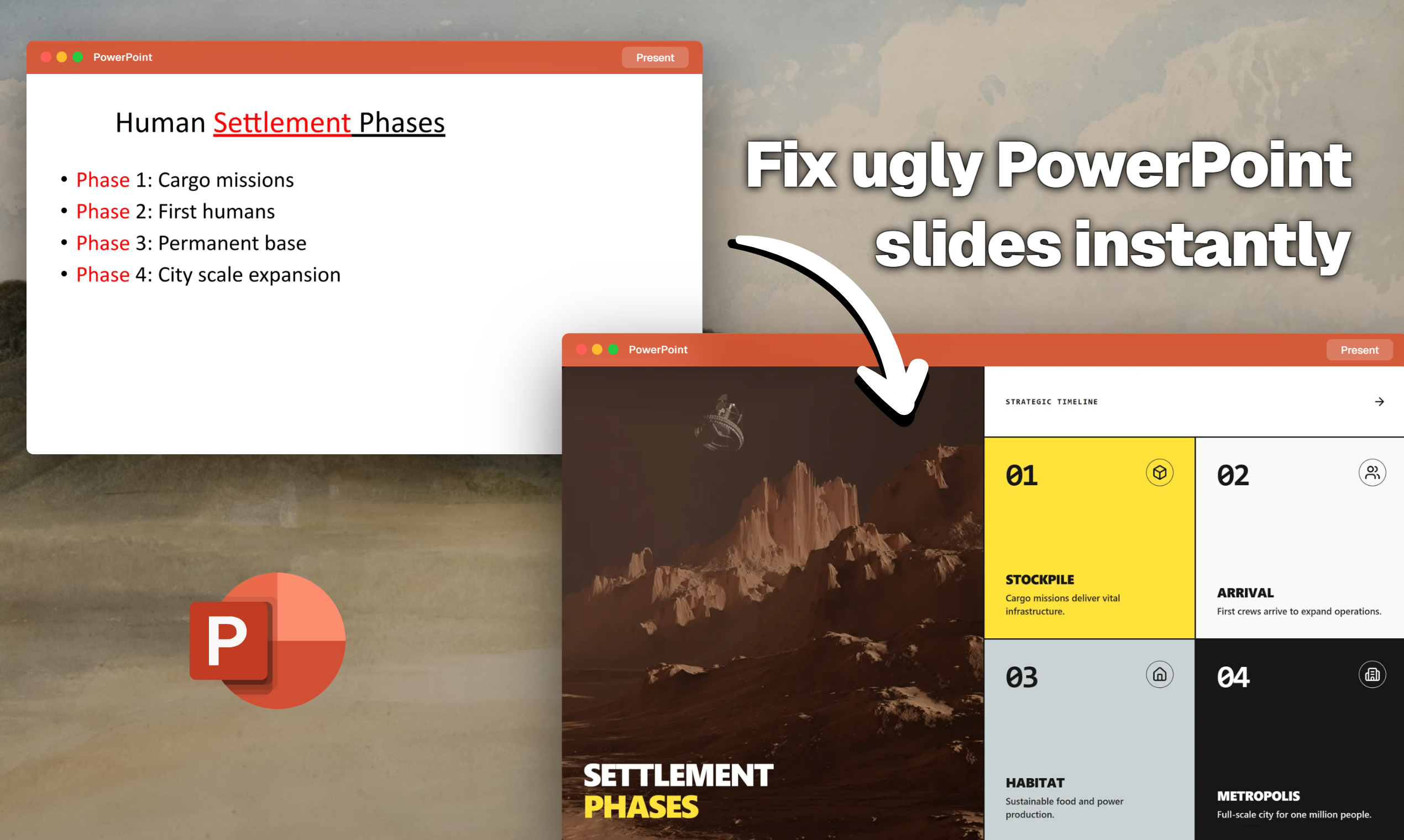
Fix Ugly PowerPoint by CubeOne: AI-Powered Presentation Redesign That Actually Works
Who designed this?
发布时间: 2/7/2026
Product Overview
Fix Ugly PowerPoint by CubeOne enters the crowded presentation design space with a clear, urgent value proposition: transforming amateur, visually cluttered slide decks into professional, polished presentations instantly. This tool addresses the common pain point that plagues nearly every business professional, student, and marketer: spending hours struggling with alignment, color palettes, and finding the right templates, only to end up with a subpar final product. CubeOne leverages sophisticated artificial intelligence to handle the heavy lifting of graphic design, allowing users to focus purely on content strategy.
The core functionality of Fix Ugly PowerPoint is remarkably straightforward: users upload their existing, messy PowerPoint file, and the system automatically analyzes the content, applying modern, premium layouts, sophisticated animations, and styling that aligns with best practices in visual communication. Crucially, this isn't just an image converter; the final output remains fully editable across the major presentation platforms—PPTX, Google Slides, and Keynote. This ensures that the AI acts as an initial design accelerator, rather than a final gatekeeper.
The target audience for Fix Ugly PowerPoint is broad but centered around high-volume presenters: sales teams needing rapid pitch decks, consultants drafting client deliverables, internal communications staff, and executives short on time. It effectively serves anyone who needs to move past the "draft" phase of a presentation quickly without sacrificing aesthetic quality. Its primary appeal lies in saving significant time while delivering enterprise-level visual appeal that traditional PowerPoint themes often fail to provide.
Problem & Solution
The central problem Fix Ugly PowerPoint by CubeOne tackles is the massive time sink and skill gap inherent in presentation design. Most users are content experts, not graphic designers. They often resort to outdated templates, inconsistent branding, or relying on complex manual formatting that leads to visual fatigue for the audience. The frustration expressed in the tagline, "Who designed this?" highlights the common anxiety around submitting visually weak work.
CubeOne solves this by democratizing professional design. Instead of offering a library of static templates to choose from, the AI dynamically redesigns the existing content layout based on recognized design principles. It intelligently structures data, selects appropriate visual hierarchies, and integrates subtle, modern animations. This moves beyond simple "template application" seen in many online tools; Fix Ugly PowerPoint promises an actual intelligent overhaul, filling a significant market gap between basic template pickers and hiring expensive freelance designers.
Key Features & Highlights
The power of Fix Ugly PowerPoint truly shines in its ability to deliver a flexible, high-fidelity output. The process is designed to minimize user input while maximizing professional output.
Key features that stand out include:
- AI-Powered Layout Generation: The system analyzes slide density and content type (text-heavy, chart-heavy, image-focused) and applies the most fitting, premium layout instantly.
- Brand-Matched Styling: The AI appears capable of interpreting or applying consistent styling, ensuring visual coherence throughout the entire deck.
- Smooth Animation Integration: Moving beyond jarring transitions, the tool adds subtle, professional animations that guide the audience's focus effectively.
- Multi-Format Export: The versatility to export to editable PPTX, Google Slides, and Keynote files is a massive competitive advantage, supporting diverse organizational workflows.
- Forever Editability: The promise of keeping the files fully editable means the AI provides a powerful starting point, not a final, locked-down product.
The user experience appears highly streamlined. Upload, wait, review the newly designed deck, and export. For users struggling with the native complexities of Microsoft PowerPoint's design options, this automated refactoring offers immediate, tangible relief.
Potential Drawbacks & Areas for Improvement
While the concept is undeniably powerful, as with any early-stage AI design tool, there are potential limitations to consider. One area for improvement is the AI's interpretation of highly complex or nuanced content. If a user has specific, non-standard formatting that relies on manual placement (e.g., a very specific diagram structure), the AI might "correct" it into something cleaner but fundamentally different from the user's intent.
A second area for enhancement could be granular control over the AI's output. While instant redesign is the selling point, advanced users might wish for options to lock down certain elements or veto specific design choices before finalizing the export. For instance, offering style presets (e.g., "Minimalist," "Corporate Bold," "Data-Heavy Focus") post-upload could add value. Finally, transparency regarding the types of premium layouts used—and whether they adhere to specific corporate accessibility standards (like WCAG contrast ratios)—would be crucial for enterprise adoption.
Bottom Line & Recommendation
Fix Ugly PowerPoint by CubeOne is a necessary utility for anyone whose professional success hinges on delivering sharp, credible presentations without the burden of steep design learning curves. If you regularly find yourself frustrated with the visual outcome of your slide decks, this tool promises to be a significant productivity booster and quality enhancer.
I highly recommend this product for sales professionals, busy managers, and anyone looking to elevate their visual communication instantly. CubeOne isn't just fixing ugly slides; it’s selling back valuable time and professional confidence. Give it a try, especially if you need to turn a rough draft into a presentation-ready deck by the end of the day.
Featured AI Applications
Discover powerful tools to enhance your productivity
MindMax
与AI互动的新方式
超越 AI 聊天,将对话转化为无限画布。结合头脑风暴、思维导图、批判性与创造性思维工具,帮助你可视化想法、高效解决问题、加速学习。
AI Slides
AI 驱动幻灯片,Markdown 魔法加持
革命性幻灯片创作,融合 AI 智能与 Markdown 灵活性 - 随处编辑,随时优化,轻松迭代。让每个想法,都能快速变成专业演示。
AI Markdown Editor
打开即写 - AI驱动的Markdown编辑器
极其高效的写作体验:AI助手、斜杠命令、极简界面。打开即用,轻松写作。✍️ Markdown简洁 + 🤖 AI强大 + ⚡ 斜杠命令 = 完美写作体验
FunBlocks AI Extension
🚀 AI驱动的浏览器扩展
用FunBlocks AI助手改变您的浏览体验。您的智能伴侣,为网络上的AI驱动阅读、写作、头脑风暴和批判性思维提供支持。