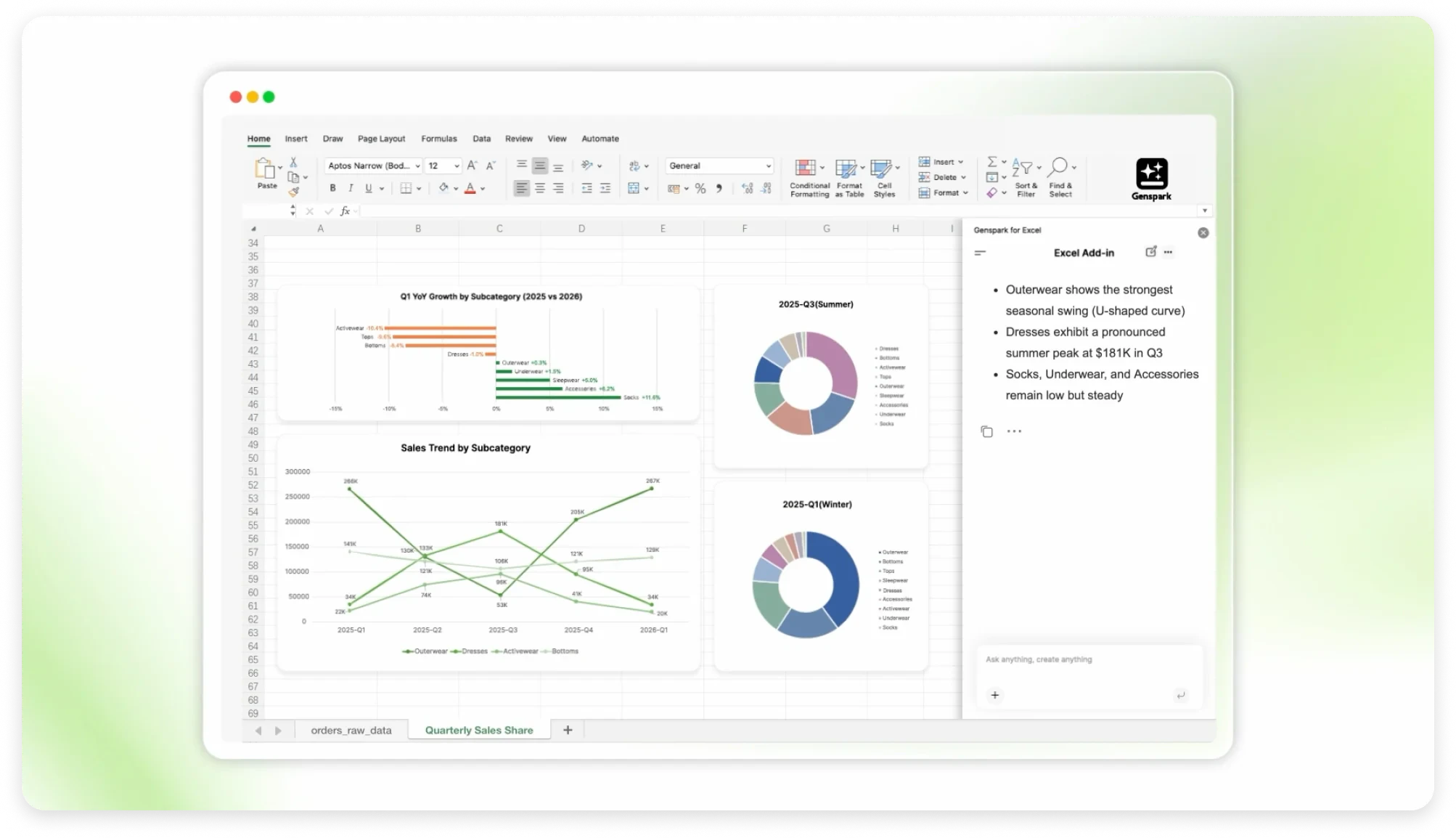
Genspark for Excel: Revolutionizing Spreadsheet Productivity with AI
AI assistant for Excel formulas, charts, insights.
发布时间: 4/25/2026
For many professionals, Microsoft Excel is the digital office where work happens. Yet, despite its power, the learning curve for complex formulas, pivot tables, and data visualization remains steep. Genspark for Excel enters the market as a transformative AI assistant designed to bridge this gap, acting as a co-pilot that lives directly inside your spreadsheet to turn complex data tasks into simple, conversational interactions.
Genspark for Excel is essentially an AI-powered bridge between natural language and spreadsheet logic. Whether you are an analyst crunching monthly reports, an operations team member managing logistics, or a business user trying to extract quick insights from a CSV file, this tool allows you to bypass the technical heavy lifting. Instead of scouring forums for the correct VLOOKUP syntax or struggling to configure a complex chart, you simply ask Genspark to do it for you in plain English. By embedding intelligence directly into the Excel interface, the product aims to keep users in the "flow state" rather than forcing them to switch windows to consult documentation or external AI chatbots.
Solving the "Spreadsheet Fatigue" Problem
The primary problem Genspark for Excel addresses is the cognitive overhead associated with data manipulation. Even power users often find themselves performing repetitive tasks or spending unnecessary time troubleshooting syntax errors. Traditional spreadsheet training is slow, and most users eventually hit a wall where they know what they want the data to show, but not how to extract it using Excel’s native functions.
Genspark fills this market gap by removing the "syntax barrier." While other AI tools exist to help write formulas, they often require copy-pasting data back and forth between a web browser and Excel. Genspark differentiates itself by being an integrated assistant that understands the context of your specific spreadsheet, reducing friction and the likelihood of human error in data handling.
Key Features and Highlights
Genspark for Excel offers a robust suite of features designed to streamline the entire data lifecycle within the application:
- Natural Language Formula Generation: Simply type, "calculate the average sales for the last quarter excluding outliers," and the assistant handles the complex logic for you.
- Automated Charting: Stop clicking through menus to format visualizations. Tell the assistant what you want to see, and it generates charts that accurately represent your data trends.
- Deep Data Insights: Beyond just formulas, the tool can analyze datasets to provide summary statistics, identify trends, or flag anomalies that might otherwise go unnoticed.
- Integrated Web Research: Perhaps the most unique feature is the ability to pull external data from the web directly into your Excel workflow, allowing you to enrich your internal datasets with real-time market info or industry benchmarks without leaving the app.
The user experience is seamless; the interface is designed to feel like a native extension of the Microsoft ecosystem rather than an intrusive third-party add-on. This focus on "conversational data management" represents a significant leap forward for business productivity.
Potential Drawbacks and Areas for Improvement
While Genspark for Excel is a powerful tool, it is not without its limitations. Like all AI-driven agents, there is always the concern of data privacy and security, especially when users are uploading sensitive company files to an AI model. Clearer documentation on how data is processed and stored would go a long way in building trust for enterprise adoption.
Additionally, while the tool is excellent for standard formulas and common data tasks, it may struggle with highly bespoke or "messy" data structures that require human intuition to clean. Future iterations would benefit from an "Explain My Formula" feature, which would educate the user on why the AI chose a specific function, helping the user learn and grow rather than just relying on the tool as a black box.
Bottom Line and Recommendation
Genspark for Excel is a must-have for anyone who spends more than two hours a day inside a spreadsheet. By converting tedious technical tasks into conversational requests, it effectively democratizes data analysis, making it accessible to team members regardless of their technical proficiency.
If you are tired of debugging nested IF statements or spending hours wrestling with chart formatting, Genspark is an investment that will pay for itself in saved time almost immediately. It is an essential tool for analysts and business professionals looking to reclaim their time and focus on high-level strategy rather than row-by-row technical execution. Highly recommended for any team looking to boost productivity in their daily operations.
Featured AI Applications
Discover powerful tools to enhance your productivity
MindMax
与AI互动的新方式
超越 AI 聊天,将对话转化为无限画布。结合头脑风暴、思维导图、批判性与创造性思维工具,帮助你可视化想法、高效解决问题、加速学习。
AI Slides
AI 驱动幻灯片,Markdown 魔法加持
革命性幻灯片创作,融合 AI 智能与 Markdown 灵活性 - 随处编辑,随时优化,轻松迭代。让每个想法,都能快速变成专业演示。
AI Markdown Editor
打开即写 - AI驱动的Markdown编辑器
极其高效的写作体验:AI助手、斜杠命令、极简界面。打开即用,轻松写作。✍️ Markdown简洁 + 🤖 AI强大 + ⚡ 斜杠命令 = 完美写作体验
FunBlocks AI Extension
🚀 AI驱动的浏览器扩展
用FunBlocks AI助手改变您的浏览体验。您的智能伴侣,为网络上的AI驱动阅读、写作、头脑风暴和批判性思维提供支持。