GitBar: The Essential macOS Menubar Companion for Streamlined PR Management
Every pull request, one menubar. GitHub, GitLab & Azure
发布时间: 4/27/2026
Product Overview
In the fast-paced world of software development, keeping track of pull requests (PRs) across multiple platforms and accounts can quickly become a bottleneck. GitBar is a lightweight, highly efficient macOS menubar application designed to centralize your workflow. By providing a single point of truth for your GitHub, GitLab (including self-hosted instances), and Azure DevOps activity, it eliminates the need to constantly refresh browser tabs or sift through cluttered email notifications.
Designed for developers, engineering managers, and DevOps professionals, GitBar excels at providing visibility into the "PR lifecycle." Whether you are managing your own contributions, reviewing peer code, or keeping an eye on team-wide blockers, the app surfaces the information you need in a clean, non-intrusive interface. It is a tool built for those who value efficiency and want to minimize context switching during deep-work sessions.
Problem & Solution
The primary problem addressed by GitBar is the fragmented nature of modern source control management. Developers often work across multiple organizations and different platforms, each with its own notification system. This leads to missed reviews, delayed merges, and a constant feeling of "alert fatigue."
GitBar solves this by acting as a unified aggregator. Unlike standard browser-based notifications that often get lost in the noise of a web app, GitBar surfaces PRs directly in your operating system’s menubar. It bridges the gap between disparate platforms—GitHub, GitLab, and Azure DevOps—into a single, cohesive experience. By doing so, it shifts the interaction from "pull" (manually checking for updates) to "push" (getting notified exactly when action is needed), significantly reducing the friction involved in code review cycles.
Key Features & Highlights
GitBar is built with React Native for macOS, ensuring a native-feeling experience that integrates seamlessly with your desktop environment. Its feature set is focused on utility and glanceability:
- Multi-Platform/Multi-Account Support: Connect as many GitHub, GitLab, and Azure DevOps accounts as you need, all within one sidebar view.
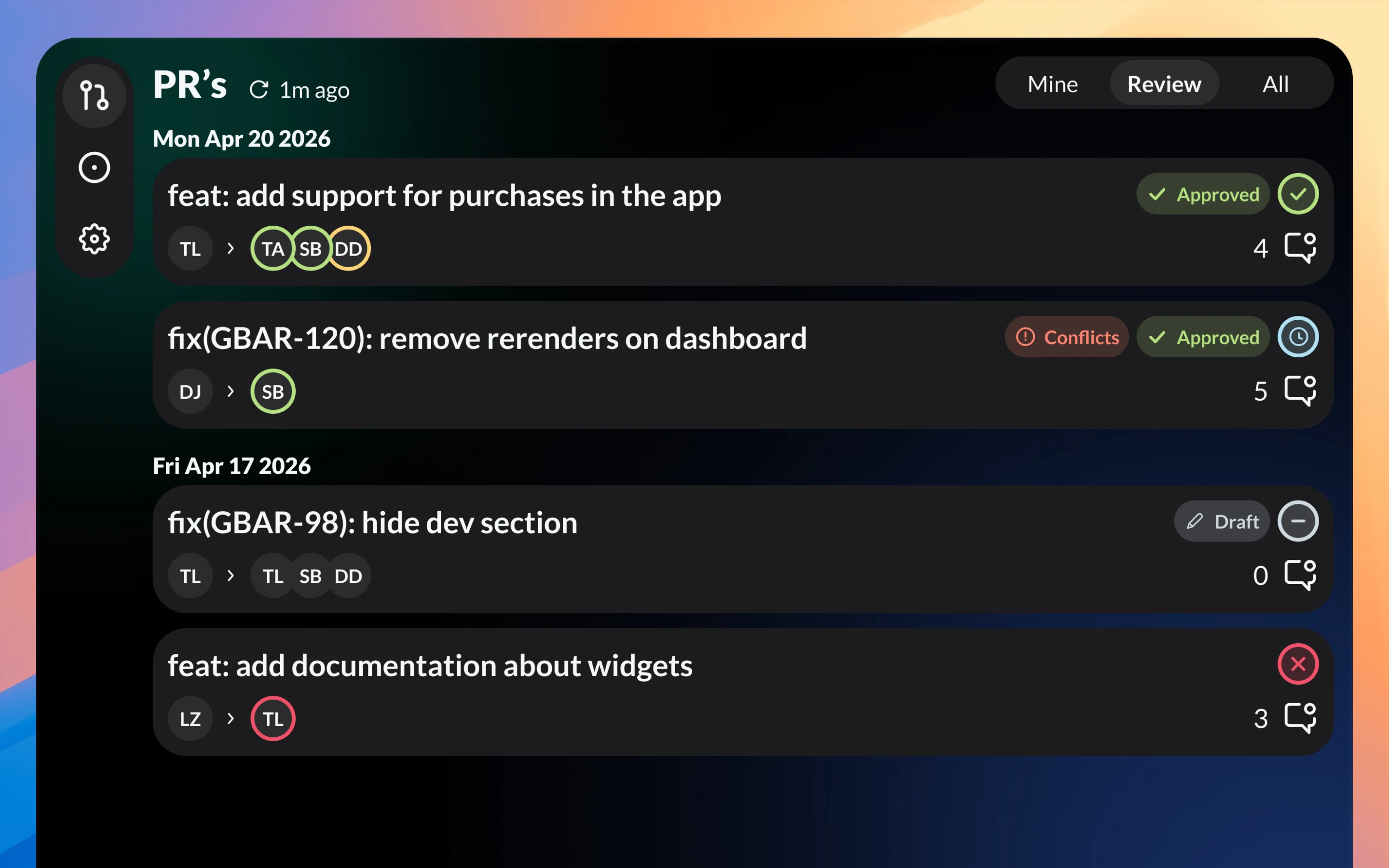
- Real-time PR Status Badges: Instantly identify the state of a pull request. Status indicators show you which PRs are approved, which are drafts, which have merge conflicts, and the current status of CI/CD checks.
- Live Menubar Counter: A glance at your top menu bar tells you exactly how many PRs require your immediate attention, keeping you informed without distracting from your IDE or terminal.
- One-Click Navigation: Every listed PR acts as a direct link, jumping you straight to the relevant repository or code review thread in your browser.
The user experience is highly optimized for developers who don't want to spend time configuring complex dashboards. Once the initial setup is complete, the app operates almost entirely in the background, offering a "set it and forget it" workflow that keeps you connected to your team’s progress.
Potential Drawbacks & Areas for Improvement
While GitBar is an excellent utility, there are areas where it could provide even more value. For power users, the ability to perform basic actions—like approving a PR or merging a branch directly from the dropdown menu—would be a game-changer. Currently, the app is primarily a "read-only" notification center that pushes you to the browser for interactions.
Additionally, while it supports multiple accounts, users managing a massive volume of repositories might benefit from advanced filtering or "smart folders." Being able to hide irrelevant PRs or prioritize specific repositories via a "favorites" system would make the interface even cleaner for those juggling dozens of projects simultaneously.
Bottom Line & Recommendation
GitBar is a must-have tool for any macOS user working in software engineering. By consolidating PR activity from GitHub, GitLab, and Azure DevOps into a single, elegant menubar widget, it succeeds in reducing cognitive load and improving response times for code reviews. Since it is available for free on the Mac App Store, there is virtually no barrier to entry for developers looking to optimize their daily routine. If you find yourself constantly checking browser tabs to see if your code has been reviewed or if a new PR has been opened, GitBar is the productivity booster you’ve been looking for.
Featured AI Applications
Discover powerful tools to enhance your productivity
MindMax
与AI互动的新方式
超越 AI 聊天,将对话转化为无限画布。结合头脑风暴、思维导图、批判性与创造性思维工具,帮助你可视化想法、高效解决问题、加速学习。
AI Slides
AI 驱动幻灯片,Markdown 魔法加持
革命性幻灯片创作,融合 AI 智能与 Markdown 灵活性 - 随处编辑,随时优化,轻松迭代。让每个想法,都能快速变成专业演示。
AI Markdown Editor
打开即写 - AI驱动的Markdown编辑器
极其高效的写作体验:AI助手、斜杠命令、极简界面。打开即用,轻松写作。✍️ Markdown简洁 + 🤖 AI强大 + ⚡ 斜杠命令 = 完美写作体验
FunBlocks AI Extension
🚀 AI驱动的浏览器扩展
用FunBlocks AI助手改变您的浏览体验。您的智能伴侣,为网络上的AI驱动阅读、写作、头脑风暴和批判性思维提供支持。