Hearica Review: The Universal Real-Time Captioning Solution for Every Desktop Audio Source
Turn all computer audio into captions for the deaf
发布时间: 3/1/2026
Product Overview: Bridging the Audio Gap on Your Computer
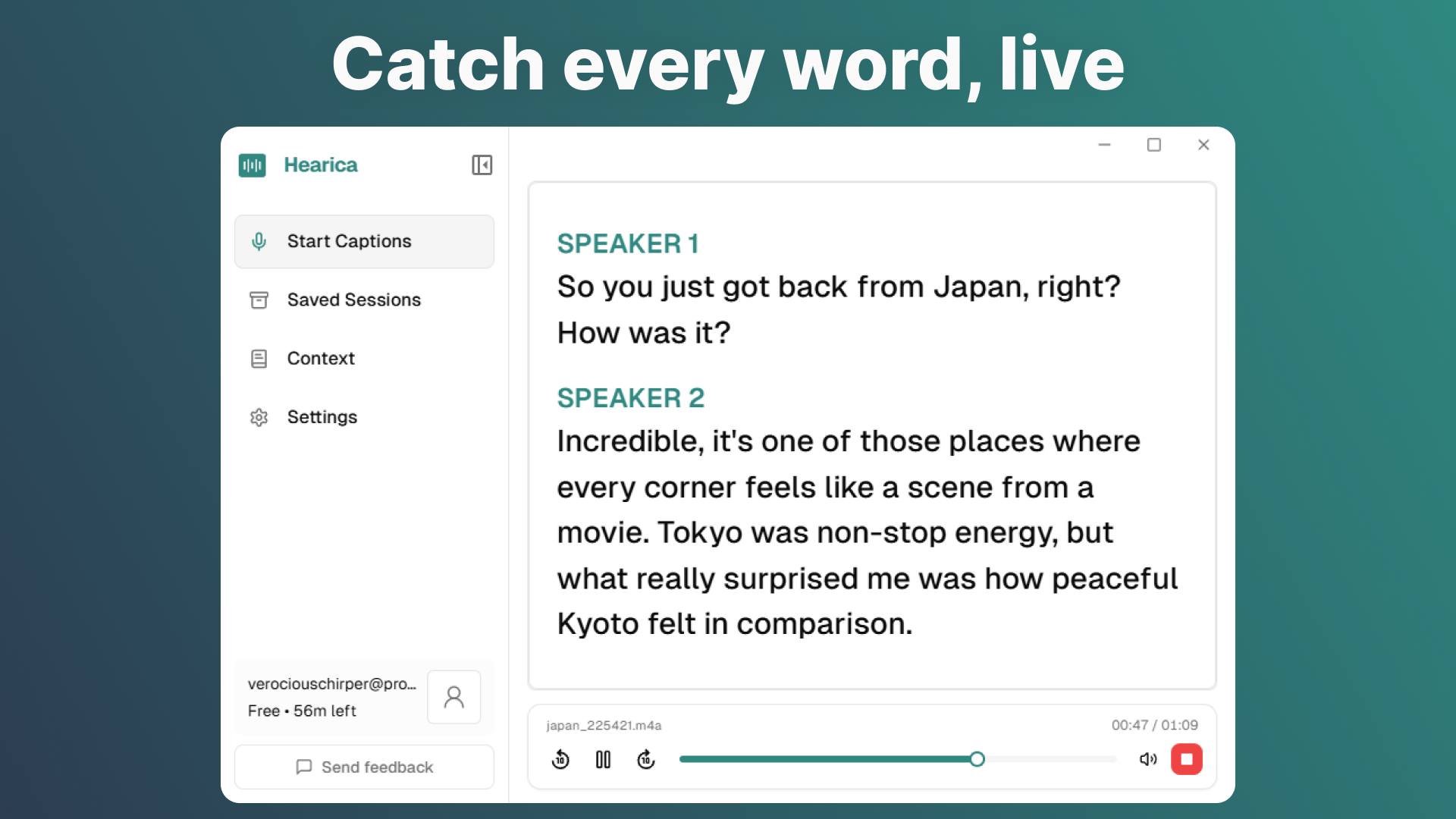
Hearica enters the productivity and accessibility tech space with a bold and much-needed promise: to transform all computer audio into real-time captions. The product acts as a universal transcription utility, designed specifically to address the limitations of in-app captioning services. Instead of being confined to the audio output of a single application like a Zoom meeting or a specific browser tab, Hearica captures, processes, and displays everything your computer is playing through a convenient, floating overlay. This positions it as a critical accessibility tool and a powerful focus aid for knowledge workers, students, and content consumers alike.
The core value proposition of Hearica lies in its comprehensive, system-wide coverage. Whether you are watching an obscure streaming service, participating in a conference call across disparate platforms, or listening to a lecture in a specialized piece of software, Hearica aims to deliver instant, legible transcription. Its target audience is broad, encompassing the Deaf and Hard of Hearing community, professionals managing multiple audio streams, and language learners seeking immediate textual reinforcement.
Problem & Solution: Unifying the Fragmented Audio Landscape
The fundamental problem Hearica solves is the fragmentation of digital audio accessibility. Traditional captioning solutions are app-specific; a meeting platform might have excellent live captions, but the moment you switch to a local video file or a different communication app, that feature vanishes or proves inadequate. This forces users to constantly juggle between different tools or miss critical information entirely when audio sources change rapidly.
Hearica cuts through this complexity by operating at the operating system level, capturing the composite audio output of the entire machine. It provides a single, consistent, and reliable transcription service. This differs significantly from existing solutions, which often require complex routing setups or only work within browser environments. Hearica’s unique market position is providing a seamless, always-on, system-wide captioning experience delivered via a non-intrusive floating interface.
Key Features & Highlights: Powering Accurate, Portable Captions
The feature set of Hearica is built around maximizing utility and accuracy for its transcribed text. The real-time transcription capability is the star, but the post-processing and export options elevate it beyond a simple live-view tool.
The most notable capabilities include:
- System-Wide Real-Time Transcription: Capturing any audio playing on the computer instantly.
- Floating Overlay Interface: A dedicated, customizable window that stays on top, ensuring captions are visible regardless of the active application.
- Save and Replay Functionality: Crucially, transcripts can be saved directly alongside the associated audio context, perfect for later review or note-taking verification.
- Advanced Accuracy Controls: The ability to add "custom context" suggests a mechanism for vocabulary or name recognition, which is vital for achieving perfect transcription in specialized or professional settings.
- Global Reach: Translation into over 60 languages extends its utility for multilingual users, language study, and international collaboration.
The user experience appears streamlined, focusing on immediate utility. By integrating features like replay and translation directly into the transcription workflow, Hearica moves past simple output and focuses on creating actionable, reusable data from spoken word.
Potential Drawbacks & Areas for Improvement
While the promise of Hearica is expansive, potential users should consider a few areas that might require refinement or that could pose limitations in early versions. Operating system-level audio capture can sometimes be resource-intensive, so performance on lower-spec machines should be monitored; lag or high CPU usage could detract from the real-time experience.
Furthermore, while "custom context" is mentioned, the clarity around how users input and manage this context would be beneficial. Is it a persistent glossary, or context fed per session? Enhancing this feature with automatic learning based on user corrections could create a powerful network effect, improving accuracy over time. Finally, integration with external hardware or specific audio routing setups (like professional audio interfaces) might present edge cases that the current system-wide capture doesn't fully account for.
Bottom Line & Recommendation
Hearica is an essential piece of software for anyone for whom spoken content accuracy is paramount—especially the Deaf and Hard of Hearing community seeking full desktop accessibility. Its ambition to conquer all computer audio sets it apart from competitors tethered to specific platforms. If you are tired of missing context across different video calls, online courses, or media consumption tools, Hearica offers a cohesive, powerful, and feature-rich solution. We highly recommend giving Hearica a serious look; it has the potential to become the foundational accessibility layer for the modern desktop user.
Featured AI Applications
Discover powerful tools to enhance your productivity
MindMax
与AI互动的新方式
超越 AI 聊天,将对话转化为无限画布。结合头脑风暴、思维导图、批判性与创造性思维工具,帮助你可视化想法、高效解决问题、加速学习。
AI Slides
AI 驱动幻灯片,Markdown 魔法加持
革命性幻灯片创作,融合 AI 智能与 Markdown 灵活性 - 随处编辑,随时优化,轻松迭代。让每个想法,都能快速变成专业演示。
AI Markdown Editor
打开即写 - AI驱动的Markdown编辑器
极其高效的写作体验:AI助手、斜杠命令、极简界面。打开即用,轻松写作。✍️ Markdown简洁 + 🤖 AI强大 + ⚡ 斜杠命令 = 完美写作体验
FunBlocks AI Extension
🚀 AI驱动的浏览器扩展
用FunBlocks AI助手改变您的浏览体验。您的智能伴侣,为网络上的AI驱动阅读、写作、头脑风暴和批判性思维提供支持。