Kuku Review: The Native, Privacy-Focused Evolution of the Local-First Knowledge Base
Obsidian — but a lot has changed
发布时间: 1/28/2026
Tagline: Obsidian — but a lot has changed
Kuku enters the crowded but fiercely loyal knowledge management space with a bold promise: to deliver the power and flexibility of local-first markdown editors like Obsidian, but without the performance compromises of Electron. Built natively on macOS using Tauri, Kuku positions itself as the high-performance, privacy-centric alternative for power users who demand speed and control over their personal knowledge graph. It takes established concepts like wikilinks and backlinks and wraps them in a modern, highly performant package, suggesting a significant leap forward for serious note-takers and personal knowledge management (PKM) enthusiasts.
Product Overview: Native Speed Meets PKM Power
Kuku is fundamentally a local-first markdown editor designed exclusively for macOS users. Its core appeal lies in its technological foundation: leveraging Tauri rather than Electron ensures a smaller memory footprint, faster launch times, and a more genuinely native feel on Apple silicon. For users already entrenched in the plain text/markdown workflow, Kuku offers a familiar environment where notes are stored as accessible, future-proof .md files. The platform deeply integrates essential PKM features, including robust graph view capabilities, ensuring that your growing body of knowledge remains interconnected and navigable.
The target audience is clear: experienced PKM users, developers, writers, and researchers who appreciate the data ownership of tools like Obsidian but are frustrated by Electron-based performance bottlenecks. Kuku’s value proposition centers on superior speed, absolute data sovereignty ("No cloud. No lock-in."), and the introduction of sophisticated AI capabilities integrated directly into the local file system.
The Problem Solved: Speed, Bloat, and AI Integration
The primary problem Kuku addresses is the common trade-off in modern productivity software: performance versus feature density. Many excellent knowledge management tools rely on Electron wrappers, which often result in sluggish performance and significant resource drain—a dealbreaker for power users maintaining thousands of notes.
Kuku solves this by committing to a native build, prioritizing lightweight operation and offline access. More uniquely, it addresses the emerging need for integrated, privacy-respecting AI. While competitors often force users to push sensitive data to the cloud for AI processing, Kuku integrates an AI agent that operates locally. This agent doesn't just passively chat; it actively searches, edits, and intelligently links your existing files, offering a level of contextual awareness few tools currently match, all while adhering to a strict offline-first philosophy.
Key Features and User Experience Highlights
The feature set in Kuku successfully merges established PKM standards with innovative AI tools. The inclusion of wikilinks and backlinks means that building a navigable second brain is intuitive, supporting the Zettelkasten methodology right out of the box.
However, the standout features elevate Kuku beyond a simple Obsidian clone:
- Tauri Native Performance: This underpins everything. Expect snappy navigation, quick opening of large vaults, and minimal system overhead—a crucial differentiator in the note-taking app market.
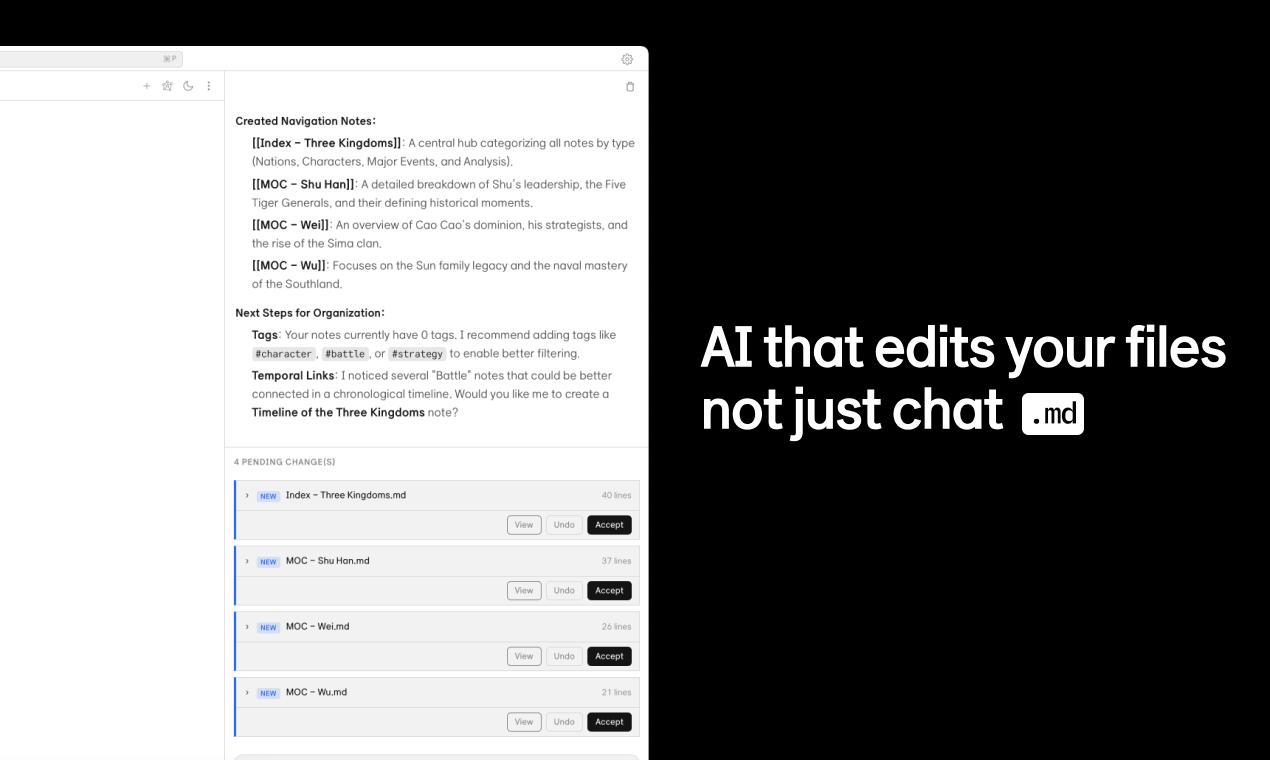
- Cursor-Style Diffs for AI Edits: This is perhaps the most impressive implementation of their local AI agent. When the AI suggests an edit or makes a connection, users see changes presented as clear, reviewable diffs (similar to Git or the Cursor editor). This preserves user agency, ensuring the AI assists rather than overwrites knowledge autonomously.
- True Local-First Architecture: Your data resides solely on your machine as plain markdown files. This guarantees data portability and security, fulfilling the promise of no vendor lock-in.
The user experience benefits greatly from this architecture. The application feels responsive, making the act of frequent linking and graph exploration genuinely enjoyable rather than a chore.
Potential Drawbacks and Areas for Enhancement
While Kuku presents a compelling vision, any V1 product, especially one entering a mature market, has room for growth. The most immediate limitation is the macOS exclusivity. While the Tauri build might offer cross-platform potential down the line, current users on Windows or Linux are excluded from this performance gain.
Furthermore, while the AI integration is exciting, its effectiveness is entirely dependent on the local model being utilized. Early adopters may find that the local search and editing capabilities, while conceptually superior for privacy, might not yet match the breadth of cloud-based LLMs for complex reasoning tasks.
Suggestions for enhancement would include:
- Third-Party Plugin Ecosystem: To truly compete with established players, Kuku will eventually need a robust, open plugin API to allow the community to build extensions, themes, and specialized workflows.
- Mobile Synchronization Strategy: Since Kuku is strictly no cloud, users will need a clear, simple, and secure method for syncing across devices (e.g., seamless integration with Syncthing, or clear instructions for using iCloud/Dropbox folders while maintaining the local file integrity).
Bottom Line & Recommendation
Kuku is not just another markdown editor; it’s a serious contender for the future of private, high-speed PKM software. If you are a dedicated macOS user who values performance, data sovereignty, and is excited by the prospect of a truly integrated, privacy-aware AI assistant operating directly on your local files, you owe it to yourself to test Kuku. It successfully delivers "Obsidian speed with Cursor intelligence" in a beautifully native package. For anyone frustrated by Electron bloat in their knowledge graph, Kuku is the highly recommended evolution.
Featured AI Applications
Discover powerful tools to enhance your productivity
MindMax
与AI互动的新方式
超越 AI 聊天,将对话转化为无限画布。结合头脑风暴、思维导图、批判性与创造性思维工具,帮助你可视化想法、高效解决问题、加速学习。
AI Slides
AI 驱动幻灯片,Markdown 魔法加持
革命性幻灯片创作,融合 AI 智能与 Markdown 灵活性 - 随处编辑,随时优化,轻松迭代。让每个想法,都能快速变成专业演示。
AI Markdown Editor
打开即写 - AI驱动的Markdown编辑器
极其高效的写作体验:AI助手、斜杠命令、极简界面。打开即用,轻松写作。✍️ Markdown简洁 + 🤖 AI强大 + ⚡ 斜杠命令 = 完美写作体验
FunBlocks AI Extension
🚀 AI驱动的浏览器扩展
用FunBlocks AI助手改变您的浏览体验。您的智能伴侣,为网络上的AI驱动阅读、写作、头脑风暴和批判性思维提供支持。