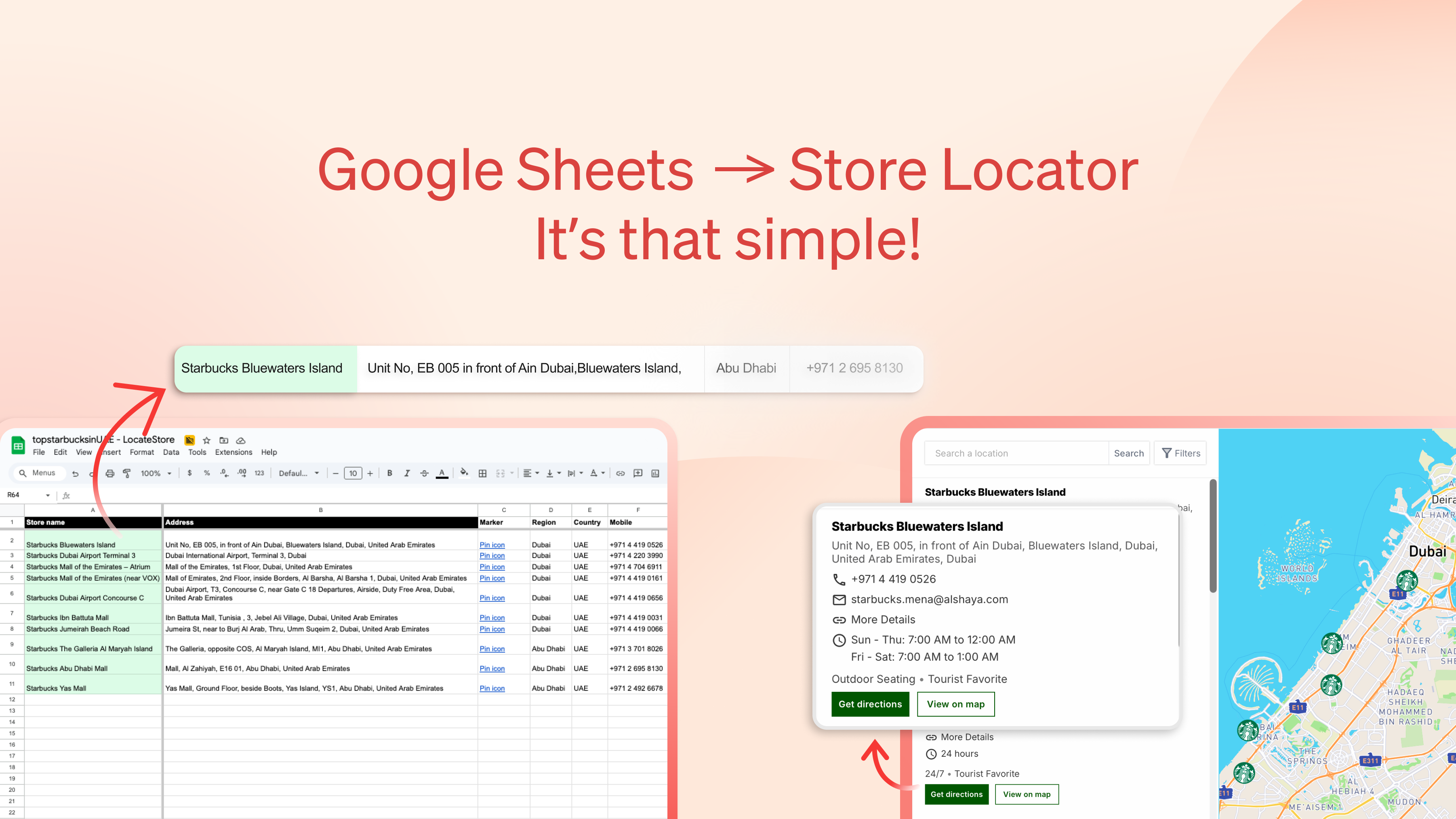
LocateStore Review: Turning Google Sheets into Instant, Embeddable Store Locators
Create a map of all your stores using Google Sheets
发布时间: 1/22/2026
Product Overview: Simplicity Meets Scalability for Multi-Location Brands
LocateStore tackles a surprisingly common pain point for businesses managing multiple physical locations: creating an accessible, functional store locator without developer intervention. Tagged as the tool to “Create a map of all your stores using Google Sheets,” LocateStore effectively bridges the gap between simple data management (a spreadsheet) and a polished, customer-facing web experience. It allows users to leverage the familiarity of Google Sheets to house all their location data—addresses, hours, special notes—and instantly transforms this static data into a dynamic, interactive map interface.
This solution is squarely aimed at small-to-medium enterprises, franchises, retail chains, and service providers who operate several physical branches but lack the technical resources or budget to implement custom mapping solutions. The core value proposition of LocateStore is speed and ease of deployment. If you can update a spreadsheet, you can update your entire public-facing store finder in real-time.
Problem & Solution: Eliminating the Code Barrier in Location Management
The traditional method of setting up a robust, searchable store locator often involves significant technical hurdles. Businesses typically need to manage a database, integrate with mapping APIs (like Google Maps Platform), handle frontend coding for search functionality, and deal with API key security. This process is expensive, slow, and requires ongoing maintenance.
LocateStore elegantly bypasses this entire complexity. It solves the problem of data-to-map synchronization by using Google Sheets as the single source of truth. By eliminating the need for coding, third-party API keys, and complex integrations, LocateStore democratizes the store locator feature. It fills a distinct market gap for "no-code mapping solutions" specifically tailored for multi-location data management, providing an instant, mobile-friendly "find a store near me" experience that updates automatically as the sheet is edited.
Key Features & Highlights: Instant Sync and Zero Dependencies
The strength of LocateStore lies in its streamlined feature set, designed for maximum user utility with minimal setup overhead. The tool shines by delivering core functionality users expect from a dedicated locator system without the usual baggage.
The most notable features include:
- Google Sheets Integration: Use familiar spreadsheet tools to manage all location details.
- Instant Sync: Any edits made in the sheet are reflected immediately on the live map embed.
- Mobile-Friendly Design: Ensures customers on the go have a smooth "find a store" experience.
- Search and Filtering: Provides essential functionality allowing customers to quickly narrow down locations based on parameters defined in the sheet (e.g., services offered, store type).
- Easy Embedding: Delivers a simple embed code, making integration into existing websites (WordPress, Shopify, custom sites) straightforward.
The user experience is deliberately simple. Because it’s built on Google Sheets, power users can leverage sheet functions for data validation, while non-technical users can focus solely on accurate data entry. This focus on accessibility makes LocateStore a powerful tool for marketing and operations teams managing location data.
Potential Drawbacks & Areas for Improvement
While LocateStore excels at delivering simplicity, this streamlined approach naturally comes with certain limitations compared to fully custom or premium mapping platforms.
One primary area for improvement lies in advanced branding and customization. While the map is functional and mobile-friendly, users who require deep aesthetic control over the final map interface—beyond basic colors or styling options that might be available—might find the options somewhat constrained by the platform's inherent design philosophy. Furthermore, managing a very large volume of locations (thousands) might eventually strain performance compared to dedicated database solutions, although for most SMEs this won't be an immediate concern.
Future enhancements could explore more sophisticated data integration points beyond Google Sheets, perhaps offering direct CSV imports or basic API endpoints for advanced syncing. Adding built-in analytics regarding which stores are searched most frequently would also provide valuable operational insights to users of LocateStore.
Bottom Line & Recommendation
LocateStore is an excellent, pragmatic solution for any multi-location business seeking a fast, zero-code method to publish an interactive store locator map. If your primary constraint is technical expertise or time-to-market, and you are already comfortable managing data in Google Sheets, this product is highly recommended. It successfully converts an everyday productivity tool into a powerful customer-facing utility. Give LocateStore a try if you need to get your locations online today without hiring a developer or wrestling with complex mapping APIs.
Featured AI Applications
Discover powerful tools to enhance your productivity
MindMax
与AI互动的新方式
超越 AI 聊天,将对话转化为无限画布。结合头脑风暴、思维导图、批判性与创造性思维工具,帮助你可视化想法、高效解决问题、加速学习。
AI Slides
AI 驱动幻灯片,Markdown 魔法加持
革命性幻灯片创作,融合 AI 智能与 Markdown 灵活性 - 随处编辑,随时优化,轻松迭代。让每个想法,都能快速变成专业演示。
AI Markdown Editor
打开即写 - AI驱动的Markdown编辑器
极其高效的写作体验:AI助手、斜杠命令、极简界面。打开即用,轻松写作。✍️ Markdown简洁 + 🤖 AI强大 + ⚡ 斜杠命令 = 完美写作体验
FunBlocks AI Extension
🚀 AI驱动的浏览器扩展
用FunBlocks AI助手改变您的浏览体验。您的智能伴侣,为网络上的AI驱动阅读、写作、头脑风暴和批判性思维提供支持。