MonoDesk Review: Reclaiming Your Creative Flow in the Freelance Jungle
For designers, web/video creators who'd rather be creating
发布时间: 3/3/2026
Product Overview: The Freelancer's Unified Command Center
MonoDesk enters the crowded productivity space with a sharply focused mission: to serve the independent creative professional—designers, web developers, and video editors—who spends more time managing their business than actually creating. The core problem it aims to solve is the notorious "context-switching tax" that plagues freelancers. Instead of juggling email, project management tools, client messaging apps, and file-sharing services, MonoDesk proposes a singular, calm workplace. The tagline, "For designers, web/video creators who'd rather be creating," clearly positions this tool not as another generic project management suite, but as a specialized environment designed around the specific, often messy, workflow of a creative entrepreneur.
The product promises to consolidate the administrative chaos that invariably accompanies freelancing: managing briefs, handling endless feedback loops, mitigating scope creep, and battling self-doubt. By centralizing these disparate tasks, MonoDesk seeks to be the indispensable hub where the business side of creative work is streamlined, allowing the user to maintain focus and momentum on their actual deliverables. This focus on the psychology of creation—reducing friction and anxiety—is a significant differentiator in the crowded software-as-a-service (SaaS) market for solopreneurs.
The Freelance Struggle: Problem & Solution
The specific problem MonoDesk addresses is painfully familiar to anyone running a solo creative venture. Freelancing often means wearing three hats: Creator, Project Manager, and Administrator. The shift between writing a client email about a missed deadline, deciphering revision notes in a PDF, and then jumping back into design software is a massive drain on cognitive energy. This constant context-switching erodes deep work time, increases stress, and ultimately slows down project turnaround.
MonoDesk’s solution is a highly curated environment that specifically integrates the necessary business functions around the creative output. While many all-in-one tools exist, MonoDesk is positioned to fill the gap for creatives who find generalist tools too rigid or too cluttered. It’s built for how these professionals actually work, suggesting features that align more closely with revision tracking and client communication loops common in visual or video projects, rather than purely task-based management favored by software developers or general consultants.
Key Features & Highlights: Designed for Deep Work
While a full feature list isn't provided, the description strongly implies that MonoDesk prioritizes workflow coherence and momentum preservation. The standout offering appears to be its ability to manage the critical, yet often frustrating, stages of client interaction:
- Consolidated Feedback: The promise to handle "feedback threads" suggests a streamlined system for receiving, organizing, and marking client revisions, potentially integrating annotation tools directly over project assets.
- Scope Control: By centralizing project details and potentially including built-in mechanisms for change requests or scope documentation, MonoDesk aims to proactively combat scope creep—a major profit killer for freelancers.
- Momentum Preservation: The overall design philosophy centers on reducing context-switching, meaning the user interface is likely clean, intuitive, and focused on driving the user from "brief" to "done" with minimal digital distraction.
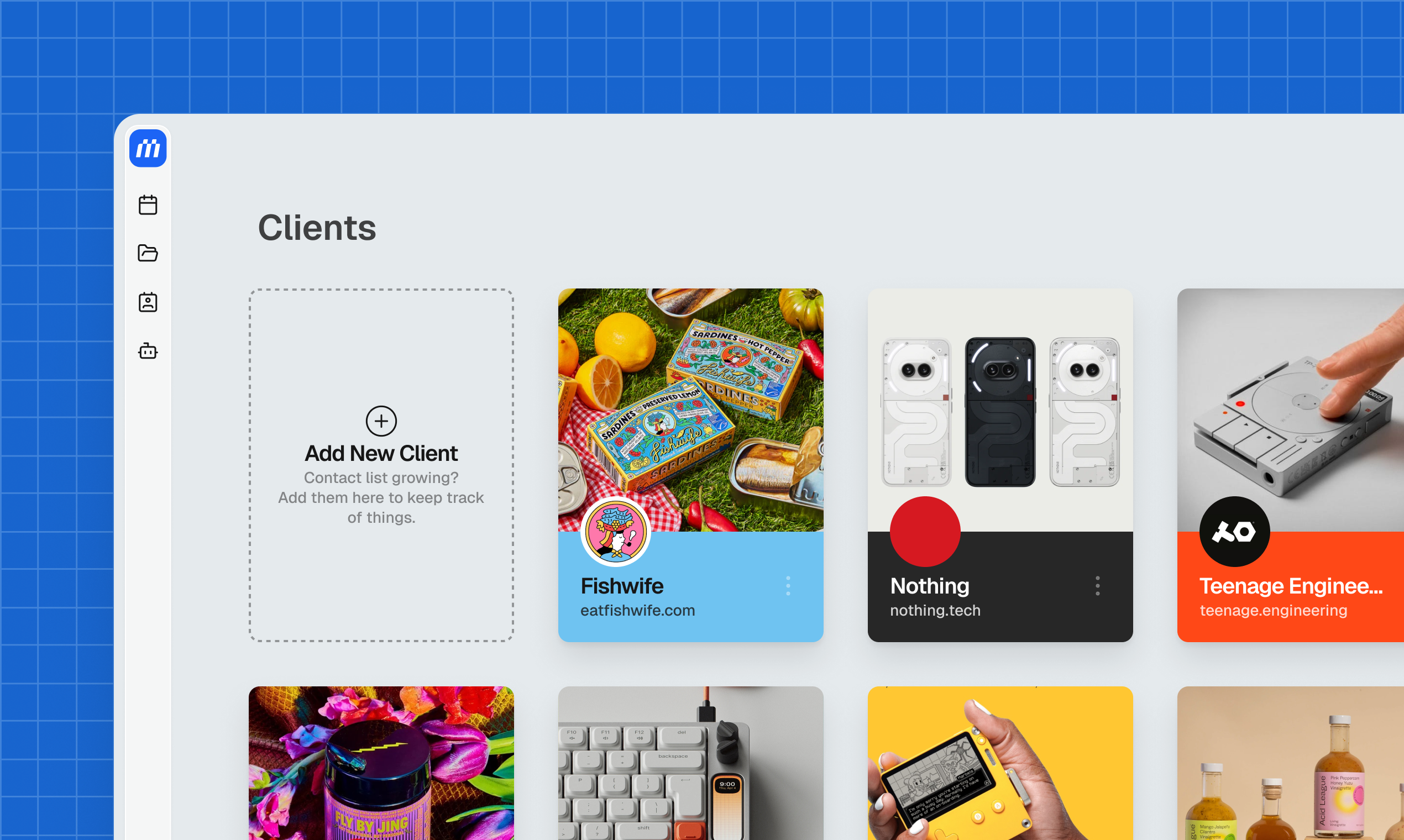
The visual impression from the provided screenshot suggests a clean, modern interface that favors clarity over complexity, reinforcing the promise of a "calm workplace." For a designer or video editor accustomed to visually rich, yet sometimes overwhelming, native applications, MonoDesk aims to be the simple, reliable administrative anchor.
Potential Drawbacks & Areas for Improvement
As a tool focused intently on the creative freelance niche, MonoDesk’s primary limitation might be its narrow focus. If a user handles significant amounts of pure B2B service work (e.g., high-volume consulting or complex accounting), the specialized features might feel restrictive compared to a heavyweight like Asana or ClickUp.
Furthermore, while centralizing feedback is great, the real value will hinge on the quality of the integrations:
- Integration Depth: How well does it integrate with the tools creatives must use? Seamless, two-way sync with tools like Adobe Creative Cloud, Figma, or major video editing suites will be crucial for widespread adoption.
- Invoicing and Payments: To truly replace multiple business tools, robust, easy-to-use invoicing, contract management, and payment tracking capabilities must be included or perfectly integrated.
- Self-Doubt Mitigation: While addressing the reality of "second-guessing" is admirable, this is a softer feature. The platform needs concrete ways to provide validation, such as automated milestone celebration or clear progress tracking against initial project goals, to genuinely support the freelancer's mental load.
Bottom Line & Recommendation
MonoDesk is a promising contender in the solo-operator software space, moving beyond generic task management to address the unique workflow friction of creative freelancers. If you are a designer, web developer, or video creator who consistently feels that administrative overhead and client communication are stealing valuable hours from your craft, MonoDesk is absolutely worth trying.
Its core value proposition—creating one calm workplace to fight context-switching—is a compelling argument for regaining creative control. For those looking to streamline their client pipeline and finally get out of the context-switching trap, MonoDesk feels like it was built specifically for your screen.
Featured AI Applications
Discover powerful tools to enhance your productivity
MindMax
与AI互动的新方式
超越 AI 聊天,将对话转化为无限画布。结合头脑风暴、思维导图、批判性与创造性思维工具,帮助你可视化想法、高效解决问题、加速学习。
AI Slides
AI 驱动幻灯片,Markdown 魔法加持
革命性幻灯片创作,融合 AI 智能与 Markdown 灵活性 - 随处编辑,随时优化,轻松迭代。让每个想法,都能快速变成专业演示。
AI Markdown Editor
打开即写 - AI驱动的Markdown编辑器
极其高效的写作体验:AI助手、斜杠命令、极简界面。打开即用,轻松写作。✍️ Markdown简洁 + 🤖 AI强大 + ⚡ 斜杠命令 = 完美写作体验
FunBlocks AI Extension
🚀 AI驱动的浏览器扩展
用FunBlocks AI助手改变您的浏览体验。您的智能伴侣,为网络上的AI驱动阅读、写作、头脑风暴和批判性思维提供支持。