Mosaic Review: Is This the Zapier for Video Editing We've Been Waiting For?
Zapier for Video Editing
发布时间: 3/2/2026
Product Overview: Automating the Video Production Pipeline
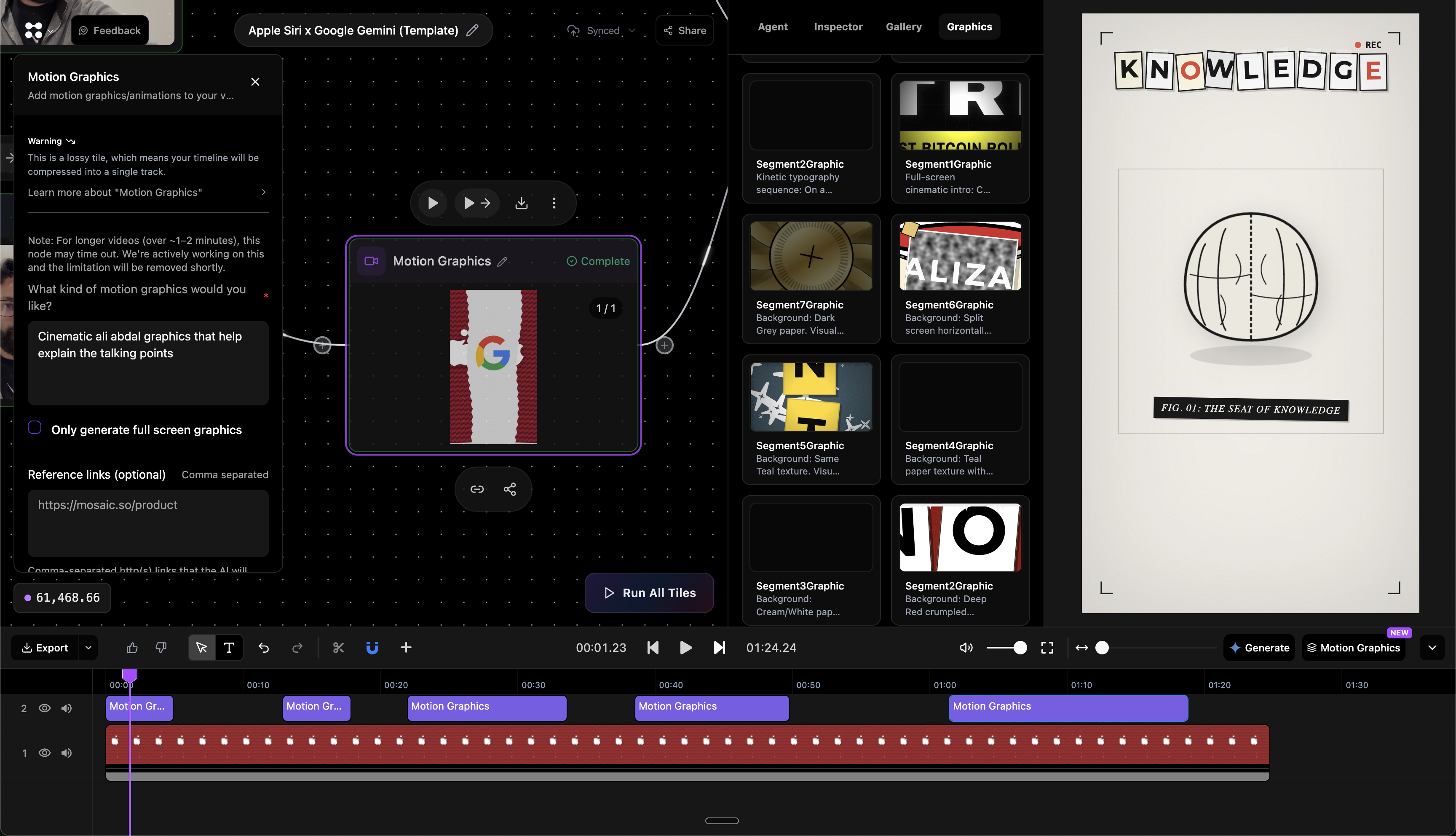
Mosaic enters the crowded world of video production software with a bold claim: to be the "Zapier for Video Editing." At its core, Mosaic is a powerful, node-based workflow automation tool specifically designed for video post-production tasks. Unlike traditional Non-Linear Editors (NLEs) that rely on linear timelines, Mosaic utilizes a visual, node-based canvas to map out complex editing sequences, motion graphics setups, and repetitive tasks.
This platform is clearly aimed at studios, creative agencies, and high-volume content creators who struggle with the tedious, manual labor involved in scaling video output. Imagine needing to create 50 slightly different versions of an ad spot, each with unique text overlays, branding, or music placement—tasks that typically require hours of tedious keyframing and copy-pasting. Mosaic promises to turn these processes into scalable, reusable blueprints.
The core value proposition of Mosaic lies in its ability to create standardized, repeatable video assembly lines. Once a workflow is built, it can be triggered by an API call, an event, or simply saved as a reusable template, dramatically accelerating project turnaround times and ensuring brand consistency across numerous assets.
Problem & Solution: Breaking Free from Linear Constraints
The fundamental problem Mosaic addresses is the lack of scalability in current professional video workflows. Traditional editing software, while powerful for creative storytelling, is inherently linear and sequential. Repetitive tasks—like format resizing, generating title cards, syncing localized audio, or applying standard B-roll sequences—must be manually executed for every new project, leading to production bottlenecks and high operational costs.
Mosaic solves this by abstracting the editing logic into a visual flow diagram. Instead of manually dragging clips and setting keyframes, users define the rules of the edit. For instance, a user can create a node sequence that says: "Take the main interview footage, cut at every 3-second mark, overlay this template title card, then render out 1080p and 9:16 versions." This declarative approach contrasts sharply with the imperative methods of tools like Premiere Pro or Final Cut Pro, allowing for dynamic, data-driven video creation that fills a significant gap in the market for automated creative execution.
Key Features & Highlights: Nodes, APIs, and Seamless Interoperability
The strength of Mosaic lies in its architecture, which marries creative flexibility with engineering efficiency. The node-based canvas is undoubtedly the star, providing an intuitive yet powerful way to visualize and construct complex video logic. This setup is essential for developers or technically-minded editors who thrive in node environments like those found in compositing software.
Key capabilities that stand out include:
- Workflow Automation: The ability to define any video edit—from rough cuts to complex motion graphics—as an automated process.
- API & Event Triggers: Workflows can be programmatically triggered, enabling integration into larger business systems (e.g., generating a personalized video as soon as a customer signs up).
- Seamless Export/Integration: Crucially, Mosaic doesn't aim to replace established NLEs entirely. Instead, it facilitates a collaborative loop, allowing users to export their automated timelines back into familiar tools like Premiere Pro, Final Cut Pro, or DaVinci Resolve for final artistic polish. This commitment to interoperability is a major selling point.
- Template Reusability: Once a perfect workflow is established, it becomes a high-value, instantly deployable template for future projects.
Potential Drawbacks & Areas for Improvement
While the promise of Mosaic is exciting, its focus on automation inherently presents challenges, particularly concerning the creative aspects of editing.
The primary potential drawback lies in the learning curve associated with node-based systems. While powerful, these interfaces can intimidate editors comfortable only with the traditional timeline metaphor. The initial setup of complex automation sequences might require a more technical mindset than traditional video editing demands.
For improvement, the platform could benefit from:
- A Richer Template Gallery: Offering pre-built, sophisticated node templates for common use cases (e.g., webinar clipping, social media repurposing) would lower the barrier to entry significantly.
- Enhanced Real-Time Preview: Given that workflows might involve many steps, a highly responsive, near-instantaneous preview of the automated output within the node canvas is critical for rapid iteration.
- Deeper DAM Integration: While it mentions exporting to Media Asset Management (MAM) software, deeper, bi-directional integration with popular MAM solutions would solidify its place in enterprise pipelines.
Bottom Line & Recommendation
Mosaic is not intended to replace your favorite linear editor for bespoke, one-off creative projects. Instead, it is a game-changing tool for anyone tasked with high-volume, repeatable video asset generation. If your role involves transforming raw footage into dozens of standardized, slightly varied outputs—whether for localized marketing, dynamic ad variations, or personalized communications—Mosaic offers a powerful, future-proof solution.
I highly recommend that production managers, agency workflow leads, and technical video artists explore Mosaic. It represents a significant leap forward in production efficiency, transforming video editing from a manual craft into a scalable, programmatic process. If you're ready to build your first video assembly line, Mosaic is the platform to start with.
Featured AI Applications
Discover powerful tools to enhance your productivity
MindMax
与AI互动的新方式
超越 AI 聊天,将对话转化为无限画布。结合头脑风暴、思维导图、批判性与创造性思维工具,帮助你可视化想法、高效解决问题、加速学习。
AI Slides
AI 驱动幻灯片,Markdown 魔法加持
革命性幻灯片创作,融合 AI 智能与 Markdown 灵活性 - 随处编辑,随时优化,轻松迭代。让每个想法,都能快速变成专业演示。
AI Markdown Editor
打开即写 - AI驱动的Markdown编辑器
极其高效的写作体验:AI助手、斜杠命令、极简界面。打开即用,轻松写作。✍️ Markdown简洁 + 🤖 AI强大 + ⚡ 斜杠命令 = 完美写作体验
FunBlocks AI Extension
🚀 AI驱动的浏览器扩展
用FunBlocks AI助手改变您的浏览体验。您的智能伴侣,为网络上的AI驱动阅读、写作、头脑风暴和批判性思维提供支持。