Nook Browser Review: A Fast, Open-Source Challenger to Arc on macOS
Fast, focused, and open — a new WebKit browser for Mac
发布时间: 10/6/2025
Product Overview
Nook Browser enters the highly competitive macOS browser market with a clear mission: to provide a fast, focused, and open-source alternative, primarily targeting users who appreciate the innovative features of modern browsers like The Browser Company's Arc. Built on WebKit, the same engine powering Safari, Nook promises a native, seamless, and high-performance browsing experience tailored for the Mac ecosystem.
The core value proposition of Nook is its commitment to speed and simplicity, combined with the transparency and flexibility inherent in its open-source nature. It’s designed for power users, developers, and anyone seeking a clean, distraction-free digital workspace that doesn't sacrifice performance for features. By positioning itself as an "Arc alternative," Nook is aiming squarely at a niche audience tired of traditional browser layouts but perhaps hesitant about proprietary solutions or resource-heavy alternatives.
Problem & Solution
The modern web is cluttered, and traditional web browsers often contribute to the chaos with excessive UI elements, distracting tabs, and a lack of organization. While browsers like Arc have successfully addressed this by reinventing the browser interface, they operate as closed-source products. This is where Nook Browser steps in.
Nook addresses the dual problem of digital clutter and a lack of open-source innovation in the "new-wave" browser category. It seeks to replicate the productivity-enhancing, focused environment of its inspiration, but does so with a foundation of open standards and community transparency. By choosing WebKit, Nook ensures it offers excellent performance and battery life on macOS, often a critical factor for laptop users. It fills a specific market gap for users who want the efficiency of an Arc-like experience—think streamlined UI and organized workspaces—combined with the peace of mind that comes from using an open-source product.
Key Features & Highlights
Though still early in its development, the promise of Nook Browser lies in its design philosophy of speed, focus, and openness. The commitment to being a "fast, focused, and open" WebKit browser are its primary selling points.
- WebKit Foundation: Utilizing Apple's WebKit engine translates directly into a speedy, native experience on macOS. This often means better integration with system features and potentially optimized power consumption compared to Chromium-based competitors.
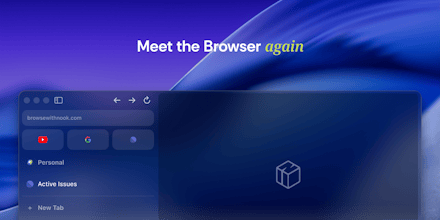
- Arc-Inspired Interface: The maker's review explicitly positions Nook as "very similar to Arc." This suggests an interface focused on vertical tabs, sidebars, and workspaces designed to reduce visual noise and improve organization. The included screenshot shows a minimalist design with a clean-looking sidebar, reinforcing this focus on a streamlined UX.
- Open-Source Commitment: This is arguably Nook's most unique selling point. For privacy-conscious users and developers, open-source software offers transparency, allowing the community to inspect the code, verify security, and contribute to its development. This contrasts sharply with many proprietary, closed-source competitors in this category.
The highlight of the user experience is likely to be the combination of performance and an efficient, modern layout. For those who value control and transparency, the open-source nature of the project is a significant draw, fostering trust and community-driven improvement.
Potential Drawbacks & Areas for Improvement
As a new, open-source alternative, Nook Browser faces the inherent challenges of any ambitious startup project, especially when challenging giants.
The primary potential drawback is the maturity and feature set compared to established competitors. Arc, for instance, has a host of integrated features like the Easel, Notes, and its unique command bar functionality. Nook will need to quickly build out its feature parity or introduce truly unique innovations to stand out beyond just the "open-source" label. Early iterations of new browsers often lack the extensive extension library support, robust syncing capabilities, or deep customization options that users are accustomed to in Chrome or Safari.
Suggestions for Enhancement:
- Unique Organization Features: To truly compete, Nook should iterate on the vertical tab/workspace concept with a feature unique to the open-source platform, perhaps deeply customizable shortcuts or unique integration with common open-source developer tools.
- Community-Driven Roadmap: A transparent, community-driven feature roadmap and bug tracker would be essential to leverage its open-source advantage and build user trust.
- Cross-Platform Sync: While currently macOS-focused, the long-term viability would be significantly boosted by secure, open-source syncing capabilities across devices.
Bottom Line & Recommendation
Nook Browser is a compelling new contender for the best browser on macOS, particularly for a specific segment of the user base.
Who should try this product?
- Arc users who are looking for an open-source alternative.
- Developers and privacy advocates who prioritize transparency and the WebKit engine's performance.
- Early adopters interested in shaping the future of focused, modern web browsing.
Overall, Nook is an exciting product and a necessary addition to the browser landscape. Its commitment to being fast, focused, and open-source fills a genuine market gap. While it is likely still an early-stage project that requires patience, the foundation is strong. We highly recommend giving Nook Browser a try if you value performance, a modern workflow, and the principles of open-source software on your Mac. It has the potential to become the default productivity browser for the open-source community.
Featured AI Applications
Discover powerful tools to enhance your productivity
MindMax
与AI互动的新方式
超越 AI 聊天,将对话转化为无限画布。结合头脑风暴、思维导图、批判性与创造性思维工具,帮助你可视化想法、高效解决问题、加速学习。
AI Slides
AI 驱动幻灯片,Markdown 魔法加持
革命性幻灯片创作,融合 AI 智能与 Markdown 灵活性 - 随处编辑,随时优化,轻松迭代。让每个想法,都能快速变成专业演示。
AI Markdown Editor
打开即写 - AI驱动的Markdown编辑器
极其高效的写作体验:AI助手、斜杠命令、极简界面。打开即用,轻松写作。✍️ Markdown简洁 + 🤖 AI强大 + ⚡ 斜杠命令 = 完美写作体验
FunBlocks AI Extension
🚀 AI驱动的浏览器扩展
用FunBlocks AI助手改变您的浏览体验。您的智能伴侣,为网络上的AI驱动阅读、写作、头脑风暴和批判性思维提供支持。