Notchie Review: The Ultimate Discreet Teleprompter Solution for Mac Users
A teleprompter that lives in your Macbook's notch
发布时间: 12/31/2025
Product Overview
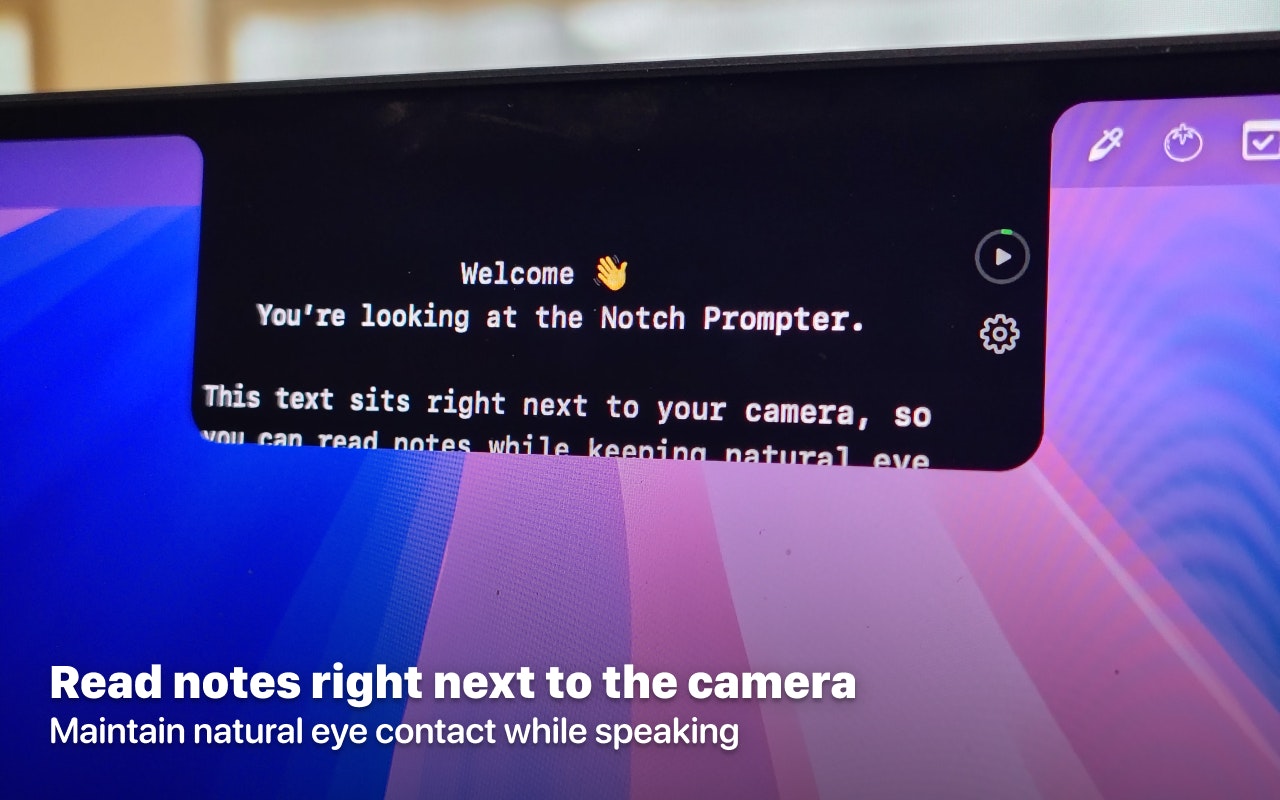
Notchie is a novel productivity tool designed to solve one of the most persistent challenges in digital communication: maintaining genuine eye contact while delivering scripted content. Tagged as "A teleprompter that lives in your Macbook's notch," Notchie seamlessly integrates a scrolling script directly into the status bar area of modern MacBooks—specifically, the physical notch housing the camera. This ingenious placement ensures that the text is positioned immediately below the lens, making it nearly invisible to the audience while keeping the presenter’s gaze locked onto the camera.
This utility is tailored for professionals who rely heavily on virtual communication. Think sales executives nailing pitches on Zoom, educators hosting engaging online webinars, job seekers crushing virtual interviews, or content creators recording polished video content for platforms like YouTube or internal training modules. Notchie’s core value proposition is simple yet powerful: deliver perfectly worded scripts without ever breaking the crucial connection established through direct eye contact.
Problem & Solution: Bridging the Eye Contact Gap
The fundamental problem Notchie addresses is the disconnect inherent in digital presentations. When reading notes off a secondary screen or glancing down at a separate document, the presenter instantly appears disengaged, shifting their focus away from the audience. Traditional external teleprompters, while effective, are often bulky, expensive, or require dedicated hardware setups that don't suit the modern, agile remote worker.
Notchie elegantly fills this market gap by utilizing existing, otherwise unused screen real estate—the area around the MacBook camera notch. By placing the script literally in the line of sight of the lens, it transforms the Mac laptop into an instant, high-quality teleprompter setup without any physical clutter. This is a software solution that brings professional-grade presentation poise to everyday virtual meetings.
Key Features & Highlights
The design philosophy behind Notchie prioritizes seamless integration and intelligent control, setting it apart from basic scrolling text apps.
The standout feature is the Voice-Synced Scrolling. This intelligent function monitors the user's speaking pace, automatically advancing the script in real-time. If you pause to let a point sink in, the text waits; if you speed up during an exciting moment, the text keeps pace. This dynamic synchronization removes the awkward manual scrolling that plagues many teleprompter setups, leading to much more natural delivery.
Furthermore, Notchie excels in maintaining its discretion. Its "invisible during screen sharing" capability is a game-changer for professionals using services like Zoom, Google Meet, or Microsoft Teams. Users can confidently display their slides or screen-share their primary content while the script scrolls unobtrusively just for them, hidden from the participants. This dual-view functionality is essential for high-stakes virtual environments.
Key highlights include:
- Notch Integration: Perfect positioning directly under the camera lens.
- Voice-Sync Technology: Real-time, automated text scrolling matching speaking speed.
- Screen Sharing Stealth Mode: Script remains hidden from the audience during presentations.
- Intuitive Control: Focus remains on the delivery, not managing the text flow.
Potential Drawbacks & Areas for Improvement
While Notchie is exceptionally well-executed for its stated purpose, there are a few areas where refinement could enhance its appeal. As a tool specifically designed for MacBooks with notches (M1/M2/M3 Pro/Max models), users on older or non-notched MacBooks might find the utility limited or non-functional, narrowing its immediate user base. Developers should consider an adaptation layer for older models that utilizes a customizable persistent status bar area.
Another constructive suggestion involves input flexibility. While voice synchronization is excellent for continuous flow, providing more robust manual controls—perhaps keyboard shortcuts for quick jumps or manual pause/resume independent of voice detection—would be beneficial for speeches requiring specific timing or deliberate pauses. Furthermore, expanding script import options beyond basic text files (e.g., direct integration with Google Docs or Notion) would significantly streamline workflow preparation for heavy users.
Bottom Line & Recommendation
Notchie is a thoughtfully engineered utility that finally makes professional teleprompting truly accessible and discreet for the millions of Mac users who live in virtual meeting rooms. Its voice-synced scrolling mechanism alone justifies the price of admission by significantly elevating the perceived quality and polish of one’s digital presence.
If you frequently conduct webinars, sales demonstrations, critical interviews, or any video recording where maintaining direct, authentic eye contact is paramount, Notchie is a must-try download. It solves a niche hardware problem with a beautifully simple software solution, making it one of the best Mac productivity tools to hit the market recently. Highly recommended for the modern remote professional.
Featured AI Applications
Discover powerful tools to enhance your productivity
MindMax
与AI互动的新方式
超越 AI 聊天,将对话转化为无限画布。结合头脑风暴、思维导图、批判性与创造性思维工具,帮助你可视化想法、高效解决问题、加速学习。
AI Slides
AI 驱动幻灯片,Markdown 魔法加持
革命性幻灯片创作,融合 AI 智能与 Markdown 灵活性 - 随处编辑,随时优化,轻松迭代。让每个想法,都能快速变成专业演示。
AI Markdown Editor
打开即写 - AI驱动的Markdown编辑器
极其高效的写作体验:AI助手、斜杠命令、极简界面。打开即用,轻松写作。✍️ Markdown简洁 + 🤖 AI强大 + ⚡ 斜杠命令 = 完美写作体验
FunBlocks AI Extension
🚀 AI驱动的浏览器扩展
用FunBlocks AI助手改变您的浏览体验。您的智能伴侣,为网络上的AI驱动阅读、写作、头脑风暴和批判性思维提供支持。