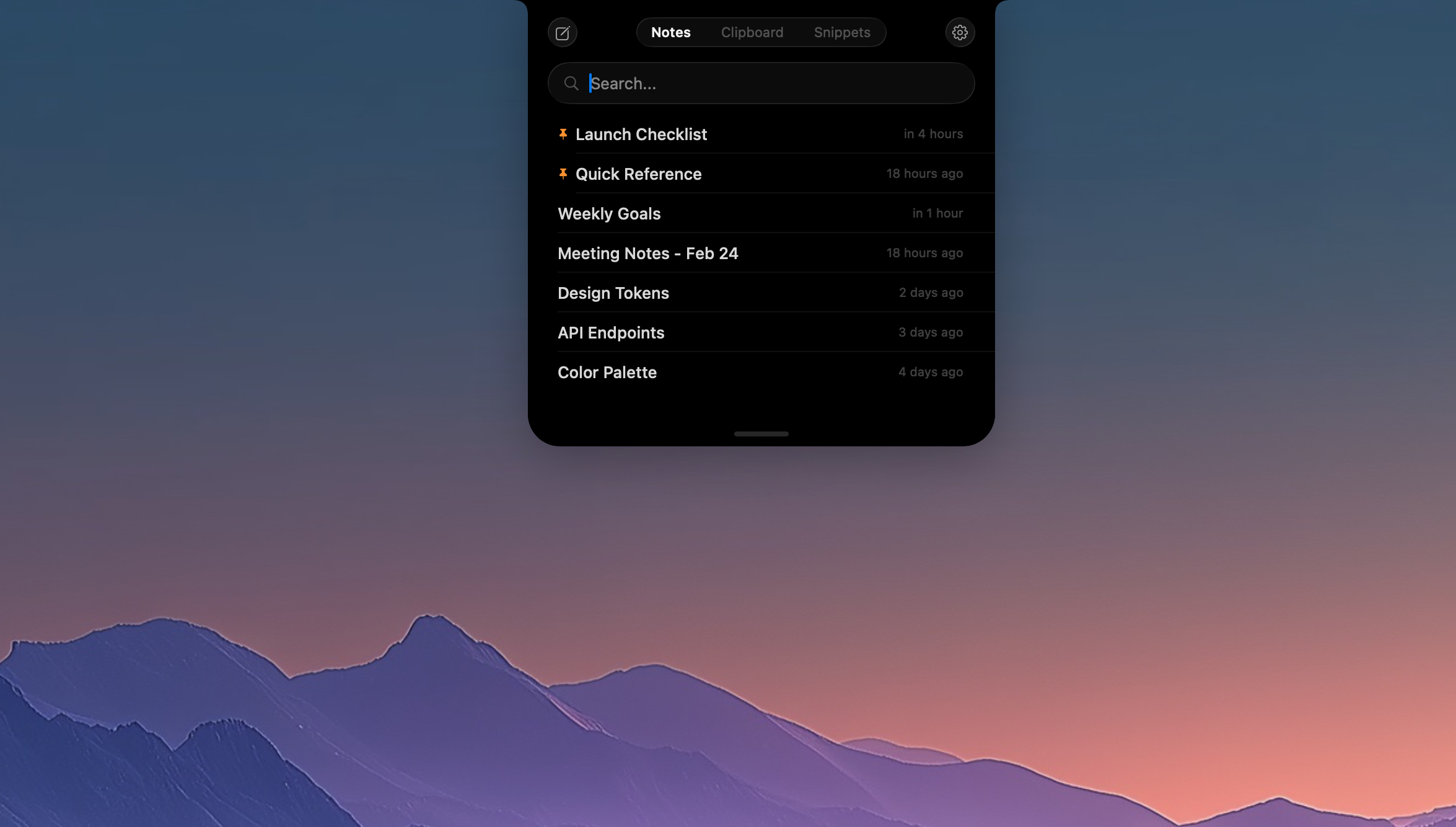
NotchPad Review: The Ultimate Low-Friction Productivity Tool Living in Your Mac Notch
The secure notepad and clipboard manager for your Mac.
发布时间: 3/7/2026
NotchPad is entering the competitive productivity space with a deceptively simple, yet brilliantly executed concept: making your essential tools—notepad, clipboard history, and text snippets—instantly accessible without ever pulling you away from your primary workflow. Tagged as "The secure notepad and clipboard manager for your Mac," NotchPad targets professionals who rely heavily on quick note-taking, frequent context switching, and secure text handling. If you’ve ever lost your train of thought while switching between applications to paste an address or grab a key piece of code, this tool is specifically engineered for you.
Product Overview: Access Without Interruption
NotchPad is designed as a utility that seamlessly integrates into the user interface of modern MacBooks featuring the display notch. Instead of cluttering your desktop with persistent windows or burying functionality behind complex keyboard shortcuts, NotchPad resides exactly where your hardware suggests—in that often-unused space. Clicking the notch icon instantly deploys a clean, focused interface, allowing users to jot down quick thoughts, manage copied items, or insert saved text snippets.
This utility is ideal for developers, writers, project managers, and anyone whose work requires constant access to ephemeral data or reusable blocks of text. The core value proposition of NotchPad isn't just feature parity with other notepad apps; it's delivery. By eliminating window switching and context loss, NotchPad promises immediate access, transforming the notch from a design quirk into a powerful, always-available productivity hub.
Problem & Solution: Solving Context Switching Fatigue
The biggest friction point for power users is context switching. Every time you press Cmd+Tab to pull up a separate notes app, you disrupt deep focus. Traditional clipboard managers help manage history but still require opening a separate window or menu overlay. NotchPad solves this by making the utility disappear and reappear in the same, static location with zero effort.
Unlike standard macOS sticky notes or third-party clipboard utilities, NotchPad centralizes three key functions—note-taking, history management, and snippet insertion—into a single, non-intrusive interface anchored to the notch. This dedicated, focused interaction space is what sets NotchPad apart, filling a clear market gap for users who value minimal intrusion while demanding high accessibility from their essential utilities.
Key Features & Highlights: Security Meets Simplicity
NotchPad boasts an impressive feature set packaged into its minimalist design. Its strength lies in the marriage of accessibility and robust security features crucial for handling sensitive information.
The three primary functions include:
- Instant Notepad: Quick, distraction-free drafting accessible immediately.
- Clipboard Manager: Keeping a history of your recent copies, accessible on demand.
- Snippets Tool: Storing and inserting frequently used text blocks, saving valuable typing time.
What elevates NotchPad significantly is its commitment to data security. The app incorporates AES-256 encryption, offering peace of mind for users handling proprietary or personal data. Furthermore, integration with established password managers like 1Password and Bitwarden, alongside native Touch ID support, makes securing access to encrypted notes incredibly smooth. Crucially, the maker confirms that "Everything stays local on your Mac," which is a major selling point for privacy-conscious individuals who prefer avoiding cloud syncing for sensitive data. The one-time purchase model ($9.99 after a 15-day trial) is also a refreshing change from the current subscription fatigue.
Potential Drawbacks & Areas for Improvement
While the core concept of NotchPad is excellent, its dependence on the Mac notch might be a limiting factor for users on older Mac models or those who prefer not to use that area of the display. While the functionality is undoubtedly useful, users without the notch might find the feature set less compelling, potentially requiring a more universal menu bar anchor option for broader appeal.
Another area for refinement could be integration depth. While 1Password and Bitwarden integration is fantastic, expanding this to support more granular macOS system integrations—perhaps better integration with Spotlight search for quickly recalling snippets—could enhance the overall power-user experience. Finally, while data stays local, offering an optional, secure cloud backup service (perhaps using the user's existing iCloud or Dropbox infrastructure) could offer users a way to seamlessly transfer notes if they upgrade their hardware, without compromising the default local-first philosophy.
Bottom Line & Recommendation
NotchPad is an essential utility for any modern MacBook Pro owner looking to reclaim focus and streamline their workflow. It brilliantly solves the problem of context-switching fatigue by placing a secure, feature-rich notepad and clipboard manager exactly where you least expect it.
If you value instant access, robust local encryption, and a transparent pricing structure (one-time purchase!), you should absolutely download the 15-day trial. NotchPad is more than just a notepad; it’s a significant quality-of-life upgrade that leverages the physical design of your hardware to boost daily productivity. Highly recommended for power users looking for their next indispensable Mac utility.
Featured AI Applications
Discover powerful tools to enhance your productivity
MindMax
与AI互动的新方式
超越 AI 聊天,将对话转化为无限画布。结合头脑风暴、思维导图、批判性与创造性思维工具,帮助你可视化想法、高效解决问题、加速学习。
AI Slides
AI 驱动幻灯片,Markdown 魔法加持
革命性幻灯片创作,融合 AI 智能与 Markdown 灵活性 - 随处编辑,随时优化,轻松迭代。让每个想法,都能快速变成专业演示。
AI Markdown Editor
打开即写 - AI驱动的Markdown编辑器
极其高效的写作体验:AI助手、斜杠命令、极简界面。打开即用,轻松写作。✍️ Markdown简洁 + 🤖 AI强大 + ⚡ 斜杠命令 = 完美写作体验
FunBlocks AI Extension
🚀 AI驱动的浏览器扩展
用FunBlocks AI助手改变您的浏览体验。您的智能伴侣,为网络上的AI驱动阅读、写作、头脑风暴和批判性思维提供支持。