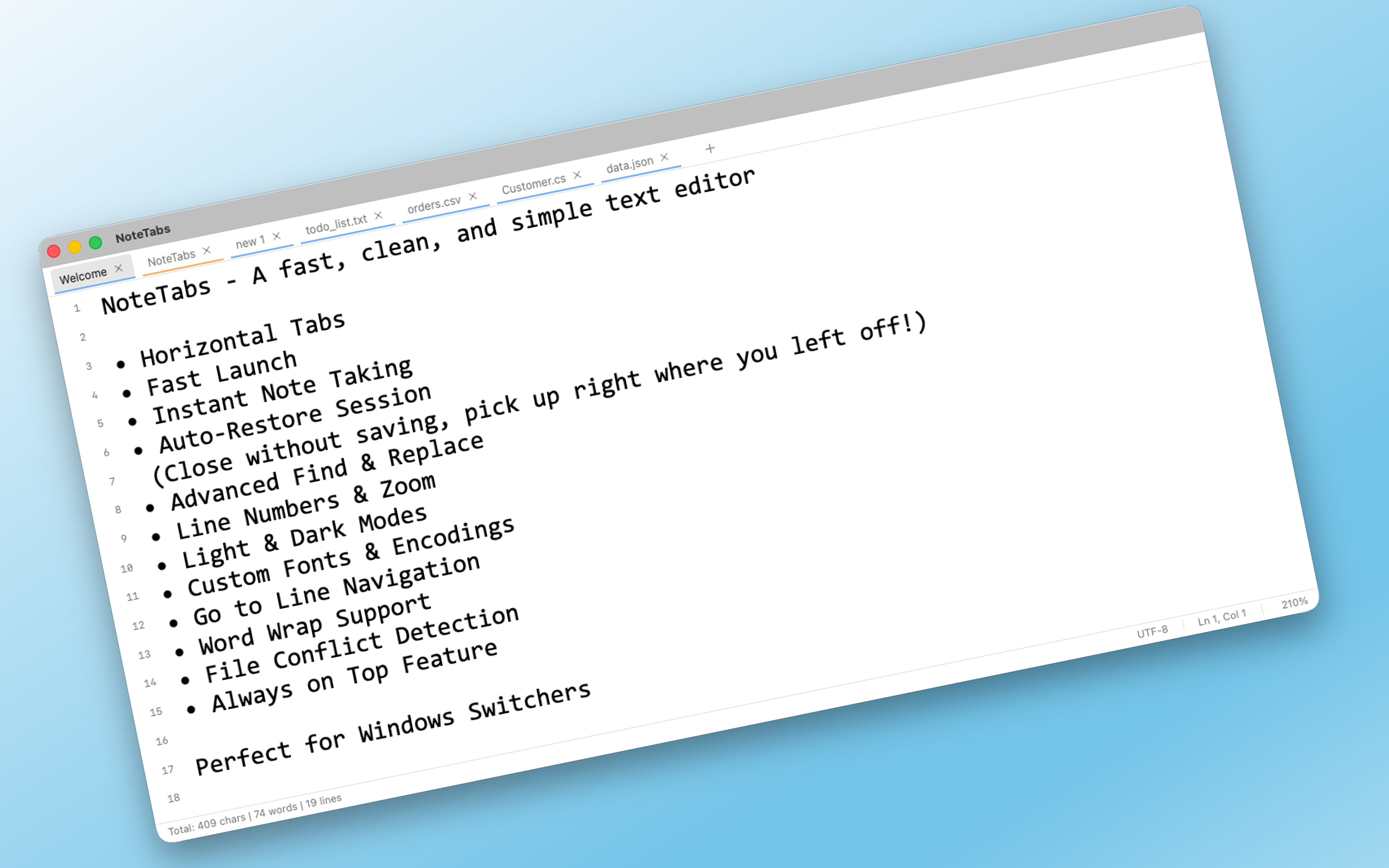
NoteTabs: Finally, a Native macOS Text Editor That Thinks Like Notepad++
Native macOS text editor with horizontal tabs & auto-restore
发布时间: 1/3/2026
Product Overview
NoteTabs is a refreshing entry into the macOS productivity space, positioning itself as the long-awaited, native spiritual successor to the tabbed text editing experience popularized by Windows applications like Notepad++. The core promise of NoteTabs is simple yet profound: deliver a lightning-fast, distraction-free writing environment that completely eliminates window clutter and the constant fear of losing unsaved work. It’s designed not for complex coding projects, but for rapid note-taking, brainstorming, drafting quick documents, and managing ephemeral text snippets that need to be instantly accessible.
This minimalist text editor is clearly targeting power users on macOS who have felt underserved by Apple’s default text utilities or those migrating from other operating systems who miss robust tab management within a single application window. The target audience values speed, efficiency, and a native feel above all else. By focusing intensely on these core functionalities—horizontal tabs and reliable auto-restore—NoteTabs carves out a valuable niche for users demanding zero-friction text manipulation.
The central value proposition of NoteTabs rests on its elegant combination of simplicity and persistence. It aims to be the quickest tool on your dock to open, write in, and close, secure in the knowledge that the exact state of your work will be restored precisely when you reopen the application. This focus on immediacy and data safety makes it an excellent companion for everything from quick meeting minutes to long-form journaling that you don't want interrupted by system updates or accidental closures.
Problem & Solution
The prevailing problem on macOS for many text-based workflows is the segmentation of open documents into multiple, often overlapping, windows. While macOS applications utilize tabs, they frequently operate vertically within a single window pane, which can become cumbersome when dealing with many disparate short notes or drafts. Users often resort to juggling numerous separate .txt files or relying on full-featured, heavier apps when all they need is a quick scratchpad that retains its context.
NoteTabs solves this by directly implementing the highly efficient horizontal tabbed experience favored by seasoned power users on other platforms. Unlike alternatives that might require complex window management setups or third-party scripting, NoteTabs offers this functionality natively and intuitively. The solution is brilliantly straightforward: one window hosts all your open notes, neatly organized horizontally, and the crucial auto-restore feature ensures that if you close the app or your Mac restarts, every tab is reopened exactly as you left it. This directly addresses the "Save button anxiety" mentioned in the description, making the writing flow uninterrupted by manual saving protocols.
Key Features & Highlights
The design philosophy behind NoteTabs is clearly "less is more," focusing development resources on perfecting the core mechanisms.
The most immediately notable feature is the native horizontal tab bar. This allows users to manage dozens of open text documents simultaneously within one visually clean window frame. It drastically improves document switching efficiency compared to standard macOS tab implementation or using the application switcher.
Key highlights include:
- True Auto-Save and Restore: Your writing session is preserved down to the cursor position. This is arguably the most compelling feature for context switching professionals.
- Minimalist macOS Interface: The application adheres beautifully to Apple's design language, feeling fast and responsive, avoiding the bloat often associated with feature-heavy editors.
- Speed and Lightweight Performance: Built for rapid access, NoteTabs launches almost instantaneously, making it superior to launching larger word processors for simple tasks.
- Zero Friction Workflow: The process is streamlined: Open. Write. Close. The application handles the rest, maximizing user focus on content creation rather than application management.
The user experience is immediately satisfying for anyone familiar with this style of editor; the editor is clean, the typography is sharp, and switching between contexts is seamless thanks to the visual layout of the horizontal tabs.
Potential Drawbacks & Areas for Improvement
While NoteTabs excels at its intended, focused purpose, this very specialization can be seen as a limitation by users needing slightly more functionality. For a text editor aiming for speed, the current feature set might be too barebones for some.
Constructive feedback for the NoteTabs team would focus on minor enhancements that don't compromise the core speed:
- Basic Formatting Support: While complexity is avoided, simple markdown preview or syntax highlighting (for basic code snippets or lists) could significantly boost utility without adding much overhead.
- Search Functionality: If a user has 30 tabs open, a simple search feature across all open tabs, or even a basic file-based search capability, would be immensely useful for retrieval.
- Cloud Sync Options: While local auto-save is great, providing an option to back up the tab state via iCloud (or another service) would provide peace of mind for users upgrading machines or running critical documentation.
Currently, the product seems perfectly positioned for pure text, but a small layer of organizational or light formatting capability could broaden its appeal without sacrificing its lightweight nature.
Bottom Line & Recommendation
NoteTabs is an outstanding utility that delivers precisely what its tagline promises: the beloved, highly efficient horizontal tabbed experience, perfectly tailored for the native macOS environment. If you frequently juggle multiple short notes, drafts, or research snippets and find yourself constantly battling window clutter or worrying about saving, you need to try NoteTabs.
For developers, writers, students, or knowledge workers who value speed, context retention, and a distraction-free workspace above heavy feature sets, NoteTabs is an instant productivity upgrade. It’s a sharp, focused tool that successfully fills a long-standing gap in the macOS software ecosystem. Highly recommended for those seeking simplicity perfected.
Featured AI Applications
Discover powerful tools to enhance your productivity
MindMax
与AI互动的新方式
超越 AI 聊天,将对话转化为无限画布。结合头脑风暴、思维导图、批判性与创造性思维工具,帮助你可视化想法、高效解决问题、加速学习。
AI Slides
AI 驱动幻灯片,Markdown 魔法加持
革命性幻灯片创作,融合 AI 智能与 Markdown 灵活性 - 随处编辑,随时优化,轻松迭代。让每个想法,都能快速变成专业演示。
AI Markdown Editor
打开即写 - AI驱动的Markdown编辑器
极其高效的写作体验:AI助手、斜杠命令、极简界面。打开即用,轻松写作。✍️ Markdown简洁 + 🤖 AI强大 + ⚡ 斜杠命令 = 完美写作体验
FunBlocks AI Extension
🚀 AI驱动的浏览器扩展
用FunBlocks AI助手改变您的浏览体验。您的智能伴侣,为网络上的AI驱动阅读、写作、头脑风暴和批判性思维提供支持。