Phia Review: Effortlessly Transform Your macOS Screencasts into Polished Video Content
Create beautiful screen recordings automatically
发布时间: 1/13/2026
Product Overview: Next-Generation Screen Recording on macOS
Phia is stepping into the crowded screen recording market with a clear and compelling mission: to help users create beautiful screen recordings automatically, right on their Mac. Far from being just another screen capture utility, Phia positions itself as a dedicated video production tool integrated seamlessly into the macOS environment. It targets anyone who regularly needs to share technical tutorials, product demos, onboarding guides, or complex workflows, moving beyond static GIFs or choppy recordings toward truly professional visual communication.
The core value proposition of Phia lies in its automation and inherent polish. Instead of spending hours in external editing software tweaking camera movements and zooming, Phia applies intelligent post-processing effects directly during or immediately after recording. This focus on quality output, combined with the assurance that everything runs locally and offline, makes it an appealing proposition for privacy-conscious creators and professionals seeking efficiency.
Problem & Solution: Ending the Editing Drag
The biggest pain point for content creators using standard screen recorders is the post-production time sink. Raw screen recordings are often overwhelming—the cursor jumps jarringly, important elements are too small to see, and the flow feels amateurish. Editing these sequences in tools like iMovie or Premiere Pro to add professional polish is time-consuming, requiring precise keyframing for zooms and tracking motion.
Phia solves this by embedding cinematic intelligence directly into the recording process. It addresses the market gap by offering automated enhancements previously only achievable through painstaking manual editing. Features like Intelligent Zoom and Smooth Cursor Motion ensure that viewer focus is always guided, transforming raw capture into directed storytelling. For creators prioritizing speed without sacrificing aesthetic quality, Phia offers a significant workflow acceleration.
Key Features & Highlights: Automation Meets Artistry
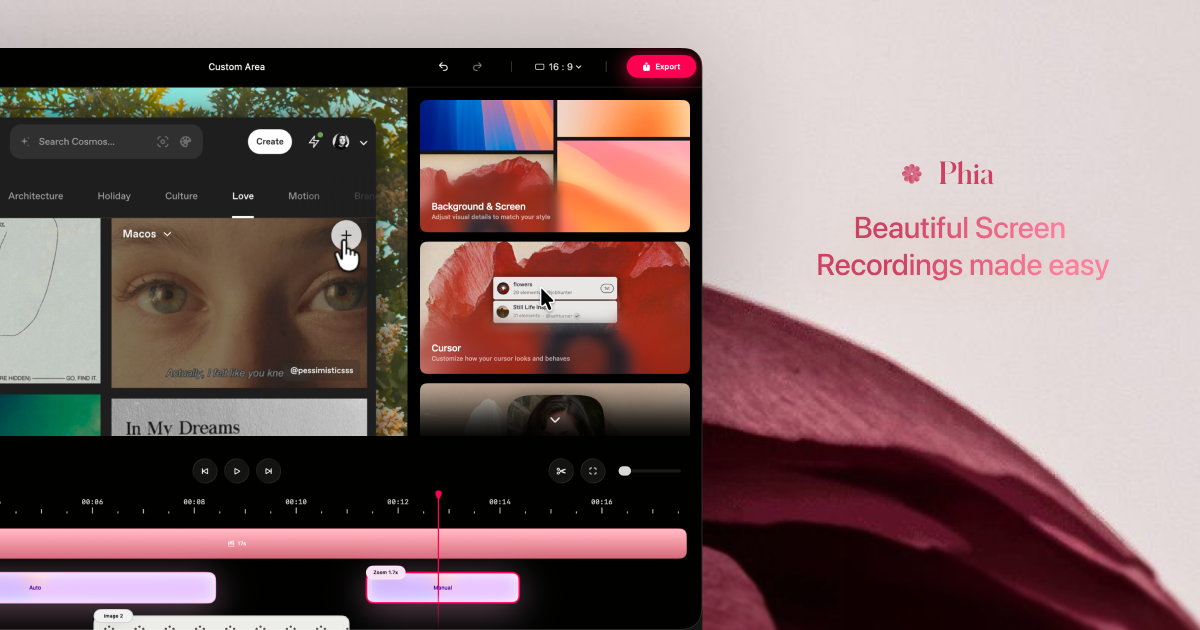
What truly sets Phia apart are the features designed to inject production value automatically. The lightweight timeline provides an intuitive interface for minor adjustments without overwhelming the user with complexity.
The most notable highlights include:
- Intelligent Zoom & Cinematic Movement: These features analyze the recording to dynamically focus on areas of interest, mimicking professional camera work.
- Automated Captioning: Crucial for accessibility and engagement, Phia integrates caption creation to make videos instantly more valuable across platforms.
- Flexible Layouts with Slides and Media: The ability to integrate text, images, and even other video clips directly alongside your screen recording canvas, complete with animated brand titles, elevates recordings from simple demonstrations to structured presentations.
The commitment to local processing ensures excellent performance and data privacy—a significant bonus for teams handling sensitive materials. This offline capability ensures creators can produce polished content anywhere, regardless of internet connectivity.
Potential Drawbacks & Areas for Improvement
While Phia excels at making recordings look beautiful out-of-the-box, its primary strength (automation) might also be its limitation for advanced users. Creators who require highly specific, granular control over every frame’s zoom factor or cursor path might find the automated intelligence restrictive. The current feature set seems heavily skewed towards polished presentation rather than deep-dive editing control.
Furthermore, while the description mentions flexible layouts, more details on integration with external assets (like template imports or specific brand kit management) would be valuable. For a tool focused on beautiful output, enhanced customization options for the automated animations—perhaps style presets for the smooth cursor movements—could further enhance its appeal to brand-conscious users. Expanding integration options with popular content platforms during the export stage would also streamline distribution workflows.
Bottom Line & Recommendation
Phia is a powerful and necessary evolution in the macOS screen recording ecosystem. It is highly recommended for product marketers, SaaS demo creators, technical trainers, and educators who need to produce high-quality, engaging video content frequently but lack the time or expertise for intensive video editing. If your primary goal is turning mundane screen actions into visually engaging, easily digestible tutorials quickly, Phia is a standout tool worth adopting. It successfully bridges the gap between simple capture and professional visual narrative production.
Featured AI Applications
Discover powerful tools to enhance your productivity
MindMax
与AI互动的新方式
超越 AI 聊天,将对话转化为无限画布。结合头脑风暴、思维导图、批判性与创造性思维工具,帮助你可视化想法、高效解决问题、加速学习。
AI Slides
AI 驱动幻灯片,Markdown 魔法加持
革命性幻灯片创作,融合 AI 智能与 Markdown 灵活性 - 随处编辑,随时优化,轻松迭代。让每个想法,都能快速变成专业演示。
AI Markdown Editor
打开即写 - AI驱动的Markdown编辑器
极其高效的写作体验:AI助手、斜杠命令、极简界面。打开即用,轻松写作。✍️ Markdown简洁 + 🤖 AI强大 + ⚡ 斜杠命令 = 完美写作体验
FunBlocks AI Extension
🚀 AI驱动的浏览器扩展
用FunBlocks AI助手改变您的浏览体验。您的智能伴侣,为网络上的AI驱动阅读、写作、头脑风暴和批判性思维提供支持。