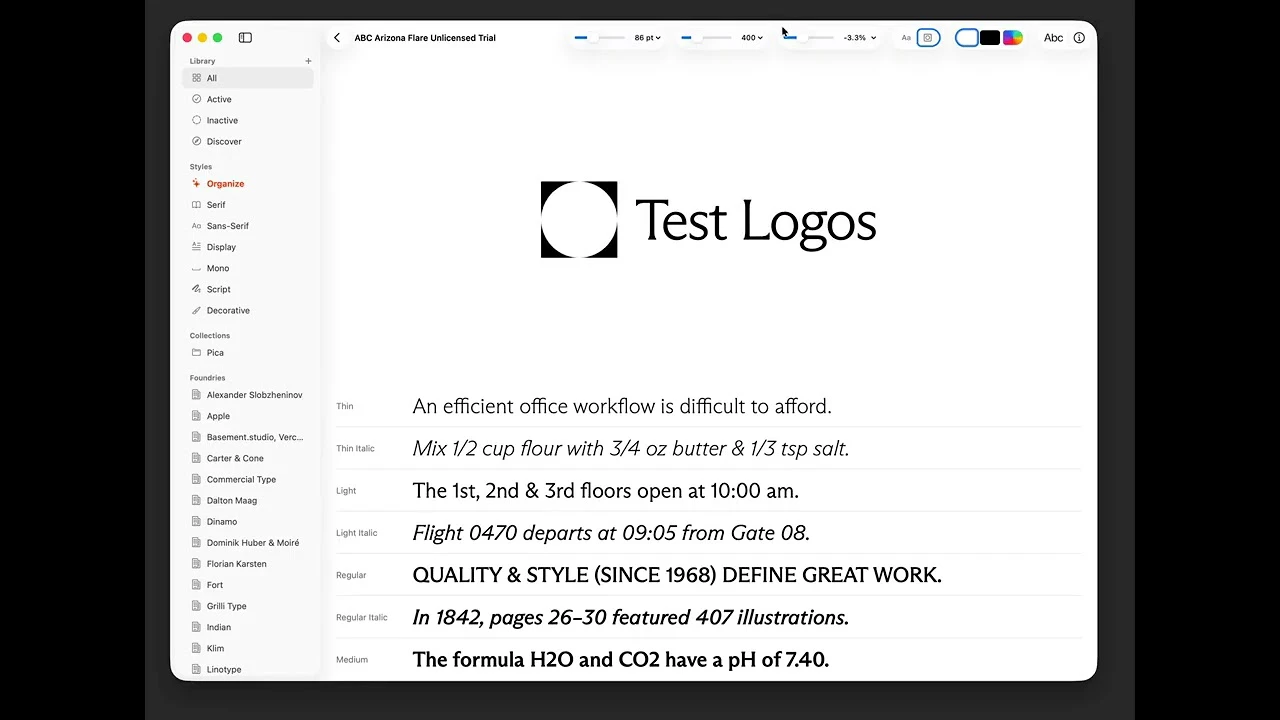
Pica: The Ultimate Native Font Manager for macOS Designers
Fully native app for managing your fonts on MacOS
发布时间: 4/26/2026
Product Overview
Pica is a dedicated font management solution built exclusively for macOS, designed to bring order to the chaos of digital typography. For designers, developers, and creative professionals who frequently work with hundreds—or even thousands—of typefaces, keeping a library organized can be a daunting task. Pica streamlines this process by providing a clean, fully native interface that prioritizes performance and seamless integration with the Apple ecosystem.
The target audience for Pica includes UI/UX designers, branding agencies, and freelance creatives who need a reliable way to manage, preview, and activate fonts. Whether you are working on a massive branding project with custom typography or simply need to organize your collection of Google Fonts and Adobe assets, Pica serves as a centralized hub to keep your design assets accessible and ready for use.
The Problem: Font Fatigue
The fundamental problem facing many creatives is "font clutter." macOS's default Font Book often feels restrictive, and third-party solutions are frequently bloated, slow, or rely on non-native architectures that clash with the clean aesthetic of macOS. This leads to wasted time searching for the right typeface or dealing with system slowdowns caused by poorly managed font caches.
Pica fills a significant gap in the market by offering a lightweight, hyper-focused tool that doesn’t compromise on functionality. Instead of trying to be an all-in-one design suite, it stays focused on what it does best: providing a frictionless environment to organize, test, and manage typefaces locally without the overhead associated with heavier, cross-platform applications.
Key Features & Highlights
What sets Pica apart is its commitment to the "native" experience. By leveraging Apple’s native frameworks, the application feels like a natural extension of macOS, boasting snappy performance and a familiar look and feel.
Notable features include:
- Intuitive Collections: Easily group fonts into custom collections, allowing for quick retrieval based on project, client, or typeface style.
- Folder Watching: Pica automatically detects new fonts added to monitored directories, ensuring your library is always up to date without manual importing.
- Live Preview & Testing: Users can test fonts against custom color themes and logo layouts directly within the app, removing the need to jump back and forth into design software like Figma or Sketch just to see how a font looks in context.
- System-Wide Integration: Manage your system-installed fonts with a clear view of what is active versus what is dormant, helping to optimize system speed.
The user experience is clean and minimalist, allowing the typography itself to take center stage. The ability to preview fonts with your own custom logo assets is a standout feature that provides immediate value during the branding exploration phase.
Potential Drawbacks & Areas for Improvement
While Pica is an excellent tool, there is always room for growth. One potential limitation is the lack of cloud-based synchronization. In a world where designers frequently switch between devices, having a way to sync font collections via iCloud or other storage services would be a massive value-add.
Additionally, while the native approach is a major selling point, power users might eventually request more advanced "pro" features, such as deep integration with specific design software plugins or automated metadata tagging based on foundry information. For users with extremely massive libraries (tens of thousands of fonts), a more robust search and filtering engine—perhaps utilizing AI-driven classification—could eventually become a necessary upgrade.
Bottom Line & Recommendation
If you are a macOS user tired of the clunky, uninspired font management tools currently available, Pica is an absolute must-try. It manages to balance power and simplicity, making it ideal for anyone who values a streamlined creative workflow. Whether you are a professional designer or a hobbyist looking to get a grip on your font collection, Pica’s focus on native performance and essential features makes it a top-tier utility. I highly recommend downloading it to see how much time a well-organized font library can save you in your daily design process.
Featured AI Applications
Discover powerful tools to enhance your productivity
MindMax
与AI互动的新方式
超越 AI 聊天,将对话转化为无限画布。结合头脑风暴、思维导图、批判性与创造性思维工具,帮助你可视化想法、高效解决问题、加速学习。
AI Slides
AI 驱动幻灯片,Markdown 魔法加持
革命性幻灯片创作,融合 AI 智能与 Markdown 灵活性 - 随处编辑,随时优化,轻松迭代。让每个想法,都能快速变成专业演示。
AI Markdown Editor
打开即写 - AI驱动的Markdown编辑器
极其高效的写作体验:AI助手、斜杠命令、极简界面。打开即用,轻松写作。✍️ Markdown简洁 + 🤖 AI强大 + ⚡ 斜杠命令 = 完美写作体验
FunBlocks AI Extension
🚀 AI驱动的浏览器扩展
用FunBlocks AI助手改变您的浏览体验。您的智能伴侣,为网络上的AI驱动阅读、写作、头脑风暴和批判性思维提供支持。