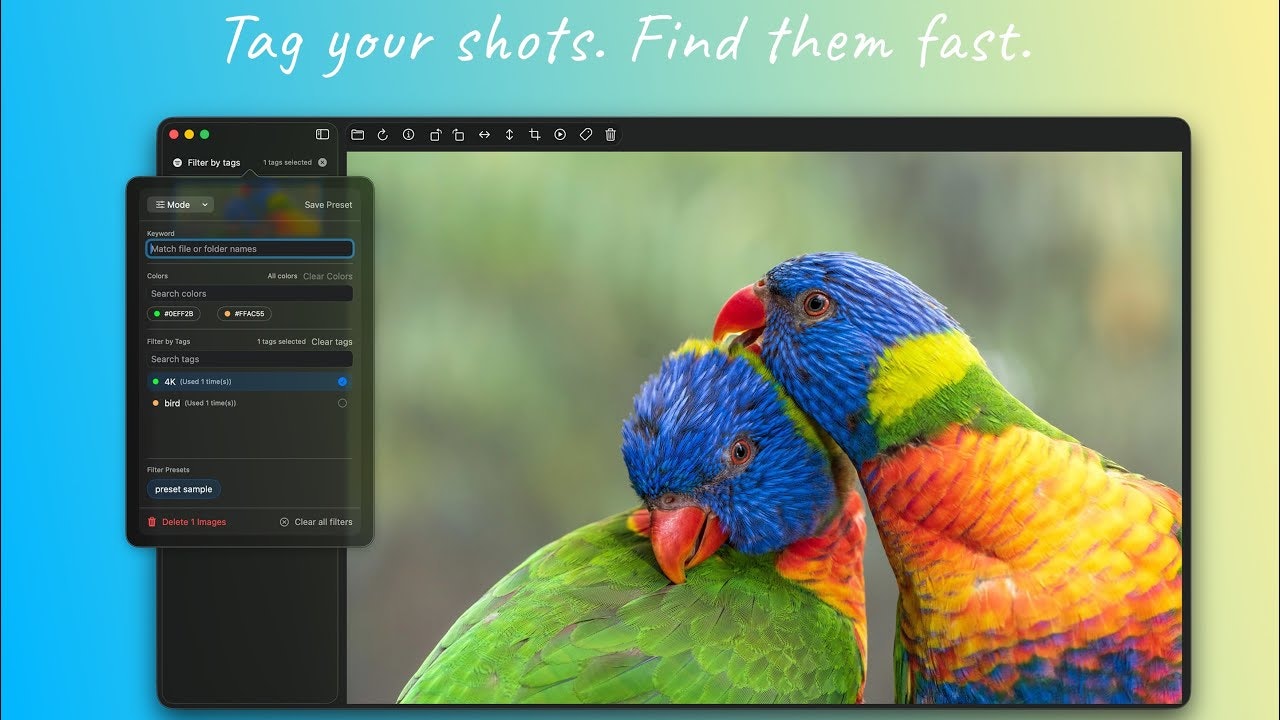
Picser 2.0: A Native macOS Image Viewer with Enhanced Workflow
Native macOS image viewer with tags & slideshow
发布时间: 12/17/2025
Picser 2.0 emerges as a compelling native macOS image viewer designed to offer a faster, more organized, and feature-rich alternative to Apple's default Preview app. Built with SwiftUI, it promises a smooth and lightweight user experience that feels inherently Mac-like. The product targets macOS users, especially those who frequently browse large image collections, manage visual assets, or simply desire a more efficient viewing and basic organizational tool without the bulk of a full-fledged photo management application like Apple Photos.
The core value proposition of Picser 2.0 lies in its commitment to a seamless, native experience combined with practical features that streamline image workflows. It's for users who find Preview too basic for folder browsing and organization, and Photos too heavy for quick viewing and light management.
Problem & Solution
The primary problem Picser 2.0 addresses is the inadequacy of the default macOS Preview app for users who need more than just basic image viewing. Preview, while functional for single files, often falls short when it comes to navigating folders, organizing numerous images, or quickly accessing metadata. The Photos app, on the other hand, can be overly robust for users who don't want to import their entire library or deal with its extensive features just to view images.
Picser 2.0 solves this by providing a "blazing-fast" and lightweight native application that enhances the image viewing experience on macOS. It fills the gap by offering essential organizational tools and a smoother browsing experience, without the overhead of a comprehensive photo editor or library manager. It differentiates itself by focusing on speed, native integration, and a clean, user-centric design that prioritizes image viewing.
Key Features & Highlights
Picser 2.0 introduces several significant upgrades that enhance its utility and user experience:
- Tag Management: This is a standout feature, allowing users to organize images instantly with keywords and colors. This enables quick filtering and sorting, which is invaluable for managing large visual asset libraries.
- Slideshow Mode: A highly requested feature, the new slideshow mode allows for automatic playback of images with customizable intervals, perfect for presentations or hands-free viewing.
- SVG Support: Users can now natively view vector graphics, broadening the range of image types supported.
- Zoom to Cursor: This quality-of-life improvement allows for precise zooming exactly where the cursor is pointed, eliminating the frustration of off-centered zooms.
- Improved User Experience: Built with SwiftUI, Picser 2.0 offers smoother transitions and a refined user interface, contributing to a silky-smooth, lightweight experience.
- Free Rotate & Mirror Tools: In a move to provide more value, basic editing tools like rotate and mirror have been made free for all users.
- Detailed EXIF Information: The app provides instant access to full EXIF data, including camera details, exposure settings, and timestamps, which is crucial for photographers and creators.
- Finder Integration: Users can open single or multiple images directly in Picser from the Finder context menu, improving workflow efficiency.
- Subfolder Control: An optional toggle allows users to include or exclude subfolders when scanning for images, offering greater control over browsing.
Potential Drawbacks & Areas for Improvement
While Picser 2.0 offers significant improvements, there are always areas for further enhancement. Currently, the focus is primarily on viewing and basic organization. More advanced image management and editing capabilities, such as color adjustments or more sophisticated cropping tools, are not extensively highlighted. While basic rotate and mirror are now free, a comprehensive suite of editing tools might be a valuable addition for some users who prefer a single application for both viewing and light editing.
Additionally, while the app prides itself on its native macOS experience, the absence of user ratings or reviews on the Apple App Store at the time of this review makes it difficult to gauge widespread user satisfaction and identify common pain points. However, the maker has actively engaged with user feedback, which bodes well for future development. The roadmap mentions features like Smart OCR, a slideshow "Image Player" (which seems to be distinct from the current slideshow mode), HDR support, and RAW support, which would further enhance its utility for a broader range of users.
Bottom Line & Recommendation
Picser 2.0 is an excellent choice for macOS users who are dissatisfied with Preview's limitations but find the Photos app to be overkill. Its fast performance, native feel, and the introduction of robust tag management and slideshow capabilities make it a strong contender in the image viewer market. It's particularly recommended for photographers, designers, developers, or any Mac user who frequently works with a large volume of images and needs an efficient tool for quick viewing, organization, and basic manipulation. While it may not replace a full-featured photo editor, Picser 2.0 excels at its core mission of providing a superior native image viewing experience on macOS. It's definitely worth trying for anyone seeking to streamline their image workflow.
Featured AI Applications
Discover powerful tools to enhance your productivity
MindMax
与AI互动的新方式
超越 AI 聊天,将对话转化为无限画布。结合头脑风暴、思维导图、批判性与创造性思维工具,帮助你可视化想法、高效解决问题、加速学习。
AI Slides
AI 驱动幻灯片,Markdown 魔法加持
革命性幻灯片创作,融合 AI 智能与 Markdown 灵活性 - 随处编辑,随时优化,轻松迭代。让每个想法,都能快速变成专业演示。
AI Markdown Editor
打开即写 - AI驱动的Markdown编辑器
极其高效的写作体验:AI助手、斜杠命令、极简界面。打开即用,轻松写作。✍️ Markdown简洁 + 🤖 AI强大 + ⚡ 斜杠命令 = 完美写作体验
FunBlocks AI Extension
🚀 AI驱动的浏览器扩展
用FunBlocks AI助手改变您的浏览体验。您的智能伴侣,为网络上的AI驱动阅读、写作、头脑风暴和批判性思维提供支持。