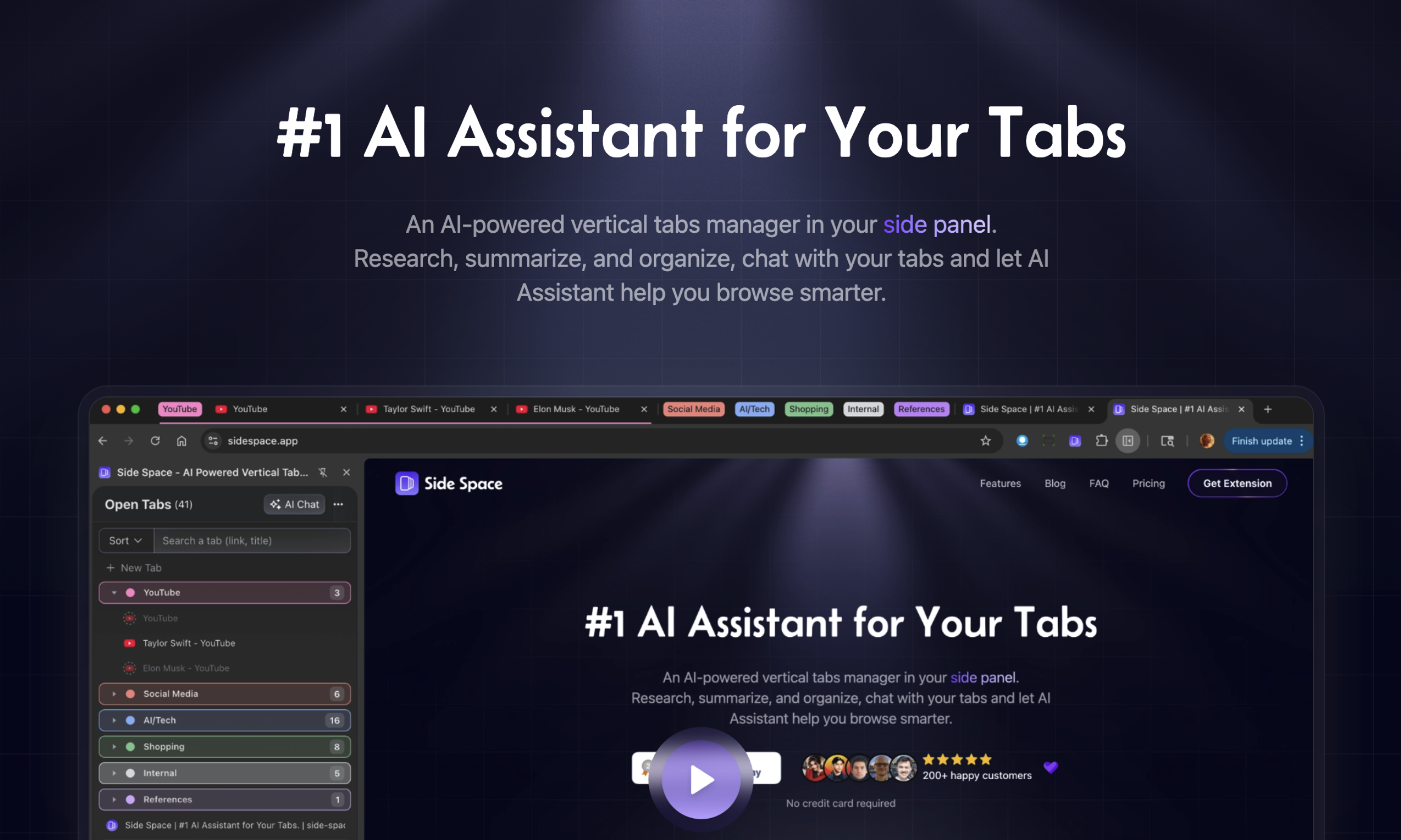
Side Space 2.0: Your #1 AI Assistant for Tab Management
#1 AI Assistant for Your Tabs
发布时间: 11/22/2025
Side Space 2.0 emerges as a powerful AI-driven solution to combat the pervasive problem of browser tab overload. Positioned as the "#1 AI Assistant for Your Tabs," this tool offers a fresh perspective on managing digital workspaces. It's an AI-powered vertical tabs manager that integrates directly into your browser's side panel, aiming to revolutionize how users research, summarize, organize, and interact with their open tabs.
The core value proposition of Side Space 2.0 lies in its "Side Copilot" AI assistant, which helps users browse smarter by bringing intelligent organization and automation to their browser. This extension is designed for anyone who finds themselves drowning in a sea of tabs, from researchers and content creators to developers and students, or simply those seeking a more organized and efficient browsing experience. It aims to transform the browser from a passive content viewer into an organized, efficient workspace.
Problem & Solution
The modern browsing experience often involves juggling dozens, if not hundreds, of tabs, leading to clutter, reduced focus, and a significant drain on system resources. Traditional horizontal tabs quickly become unmanageable, making it difficult to find specific information or maintain context across different tasks. Side Space 2.0 directly addresses this "tab chaos" by introducing an AI-powered vertical tab manager.
Unlike conventional tab managers that primarily offer manual organization, Side Space 2.0 leverages AI to automate and enhance the process. Its "Group By AI" feature intelligently analyzes the content, titles, and URLs of open tabs, automatically sorting them into logical, color-coded groups. This automation significantly reduces the tediousness of manual sorting and allows users to maintain a clutter-free browsing environment. It fills a market gap by providing an "Arc-like" sidebar experience directly within popular Chromium-based browsers (Chrome, Edge, Brave, etc.) and Firefox, offering advanced AI capabilities without requiring users to switch to an entirely new browser.
Key Features & Highlights
Side Space 2.0 boasts a robust set of features, all centered around its AI capabilities and vertical tab management:
- AI-Powered Tab Grouping (Side Copilot): This is the flagship feature. The "Side Copilot" uses AI to automatically categorize and group tabs based on their content, titles, and URLs, transforming scattered tabs into neat, logical categories like "Research," "Productivity," or "Social Media." The "Group Guardian" further enhances this by automatically grouping new tabs based on predefined URL patterns.
- Vertical Tabs & Spaces: Side Space 2.0 transforms your horizontal tabs into a sleek, vertical layout in a side panel, mirroring the popular Arc browser's sidebar. Users can create "Spaces" – essentially persistent, project-based desktops – to organize tabs into separate topics (e.g., work, hobbies, shopping), enhancing focus and clarity.
- Cloud Synchronization & Backup: All organized tabs, spaces, and preferences are automatically saved and synced across different browsers and devices (Chrome, Edge, Brave, Comet, Firefox, Zen) with a single login. There's also an option to save sessions as a JSON file for backup.
- Memory Optimization: The extension includes a tab suspension feature that automatically "hibernates" inactive tabs, significantly reducing memory usage and improving browser performance.
- Advanced Tab Management: Users can efficiently manage tabs and tab groups with drag-and-drop functionality for reordering and moving. Other features include fuzzy search for quick tab retrieval, dark mode support, and the ability to save and restore entire sessions.
- Chat with Tabs: The Side Copilot's chat mode understands the context of your open tabs, allowing you to ask questions about the content of those tabs. Its agent mode can also automate actions, such as managing tabs and windows, searching browser history, and researching topics using natural-language commands.
Potential Drawbacks & Areas for Improvement
While Side Space 2.0 offers significant advantages, a few areas could be considered for future enhancements:
- Learning Curve for AI Features: While the "Group By AI" feature is straightforward, fully utilizing the "Side Copilot's" chat and agent modes might require users to experiment with natural language commands to discover its full potential. More guided tutorials or prompt suggestions could enhance the initial user experience.
- Integration Ecosystem: While it supports cross-browser syncing, deeper integrations with popular productivity tools (e.g., project management software, note-taking apps) could further elevate its utility as a comprehensive workspace manager.
- Customization of AI Grouping: While AI grouping is powerful, offering users more granular control or "training" options for how the AI categorizes tabs based on individual preferences could be beneficial. For instance, allowing users to correct or refine AI-generated groups to learn from their habits.
- Free Plan Limitations: The current information indicates a generous free plan, but premium users get unlimited spaces. Providing a clear comparison chart on the website would help users understand the benefits of upgrading.
Bottom Line & Recommendation
Side Space 2.0 is an indispensable tool for anyone struggling with browser tab overload and seeking a more intelligent, organized, and efficient browsing experience. Its powerful AI-driven tab grouping and "Side Copilot" assistant genuinely differentiate it from traditional tab managers.
If you're a power user, researcher, content creator, or simply someone who keeps many tabs open and wishes for an "Arc-like" vertical tab experience within your existing browser, Side Space 2.0 is highly recommended. It offers a compelling blend of automation, organization, and productivity features that can significantly streamline your digital workflow and reduce browser clutter. It's a game-changer for tab productivity.
Featured AI Applications
Discover powerful tools to enhance your productivity
MindMax
与AI互动的新方式
超越 AI 聊天,将对话转化为无限画布。结合头脑风暴、思维导图、批判性与创造性思维工具,帮助你可视化想法、高效解决问题、加速学习。
AI Slides
AI 驱动幻灯片,Markdown 魔法加持
革命性幻灯片创作,融合 AI 智能与 Markdown 灵活性 - 随处编辑,随时优化,轻松迭代。让每个想法,都能快速变成专业演示。
AI Markdown Editor
打开即写 - AI驱动的Markdown编辑器
极其高效的写作体验:AI助手、斜杠命令、极简界面。打开即用,轻松写作。✍️ Markdown简洁 + 🤖 AI强大 + ⚡ 斜杠命令 = 完美写作体验
FunBlocks AI Extension
🚀 AI驱动的浏览器扩展
用FunBlocks AI助手改变您的浏览体验。您的智能伴侣,为网络上的AI驱动阅读、写作、头脑风暴和批判性思维提供支持。