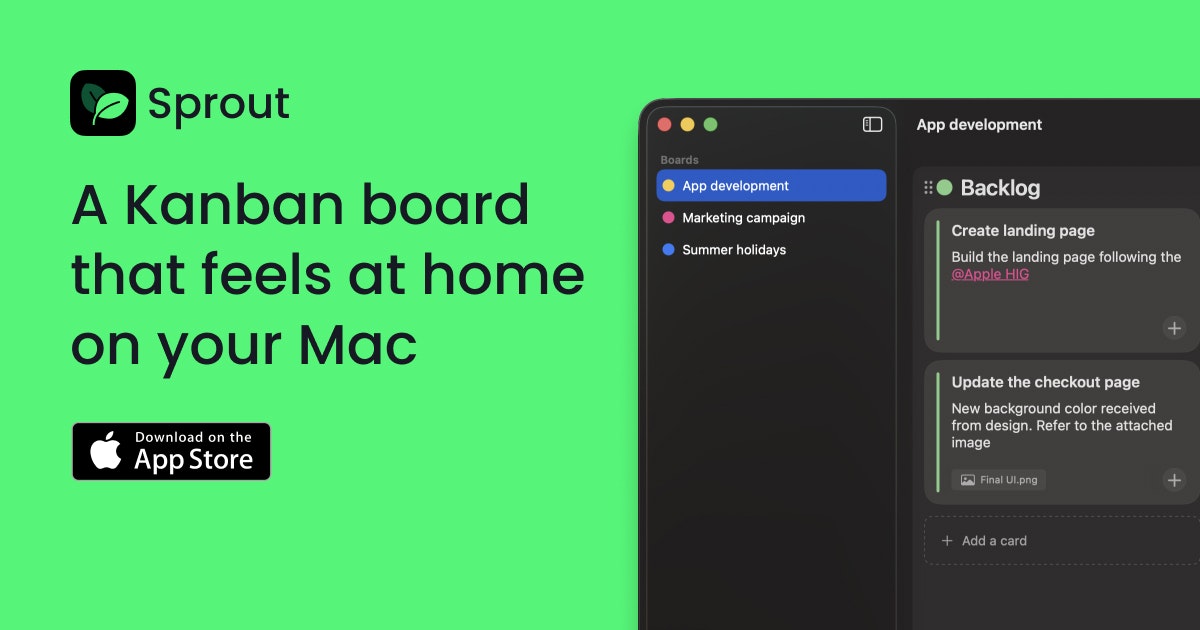
Sprout: The Minimalist, Native Kanban Board Designed Perfectly for Your Mac
A kanban board that feels at home on your Mac
发布时间: 12/22/2025
Product Overview: Rediscovering Simplicity in Task Management
In the ever-expanding universe of productivity tools, Sprout emerges as a refreshing counterpoint to bloated, cloud-centric task managers. Tagged as "A kanban board that feels at home on your Mac," Sprout delivers precisely what its tagline promises: a focused, efficient, and deeply integrated kanban experience tailored specifically for Apple users. This application is not trying to conquer cross-platform collaboration or integrate with every external service imaginable; instead, Sprout focuses intently on providing a beautiful, private space for you to organize your workflow.
Targeted squarely at individual knowledge workers, developers, writers, and anyone feeling overwhelmed by feature creep in existing project management software, Sprout offers a digital sanctuary. Its primary use case is local, personal task management—think planning sprints, tracking reading lists, managing freelance assignments, or simply keeping daily to-dos visible and actionable through the intuitive card-and-column structure of a kanban system.
The core value proposition of Sprout lies in its radical commitment to simplicity and privacy. It champions the philosophy that true productivity often requires stripping away distractions. By being a native Mac application, it leverages the speed, responsiveness, and security inherent to the macOS ecosystem, making it an essential addition for Mac enthusiasts seeking a lightweight yet powerful organizational tool.
Problem & Solution: Escaping the Noise of Modern Productivity Apps
The specific problem Sprout aims to solve is the "feature fatigue" prevalent in modern digital tools. Many popular kanban and task management platforms demand constant internet connectivity, force users into account creation, bombard them with unnecessary notifications, and often feel like heavy web wrappers rather than responsive native applications. For users who value data sovereignty and focus, this constant connectivity and data-sharing requirement is a significant barrier.
Sprout solves this by radically streamlining the feature set to the bare necessities of effective kanban visualization. Its unique differentiator is its commitment to being a 100% private, offline-first solution. By utilizing CoreData and iCloud for local storage synchronization (rather than a proprietary cloud), Sprout ensures that your tasks remain entirely under your control. This approach fills a distinct market gap for users who have actively sought a digital equivalent of a physical whiteboard—something quick, local, and free from external dependencies or marketing noise.
Key Features & Highlights: Native Speed and Absolute Privacy
The elegance of Sprout shines through its deliberate minimalism. The feature set is focused, providing everything needed for effective kanban tracking without any clutter.
Key highlights include:
- Native Mac Experience: The application is built for macOS, ensuring smooth performance, responsive animations, and integration with the system's look and feel. It’s fast because it lives locally.
- Zero Noise Philosophy: There are absolutely no ads, no accounts required, and zero notifications. This is a productivity tool designed to support focus, not shatter it.
- Uncompromising Privacy: Data is stored using CoreData, and optionally synced securely via iCloud. This means your task lists never touch third-party servers unrelated to Apple’s secure ecosystem.
The user experience is incredibly smooth. Setting up a board is instantaneous, and the visual appeal of a clean, fast-loading kanban interface on a Mac screen is a major win. Users can quickly drag and drop tasks between columns—whether they represent stages of a process (To Do, In Progress, Done) or simply different priority levels.
Potential Drawbacks & Areas for Improvement
While Sprout excels in its niche—the minimalist, private Mac kanban—its limitations stem directly from its core strengths. The primary drawback for some power users will be the lack of collaboration features. Since it is designed to be local and private, sharing boards or working synchronously with a team is not possible.
Constructive suggestions for enhancement, provided the core mission remains intact, might include:
- Advanced Styling Options: While the default aesthetic is clean, offering a small selection of themes or dark/light mode presets beyond the system default could further enhance personalization for Mac users.
- Basic Export/Import: A feature allowing users to easily export their board data (perhaps as a standardized Markdown or JSON file) would provide an extra layer of data portability assurance, even for an offline app.
- Template Support: The ability to save complex board structures as reusable templates would speed up setup time for recurring projects.
Bottom Line & Recommendation
Sprout is an outstanding product for a specific segment of the productivity market: the individual Mac user who has grown weary of subscription fatigue and cloud dependency. If your primary need is a fast, beautiful, and absolutely private kanban board that requires zero setup friction and zero ongoing administrative overhead, Sprout is highly recommended. It successfully executes its promise of feeling "at home on your Mac" by embracing native simplicity over feature bloat. Try Sprout if you are looking for the digital equivalent of a clean, local sketchbook for your personal projects.
Featured AI Applications
Discover powerful tools to enhance your productivity
MindMax
与AI互动的新方式
超越 AI 聊天,将对话转化为无限画布。结合头脑风暴、思维导图、批判性与创造性思维工具,帮助你可视化想法、高效解决问题、加速学习。
AI Slides
AI 驱动幻灯片,Markdown 魔法加持
革命性幻灯片创作,融合 AI 智能与 Markdown 灵活性 - 随处编辑,随时优化,轻松迭代。让每个想法,都能快速变成专业演示。
AI Markdown Editor
打开即写 - AI驱动的Markdown编辑器
极其高效的写作体验:AI助手、斜杠命令、极简界面。打开即用,轻松写作。✍️ Markdown简洁 + 🤖 AI强大 + ⚡ 斜杠命令 = 完美写作体验
FunBlocks AI Extension
🚀 AI驱动的浏览器扩展
用FunBlocks AI助手改变您的浏览体验。您的智能伴侣,为网络上的AI驱动阅读、写作、头脑风暴和批判性思维提供支持。