Taphouse Review: The Essential GUI That Finally Unlocks Homebrew’s Potential on macOS
The missing GUI for Homebrew
发布时间: 1/14/2026
Product Name: Taphouse Tagline: The missing GUI for Homebrew
For years, developers, system administrators, and power users on macOS have relied on Homebrew—the indispensable package manager—to handle command-line installations. However, interacting solely through the terminal can sometimes feel cumbersome, especially when managing updates, auditing security, or simply visualizing your software landscape. Enter Taphouse, which proudly bills itself as "The missing GUI for Homebrew." After diving into its latest iteration (v1.3), it’s clear Taphouse isn't just a wrapper; it’s a significant enhancement layer for the core macOS developer toolkit.
Product Overview: Bridging the CLI and Desktop Experience
Taphouse transforms the notoriously text-based experience of Homebrew into an intuitive, graphical interface tailored specifically for macOS users. At its heart, Taphouse allows users to manage all their installed packages, casks, and formulae without constantly opening the Terminal application. This shift from command-line dependency to desktop accessibility is its core value proposition.
This tool is explicitly designed for the macOS power user—whether you are a software developer needing reliable package management, a designer who uses niche command-line tools, or an IT professional maintaining multiple systems. Taphouse consolidates package management, system health monitoring, and security auditing into one sleek application. It aims to democratize complex package management by making detailed package inspection and cleanup accessible to a wider audience, moving Homebrew firmly into the realm of modern desktop applications.
The Problem Taphouse Solves: Visibility and Auditing
The primary pain point Taphouse addresses is the lack of high-level visibility and proactive maintenance inherent in pure command-line package managers. While brew update, brew upgrade, and brew doctor are essential, they require constant user intervention and interpretation of raw terminal output. Users often struggle with identifying orphaned dependencies, checking for security vulnerabilities, or tracking updates for third-party apps installed via Cask.
Taphouse solves this by providing automated, visual feedback. It doesn't aim to replace the CLI entirely, but rather to provide the necessary oversight. By integrating features like CVE vulnerability scanning and a holistic Health Dashboard, Taphouse fills a crucial market gap: the need for an intelligent, proactive macOS package management utility that prioritizes security and cleanliness alongside simple installation.
Key Features and User Experience Highlights
The feature set in Taphouse 1.3 is robust, showing consistent development effort focused on enterprise-grade tooling wrapped in a user-friendly shell.
The security and health features stand out immediately:
- CVE Vulnerability Scanning: A critical addition that automatically scans installed packages for known Common Vulnerabilities and Exposures, offering immediate security auditing that is often tedious to perform manually.
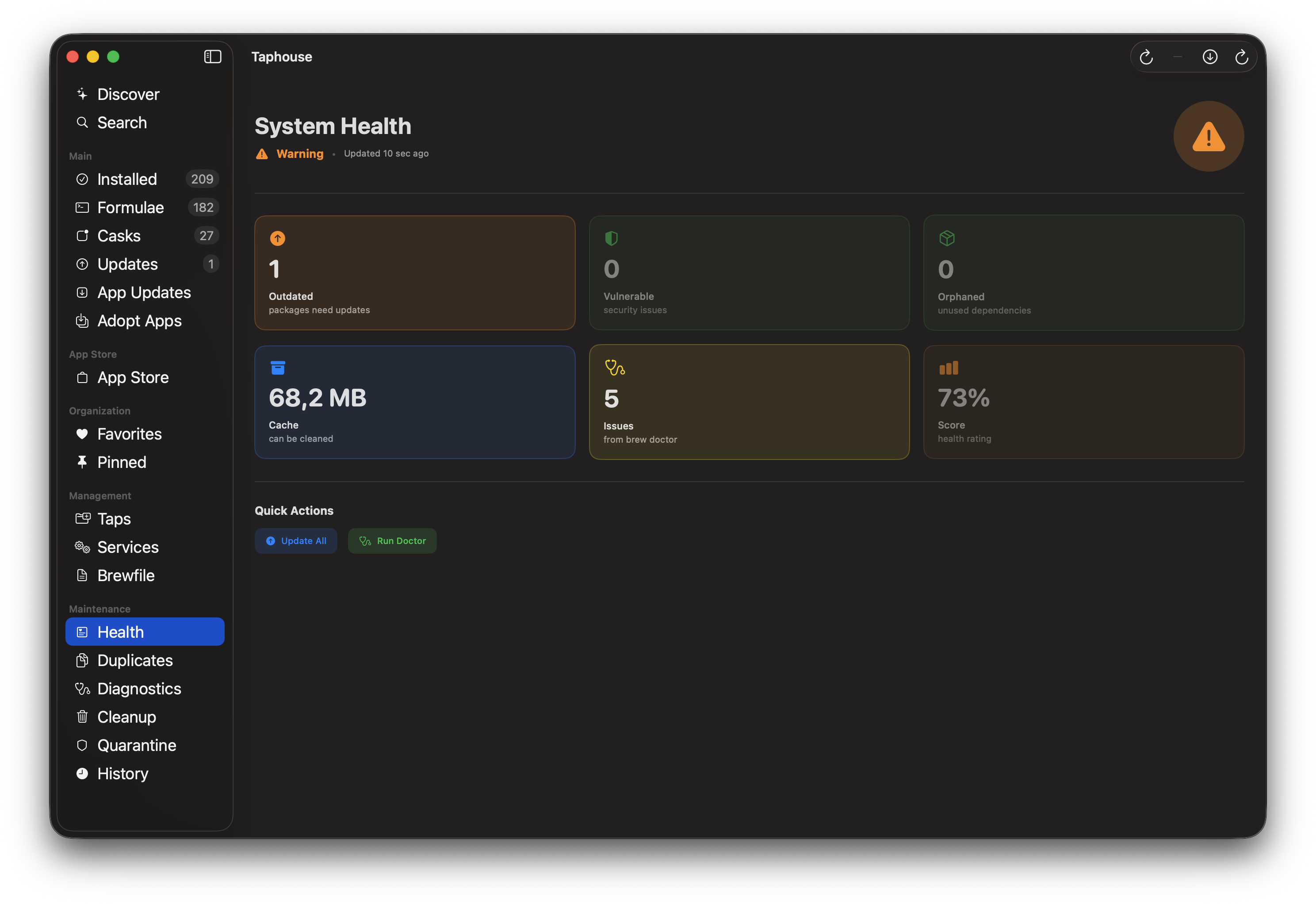
- Health Dashboard: Provides a system score, giving users a quick, actionable metric on the overall cleanliness and efficiency of their Homebrew installation.
- Orphaned Dependency Cleanup & Leftover File Detection: These utilities are goldmines for keeping disk space clear and preventing configuration clutter.
Furthermore, Taphouse significantly enhances the update ecosystem:
- Third-Party App Updates: Support for Sparkle, GitHub, and Electron updates means Taphouse can manage updates for many non-Homebrew apps installed via Cask, centralizing maintenance.
- Menu Bar Mode: Offers immediate access and auto-updates directly from the macOS menu bar, maximizing workflow efficiency for quick checks.
The user experience feels polished, featuring support for six languages and Mac App Store integration, reinforcing its dedication to being a first-class citizen on macOS. Pre-install inspection, allowing users to see exactly what a package will install before committing, is a powerful touch for cautious users.
Potential Drawbacks and Areas for Improvement
While Taphouse is impressively feature-rich, there are always areas ripe for enhancement in tools that bridge CLI and GUI workflows.
One potential limitation is the perceived dependence on the GUI. While the goal is to avoid the terminal, power users might occasionally want direct shell access or the ability to execute complex custom Brewfile operations within the application itself, rather than relying solely on the export function.
For future iterations, I would suggest:
- Advanced Filtering and Search: Allowing deeper, real-time filtering of taps, formulae, and casks based on metadata (like maintainer or license type) would benefit users with extremely large installations.
- Configuration Management Integration: Since Homebrew manages system tools, integrating light configuration file visualization or management (for common config files created by formulae) could further cement Taphouse as the central management hub.
- Tapered Security Reporting: While CVE scanning is great, offering more granular control over how often scans run or allowing users to whitelist specific benign findings would improve customization.
Bottom Line & Recommendation
Taphouse successfully delivers on its promise: it is the most comprehensive GUI available for Homebrew on macOS today. It takes a critical developer utility and layers on necessary security, health, and convenience features that are simply absent from the default command-line experience.
If you rely on Homebrew daily and find yourself wishing for better visualization, security oversight, or simplified maintenance, Taphouse is an essential download. It transforms package management from a necessary chore into a managed, transparent process. For developers and power users seeking a robust, professional tool to maintain a clean and secure macOS environment, Taphouse is highly recommended.
Featured AI Applications
Discover powerful tools to enhance your productivity
MindMax
与AI互动的新方式
超越 AI 聊天,将对话转化为无限画布。结合头脑风暴、思维导图、批判性与创造性思维工具,帮助你可视化想法、高效解决问题、加速学习。
AI Slides
AI 驱动幻灯片,Markdown 魔法加持
革命性幻灯片创作,融合 AI 智能与 Markdown 灵活性 - 随处编辑,随时优化,轻松迭代。让每个想法,都能快速变成专业演示。
AI Markdown Editor
打开即写 - AI驱动的Markdown编辑器
极其高效的写作体验:AI助手、斜杠命令、极简界面。打开即用,轻松写作。✍️ Markdown简洁 + 🤖 AI强大 + ⚡ 斜杠命令 = 完美写作体验
FunBlocks AI Extension
🚀 AI驱动的浏览器扩展
用FunBlocks AI助手改变您的浏览体验。您的智能伴侣,为网络上的AI驱动阅读、写作、头脑风暴和批判性思维提供支持。