Tweek: Your Digital Answer to the Analog Planner
Minimal weekly planner
发布时间: 11/15/2025
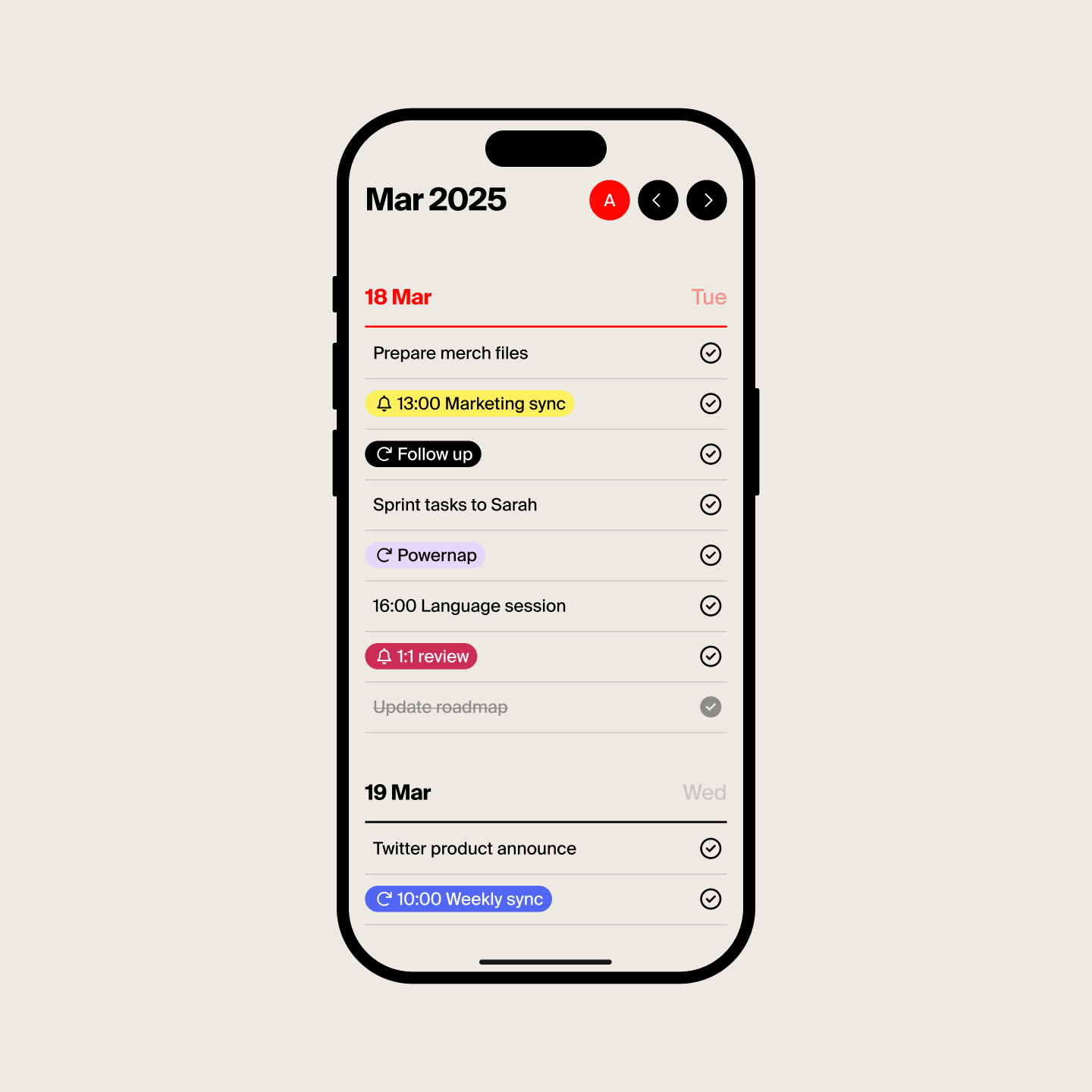
Tweek is a refreshing take on the digital planner, positioning itself as a "minimal weekly planner" that aims to replicate the natural, uncluttered feel of pen and paper. In an age of increasingly feature-rich and sometimes overwhelming productivity apps, Tweek offers a serene, streamlined experience for individuals who value simplicity and a clear weekly overview. It's designed for anyone seeking to organize their tasks and schedule without getting bogged down by excessive functionalities.
The product targets a broad audience, from casual users to busy professionals, who appreciate a straightforward approach to managing their weekly commitments. Its core value proposition lies in its minimalist aesthetic and intuitive design, making planning and prioritizing feel effortless and stress-free.
Problem & Solution
Many modern task managers and digital planners can become overly complex, leading to more time spent organizing than actually accomplishing tasks. The abundance of features, floating boxes, and buttons can create a sense of digital clutter and anxiety for users.
Tweek addresses this by deliberately stripping away the "fuss" and focusing on the essentials of weekly planning. It offers a clean, visual weekly calendar layout that resembles a traditional paper planner, providing a soothing sense of familiarity and control. By prioritizing simplicity, Tweek helps users maintain focus and boosts productivity by making task management easy to grasp and utilize, thus filling a market gap for those who feel overwhelmed by more robust project management tools.
Key Features & Highlights
Tweek's strength lies in its carefully curated set of features that enhance the minimalist planning experience:
- Intuitive Weekly View: The primary interface presents a weekly calendar, allowing users to see their entire week at a glance, including weekends. This visual overview is central to Tweek's "paper-like" feel.
- Effortless Task Management: Users can easily add tasks, notes, checklists, and even subtasks within their weekly plan.
- Visual Prioritization: The app incorporates a color palette and planner stickers, enabling users to highlight important tasks and events, mimicking the use of highlighters and sticky notes in a physical planner.
- Google Calendar Sync: For those who rely on external calendars, Tweek offers seamless, one-way synchronization with Google Calendar (a premium feature), ensuring all commitments are in one place.
- Recurring Tasks & Reminders: Automate routine tasks and ensure nothing is missed with recurring task functionality and email or push notifications.
- Printable Templates: Tweek allows users to print their weekly schedules, either filled out or as blank templates, catering to those who still appreciate a physical copy or are transitioning from paper to digital planning.
- Cross-Platform Availability: Tweek is available on iOS, Android, and web, offering flexibility for users across various devices.
Potential Drawbacks & Areas for Improvement
While Tweek excels in its simplicity, this focus can also present some limitations for certain users. For instance, the app does not offer hourly scheduling, which might be a drawback for individuals who require a more granular breakdown of their day. Additionally, while it provides subtasks, it's strictly a to-do list app and not a full-fledged project manager, meaning it might not suffice for complex projects requiring extensive features like Gantt charts or detailed progress tracking.
Some users have noted that the "Someday" feature for untriaged tasks can be somewhat tedious to access, requiring scrolling. Furthermore, while iCloud syncing is smooth between Apple devices, the experience on larger screens like the iPad has been mentioned as having "awkward gaps of white space" and occasional glitches, suggesting room for optimization in its multi-device responsiveness. The premium version, while offering valuable features like unlimited calendars and recurring tasks, might feel counterintuitive for users whose workflow becomes so complex that Tweek's inherently scanty features might no longer be sufficient.
Bottom Line & Recommendation
Tweek is an excellent choice for individuals who are tired of feature-bloated productivity apps and yearn for a digital planning experience that mirrors the simplicity and clarity of a paper planner. Its clean design, intuitive weekly view, and essential task management features make it ideal for anyone looking to organize their personal and professional life without unnecessary distractions.
If you're a visual planner, someone seeking a straightforward way to manage weekly priorities, or even a casual user who wants to keep track of high-level deadlines and chores, Tweek comes highly recommended. It's a "sweet spot" between a calendar and a task manager, offering a refreshing and effective approach to staying organized and productive. While those who require extensive project management capabilities or detailed hourly scheduling might need to look at alternatives like Todoist or TickTick, Tweek perfectly fulfills its promise of being a truly "minimal weekly planner."
Featured AI Applications
Discover powerful tools to enhance your productivity
MindMax
与AI互动的新方式
超越 AI 聊天,将对话转化为无限画布。结合头脑风暴、思维导图、批判性与创造性思维工具,帮助你可视化想法、高效解决问题、加速学习。
AI Slides
AI 驱动幻灯片,Markdown 魔法加持
革命性幻灯片创作,融合 AI 智能与 Markdown 灵活性 - 随处编辑,随时优化,轻松迭代。让每个想法,都能快速变成专业演示。
AI Markdown Editor
打开即写 - AI驱动的Markdown编辑器
极其高效的写作体验:AI助手、斜杠命令、极简界面。打开即用,轻松写作。✍️ Markdown简洁 + 🤖 AI强大 + ⚡ 斜杠命令 = 完美写作体验
FunBlocks AI Extension
🚀 AI驱动的浏览器扩展
用FunBlocks AI助手改变您的浏览体验。您的智能伴侣,为网络上的AI驱动阅读、写作、头脑风暴和批判性思维提供支持。