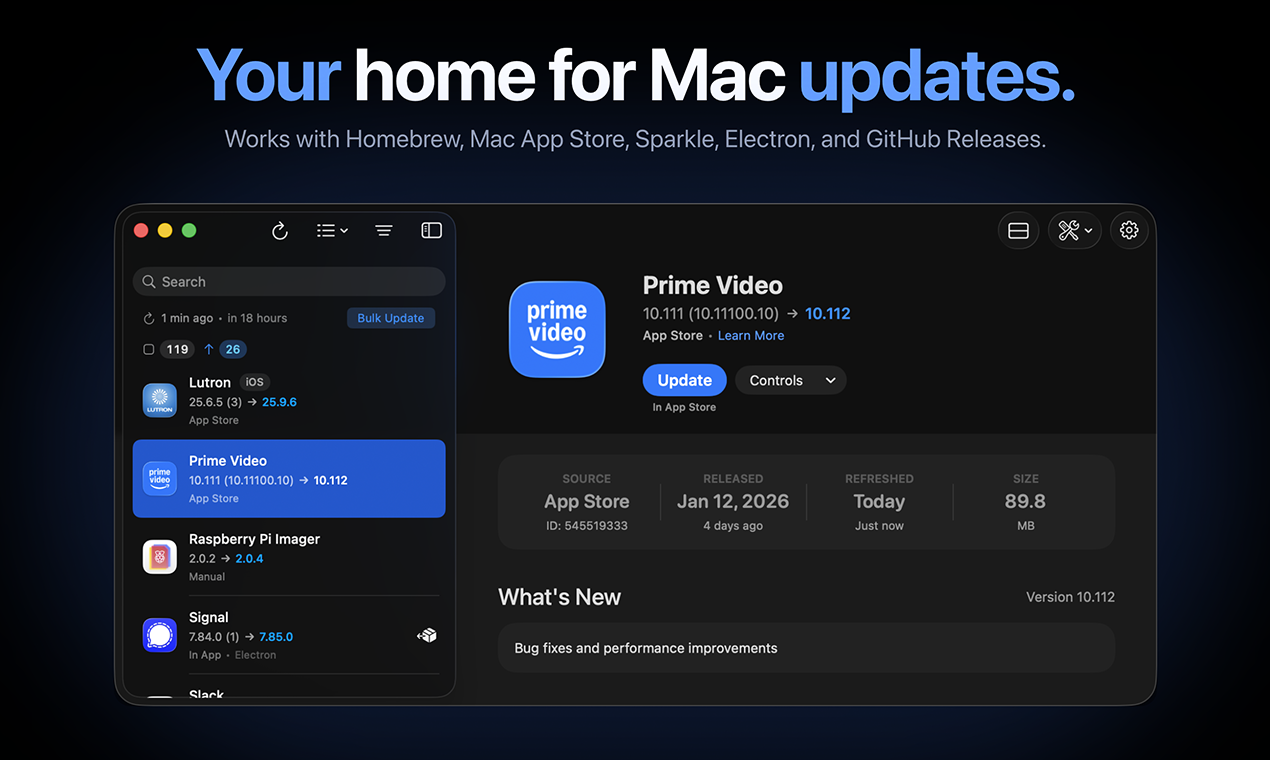
Updatest Review: Finally, A Unified Dashboard for Your Mac Software Maintenance
Your new home for Mac updates.
发布时间: 1/19/2026
Product Overview: Taming the Update Chaos on macOS
Maintaining up-to-date software on macOS can feel like juggling flaming torches. You have the official Mac App Store updates, then the separate application updaters for Sparkle-enabled apps, plus command-line tools managed via Homebrew, and developers pushing releases directly through GitHub. Updatest steps in as the dedicated solution to consolidate this fragmented update landscape. This sleek Mac application positions itself as the central hub for all software maintenance, promising to bring order to the otherwise chaotic process of keeping your ecosystem secure and running the latest versions.
The target audience for Updatest is clear: any dedicated Mac user, developer, or power user who relies on both official and third-party applications. If you frequently find yourself opening multiple terminal windows to run brew upgrade, checking the App Store, and manually downloading installers, Updatest is designed directly for you. Its core value proposition is simplification and centralization, turning a multi-step chore into a single, manageable workflow within a native application interface.
Problem & Solution: Solving Software Sprawl
The fundamental problem Updatest addresses is software update sprawl. macOS users often manage critical updates across disparate channels: the built-in system updater, the App Store, various background processes, and command-line package managers like Homebrew. This fragmentation leads to overlooked security patches, version inconsistencies, and general maintenance friction. Furthermore, manually tracking updates for open-source or niche tools distributed via GitHub Releases adds significant overhead.
Updatest solves this by actively monitoring these diverse sources—Homebrew, Mac App Store, Sparkle updates, Electron apps, and GitHub Releases—and aggregating them into a single, navigable dashboard. Unlike relying solely on command-line tools, Updatest provides a visual layer that emphasizes security and bulk management. By bringing these disparate update mechanisms under one roof, it eliminates the need for users to constantly switch contexts or rely on potentially outdated or untrustworthy third-party update aggregators.
Key Features & Highlights: Centralized Power and Privacy
The feature set of Updatest focuses heavily on efficiency and user control. Its ability to scan and report on outdated applications across five major update vectors is its standout capability. For power users, the integration with Homebrew is particularly valuable, allowing users to see homebrew-managed applications alongside GUI apps.
Key capabilities users will immediately appreciate include:
- Unified Dashboard: A single pane of glass showing all pending software updates.
- Bulk Update Functionality: The promise of updating multiple applications simultaneously with confidence.
- Security Awareness: Providing security details related to discovered updates, crucial for maintaining a safe digital environment.
- Manual Install Conversion: A unique feature allowing users to adopt manually installed apps into Homebrew management, streamlining future updates.
Crucially, Updatest emphasizes user trust. The description highlights that "your data stays local," meaning the application performs its discovery and management tasks without sending sensitive information to sketchy, unknown update databases. This focus on local processing is a significant differentiator in the ecosystem maintenance tool category.
Potential Drawbacks & Areas for Improvement
While Updatest delivers an impressive scope of integration, the initial user experience might present a slight learning curve for those entirely new to advanced Mac maintenance. Integrating Homebrew data requires the user to have Homebrew installed and configured correctly, which might be a barrier for less technical users.
For future iterations, I would suggest the team focus on enhanced visual feedback during the bulk update process. Seeing progress bars and immediate success/failure indicators for each updated component within the unified view would significantly boost user confidence when hitting the "Update All" button. Additionally, while supporting GitHub Releases is excellent, perhaps an advanced filter or grouping mechanism for these specific release types would help users prioritize security-critical updates originating from less structured sources. Deeper integration or native support for other common package managers (like MacPorts, although niche) could broaden its appeal further down the line.
Bottom Line & Recommendation
Updatest is an essential utility for any macOS user looking to reclaim control over their software maintenance routine. It successfully bridges the gap between the visual convenience of GUI applications and the power of command-line package management. If you are tired of tracking updates across five different places and value a privacy-focused, centralized dashboard, Updatest is highly recommended. It transforms a tedious administrative task into a streamlined, almost enjoyable part of managing your Mac, making it a must-try product featured here on Product Hunt.
Featured AI Applications
Discover powerful tools to enhance your productivity
MindMax
与AI互动的新方式
超越 AI 聊天,将对话转化为无限画布。结合头脑风暴、思维导图、批判性与创造性思维工具,帮助你可视化想法、高效解决问题、加速学习。
AI Slides
AI 驱动幻灯片,Markdown 魔法加持
革命性幻灯片创作,融合 AI 智能与 Markdown 灵活性 - 随处编辑,随时优化,轻松迭代。让每个想法,都能快速变成专业演示。
AI Markdown Editor
打开即写 - AI驱动的Markdown编辑器
极其高效的写作体验:AI助手、斜杠命令、极简界面。打开即用,轻松写作。✍️ Markdown简洁 + 🤖 AI强大 + ⚡ 斜杠命令 = 完美写作体验
FunBlocks AI Extension
🚀 AI驱动的浏览器扩展
用FunBlocks AI助手改变您的浏览体验。您的智能伴侣,为网络上的AI驱动阅读、写作、头脑风暴和批判性思维提供支持。