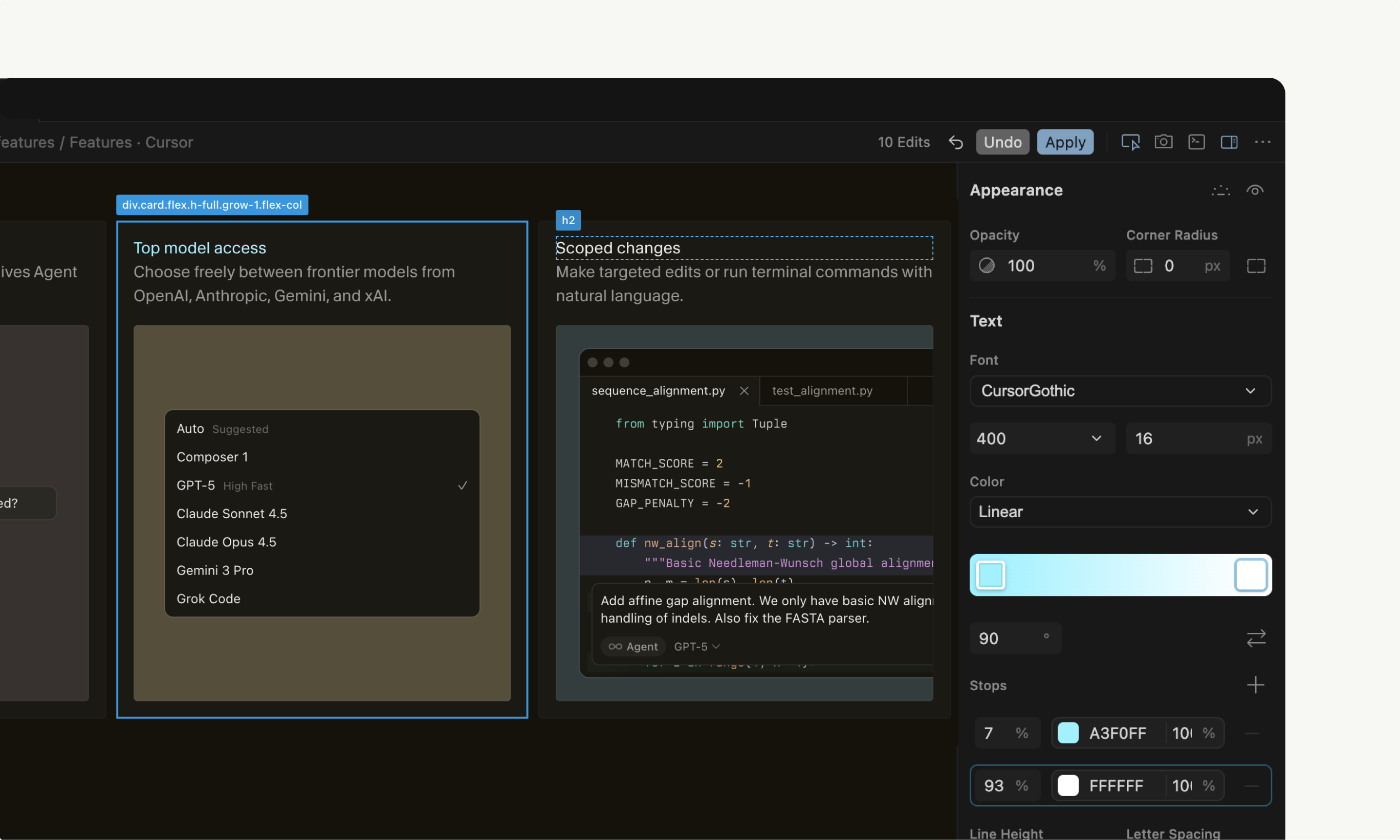
Visual Editor in Cursor Browser: Revolutionizing Web App Development
Edit web apps visually in the Cursor Browser
发布时间: 12/12/2025
The Visual Editor, integrated within the Cursor Browser, is a groundbreaking tool designed to transform how developers interact with and modify web applications. This innovative feature allows users to visually edit web apps directly in the browser, while an AI agent works in parallel to update the underlying code. It aims to bridge the gap between design and code, offering a unified workspace that streamlines the development workflow.
This product targets web developers, designers, and even less technical users who need to make quick visual adjustments to web applications. It's particularly valuable for frontend development, where constant iteration on UI/UX is common. The core value proposition lies in its ability to significantly reduce context-switching and accelerate the design-to-code process, making web development more intuitive and efficient.
Problem & Solution
Traditional web development often involves a constant back-and-forth between a code editor and a browser, along with design tools. This context-switching can be a major productivity drain, making it challenging to quickly iterate on designs and debug visual issues. Debugging client-side bugs and tweaking UI details often consumes endless hours.
The Visual Editor directly addresses this problem by providing a unified workspace where developers can see their web app, its codebase, and visual editing tools all in one window. This eliminates the need to jump between different applications. The integrated AI agent plays a crucial role by automatically translating visual changes into code, offering a unique solution that goes beyond simple WYSIWYG editors. It fills a market gap for a truly integrated, AI-powered visual development environment that understands and updates the underlying codebase in real-time.
Key Features & Highlights
The Visual Editor boasts several compelling features that enhance the web development experience:
- Drag-and-Drop Manipulation: Users can directly manipulate a site's layout and structure by dragging and dropping rendered elements across the DOM tree. This allows for quick rearrangement of buttons, sections, and even testing different grid configurations visually.
- Real-time Visual Editing with AI Assistance: As users make visual changes, the integrated AI agent works alongside them, updating the code in real-time. This provides immediate feedback and drastically speeds up the iteration process.
- Component State Testing: For modern applications built with frameworks like React, the Visual Editor makes it easy to surface and toggle between component variants and states by exposing props in a sidebar, all without directly touching the code.
- Fine-tuned Visual Controls: The sidebar offers precise controls for adjusting styles. Users can fine-tune properties like colors, typography, flexbox, and grid layouts using sliders, color pickers, and even design tokens.
- Point and Prompt Interaction: A highly intuitive feature allows users to click on any element and describe the desired change in natural language (e.g., "make this bigger," "turn this red," "swap their order"). The AI agents then execute these changes in seconds. This essentially provides an AI assistant for web design work.
- Integrated Debugging and Testing: The Cursor Browser, with its agent capabilities, can capture screenshots on demand, suggest UI fixes directly in the browser, and assist with client-side debugging by spotting and guiding fixes. This extends beyond visual editing to a comprehensive development and testing environment.
Potential Drawbacks & Areas for Improvement
While the Visual Editor offers significant advantages, there are areas for potential improvement. One potential drawback, common with AI-powered tools, could be the "inconsistent AI" factor, where suggestions might range from brilliant to baffling, or even rewrite perfectly fine code into something less readable. New users might also experience an initial learning curve, as the integrated nature of the tool requires some adjustment to muscle memory built from traditional coding workflows.
For highly complex or bespoke styling, the visual controls, while comprehensive, might still require developers to dive into the code for intricate adjustments not easily captured by sliders or color pickers. Further integration with advanced design system tokens and broader CSS property control could enhance this. Additionally, while the AI can update code, reviewing the generated code for verbosity and maintainability remains important, as some users have noted that AI agents can sometimes produce verbose code.
Bottom Line & Recommendation
The Visual Editor in the Cursor Browser is a powerful and innovative tool that pushes the boundaries of web development. It's particularly recommended for frontend developers, UI/UX designers, and teams looking to accelerate their iteration cycles and reduce context-switching between design and code. Anyone who builds, tests, or manages web applications should keep a close eye on this, as it signifies a shift in development workflows. Its AI-powered visual editing capabilities, combined with the comprehensive Cursor Browser environment, make it a game-changer for enhancing speed, confidence, and code structure. If you're seeking a more intuitive, efficient, and integrated approach to building and refining web applications, the Visual Editor in Cursor Browser is definitely worth exploring.
Featured AI Applications
Discover powerful tools to enhance your productivity
MindMax
与AI互动的新方式
超越 AI 聊天,将对话转化为无限画布。结合头脑风暴、思维导图、批判性与创造性思维工具,帮助你可视化想法、高效解决问题、加速学习。
AI Slides
AI 驱动幻灯片,Markdown 魔法加持
革命性幻灯片创作,融合 AI 智能与 Markdown 灵活性 - 随处编辑,随时优化,轻松迭代。让每个想法,都能快速变成专业演示。
AI Markdown Editor
打开即写 - AI驱动的Markdown编辑器
极其高效的写作体验:AI助手、斜杠命令、极简界面。打开即用,轻松写作。✍️ Markdown简洁 + 🤖 AI强大 + ⚡ 斜杠命令 = 完美写作体验
FunBlocks AI Extension
🚀 AI驱动的浏览器扩展
用FunBlocks AI助手改变您的浏览体验。您的智能伴侣,为网络上的AI驱动阅读、写作、头脑风暴和批判性思维提供支持。