Voice Anywhere Review: The Floating Dictation Tool That Changes How You Input Text
A floating mic that turns your speech into text anywhere
发布时间: 2/2/2026
Product Overview: Redefining Input Flexibility
Voice Anywhere enters the productivity software space with a bold promise: transforming any text field on your computer into a dictation zone. This isn't just another standard voice-to-text application; it’s a persistently available, floating microphone interface designed to integrate seamlessly across your entire operating system environment. The core concept is simple yet revolutionary: if you can type there, Voice Anywhere lets you speak there.
This innovative tool targets power users, including busy founders juggling multiple tasks, developers needing rapid code documentation ("vibe coders"), and anyone who frequently switches between different applications—from email clients and CRM platforms to complex IDEs and spreadsheet software. The central value proposition of Voice Anywhere is eliminating friction by removing the need to constantly switch focus, copy/paste, or manually type lengthy content, thus keeping users firmly in their flow state.
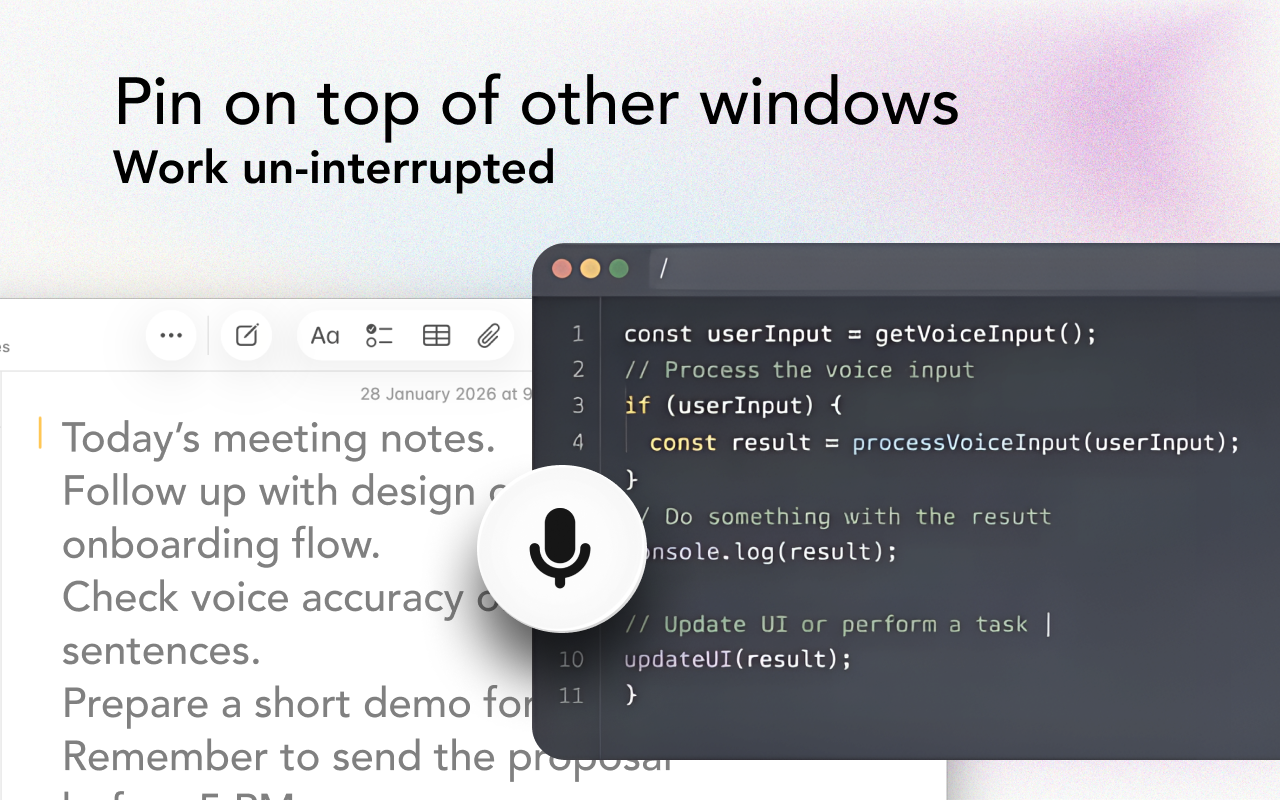
The design prioritizes accessibility, featuring a minimal, floating, and pinnable mic icon. This ensures that wherever your focus lies—whether deep in a coding session or drafting a crucial proposal—the transcription tool is just a click (or a hotkey press) away, ready to capture your thoughts instantly.
Problem & Solution: Breaking Down Application Barriers
The primary problem Voice Anywhere addresses is the inherent inflexibility of traditional dictation software. Most voice recognition tools are siloed within specific applications (like Microsoft Word, Google Docs, or a dedicated note-taking app). When a user needs to dictate a quick update into a chat window, add a comment in a design tool, or jot down an idea directly into a line of code, they are forced to interrupt their primary task, open the dictation app, speak, and then painstakingly copy the output back to the required field. This context switching severely degrades productivity.
Voice Anywhere solves this by creating a universal input layer. By offering a floating, persistent microphone that hooks into any active text field, it bypasses these application limitations entirely. Its unique selling proposition is this universal compatibility, enabling true hands-free input across diverse software ecosystems. It fills a noticeable market gap for users demanding OS-level dictation accessibility without compromising application focus.
Key Features & Highlights: Powering Flow State Dictation
The feature set of Voice Anywhere is built around speed and global utility. The most compelling highlight is its on-device recognition. This promises faster transcription times and, crucially for sensitive work, enhanced privacy by keeping data processing local rather than relying solely on cloud servers for every utterance.
Key capabilities include:
- Universal Input: Dictate directly into apps, websites, IDEs, and virtually any text box.
- Persistent Interface: The floating, pinnable microphone ensures the tool is always accessible without obscuring necessary screen real estate.
- Rapid Activation: The promised “SHIFT + R” toggle is essential for quick on/off functionality, vital for maintaining the speed that founders and developers require.
- Multi-Language Support: With support for over 100 languages, Voice Anywhere boasts strong global usability.
- Optional AI Engine: Catering to advanced users, the option to leverage a more powerful AI engine suggests capabilities beyond basic transcription, potentially offering advanced punctuation or formatting commands.
The user experience, focused on being lightweight and "sticky," is clearly designed for users who value efficiency above all else.
Potential Drawbacks & Areas for Improvement
While the concept behind Voice Anywhere is exceptional, a few areas could see immediate refinement to enhance its market appeal. The reliance on the floating mic, while a core feature, could occasionally become cumbersome if users aren't disciplined about pinning or hiding it; a more intelligent system that remembers which applications trigger the mic might be beneficial.
Furthermore, for a tool targeting "vibe coders," deeper integration with development workflows would be invaluable. Suggestions for enhancement include:
- Advanced Command Sets: Offering specialized voice commands for common IDE actions (e.g., "insert semicolon," "new line," "comment out block").
- Integration Ecosystem: Developing official plugins or scripts for popular IDEs (like VS Code or JetBrains suite) to better manage cursor placement after dictation.
- Customizable Hotkeys: While "SHIFT + R" is noted, providing granular control over the activation hotkey is standard for power-user tools.
The performance metrics of the on-device recognition versus the optional AI engine—specifically latency and accuracy comparison—would also be valuable information for potential users to fully understand the trade-offs.
Bottom Line & Recommendation
Voice Anywhere is a genuinely smart productivity application that successfully merges accessibility with high-speed execution. For entrepreneurs, writers, or developers who frequently find themselves context-switching between dictating ideas and executing tasks in disparate software environments, this tool offers a significant efficiency boost.
If your workflow involves heavy cross-application text entry and you value keeping your hands free and your focus unbroken, Voice Anywhere is highly recommended. It delivers on its promise of being the "floating mic that turns your speech into text anywhere," making it a standout utility in the crowded speech-to-text market. Give it a try if you’re looking to maximize your digital flow state.
Featured AI Applications
Discover powerful tools to enhance your productivity
MindMax
与AI互动的新方式
超越 AI 聊天,将对话转化为无限画布。结合头脑风暴、思维导图、批判性与创造性思维工具,帮助你可视化想法、高效解决问题、加速学习。
AI Slides
AI 驱动幻灯片,Markdown 魔法加持
革命性幻灯片创作,融合 AI 智能与 Markdown 灵活性 - 随处编辑,随时优化,轻松迭代。让每个想法,都能快速变成专业演示。
AI Markdown Editor
打开即写 - AI驱动的Markdown编辑器
极其高效的写作体验:AI助手、斜杠命令、极简界面。打开即用,轻松写作。✍️ Markdown简洁 + 🤖 AI强大 + ⚡ 斜杠命令 = 完美写作体验
FunBlocks AI Extension
🚀 AI驱动的浏览器扩展
用FunBlocks AI助手改变您的浏览体验。您的智能伴侣,为网络上的AI驱动阅读、写作、头脑风暴和批判性思维提供支持。