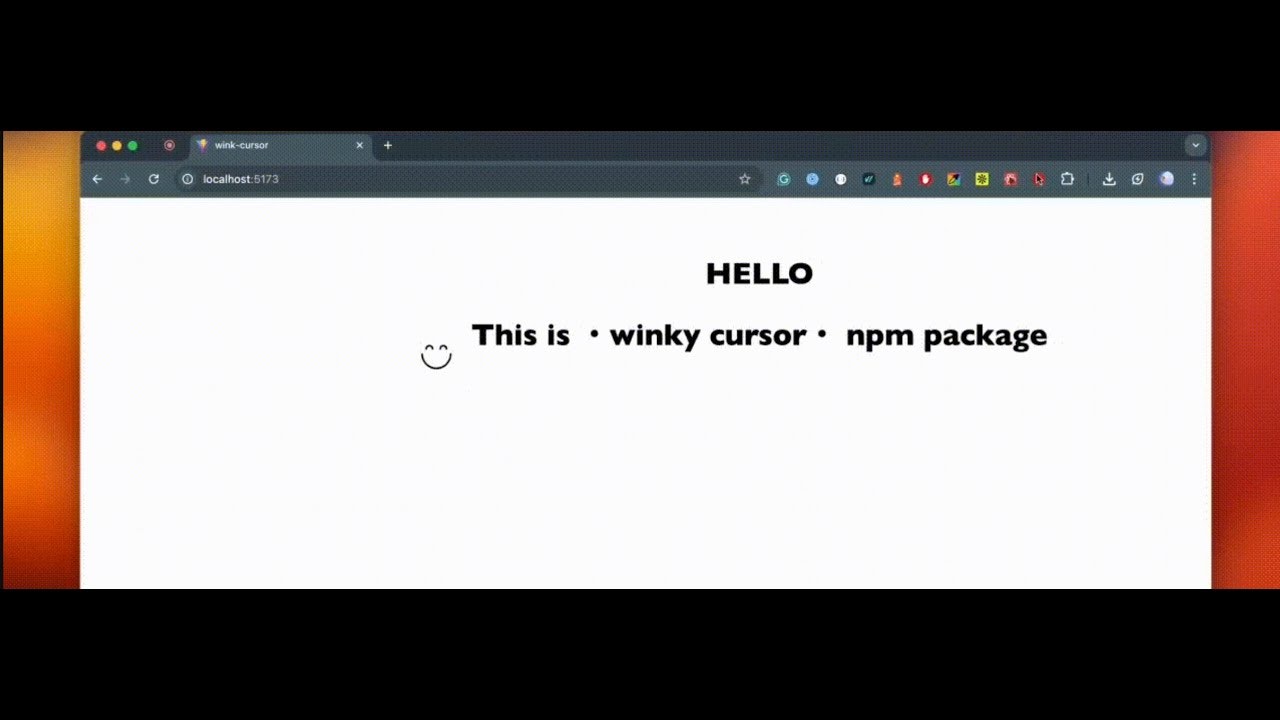
Wink-Cursor Review: Injecting Delight into Digital Interactions with a Winking Smiley
A lightweight smiley cursor with "winks" on click
发布时间: 12/31/2025
Product Overview: Bringing Joyful Micro-Interactions to Life
Wink-Cursor is a refreshingly simple, yet highly effective utility designed to combat the sterile feeling of modern digital interfaces. Tagged as "A lightweight smiley cursor with 'winks' on click," this tool transforms the mundane default mouse pointer into an engaging, playful element—specifically, a customizable emoji that executes a charming wink animation every time a user clicks.
Developed as a lightweight React component, Wink-Cursor targets developers, designers, and product owners who understand the power of micro-interactions. Its primary goal is to inject a moment of pure, unadulterated delight into user experiences. Whether you are building a creative portfolio, an engaging landing page, or aiming to soften the transactional nature of an onboarding flow, this tool provides an instant lift in perceived friendliness and personality for any web application.
The core value proposition of Wink-Cursor is instantly accessible: it offers significant emotional impact with negligible development overhead. It’s not about functionality; it’s about feeling, making the user experience notably warmer and more memorable without requiring extensive custom animation coding or heavy library integration.
Problem & Solution: Battling Interface Seriousness
In the fast-paced world of SaaS and transactional websites, many digital experiences feel cold, serious, and purely functional. The cursor, being the user’s primary point of interaction, often remains an overlooked canvas for personality expression. The problem Wink-Cursor addresses is this lack of playful feedback during crucial moments like clicks.
While complex animation libraries exist, implementing small, focused moments of joy traditionally requires significant design and engineering effort. Wink-Cursor solves this by offering an out-of-the-box, highly polished solution. It fills a clear market gap for developers seeking "zero design effort" enhancements that boost engagement. Instead of just recording an action, the user sees a positive reaction—the friendly wink—turning a simple click into a moment of positive reinforcement.
Key Features & Highlights: Lightweight Charm and Customization
The beauty of Wink-Cursor lies in its focused feature set, which prioritizes smoothness and integration ease. As a React component, installation and implementation are straightforward for modern frontend stacks.
Key highlights that make Wink-Cursor stand out include:
- Smooth Animation: The wink itself is reportedly fluid and non-jarring, ensuring the delightful effect enhances, rather than distracts from, the user flow.
- Lightweight Footprint: Crucially for performance-conscious developers, this tool is described as lightweight, ensuring that the added personality does not burden page load times or responsiveness.
- Customizability: While the default might be a smiley, the description hints at customization options, allowing developers to tailor the emoji or style to better match their brand aesthetic.
- Universal Application: It works across the entire application interface, meaning the delightful feedback is consistent wherever the user interacts.
This focus on lightweight, high-impact feedback makes Wink-Cursor a powerful tool for enhancing perceived responsiveness and approachability in any web project.
Potential Drawbacks & Areas for Improvement
As a specialized micro-interaction tool, Wink-Cursor naturally has limitations based on its scope. The primary potential drawback is that its very specific nature—the winking smiley—might not align with every brand aesthetic. If a company maintains a strictly formal or highly technical brand voice, an overtly playful cursor could feel dissonant.
For future iterations, developers might consider expanding the customization parameters beyond simple emoji swapping:
- Interaction Trigger Expansion: Allowing the wink to trigger on other events, such as hover-out or successful form submission, would increase utility.
- Style Variations: Offering different animation styles (e.g., a quick nod, a subtle blink) instead of just the wink could cater to a wider range of design needs.
- Theming Support: Better integration with CSS variables or context for easier theming (color schemes, size scaling) would be beneficial for seamless integration into complex design systems.
Bottom Line & Recommendation
Wink-Cursor is an excellent product for anyone looking to add immediate, positive emotional resonance to their web application without diving into deep UI engineering. If you manage a creative portfolio, are building a consumer-facing product where approachability is key, or are looking for a clever way to soften transactional experiences, this component is highly recommended.
It excels at delivering maximum charm for minimal effort. For modern web developers aiming to differentiate their user experience through thoughtful micro-interactions, Wink-Cursor is a fun, performant utility well worth trying out during your next build.
Featured AI Applications
Discover powerful tools to enhance your productivity
MindMax
与AI互动的新方式
超越 AI 聊天,将对话转化为无限画布。结合头脑风暴、思维导图、批判性与创造性思维工具,帮助你可视化想法、高效解决问题、加速学习。
AI Slides
AI 驱动幻灯片,Markdown 魔法加持
革命性幻灯片创作,融合 AI 智能与 Markdown 灵活性 - 随处编辑,随时优化,轻松迭代。让每个想法,都能快速变成专业演示。
AI Markdown Editor
打开即写 - AI驱动的Markdown编辑器
极其高效的写作体验:AI助手、斜杠命令、极简界面。打开即用,轻松写作。✍️ Markdown简洁 + 🤖 AI强大 + ⚡ 斜杠命令 = 完美写作体验
FunBlocks AI Extension
🚀 AI驱动的浏览器扩展
用FunBlocks AI助手改变您的浏览体验。您的智能伴侣,为网络上的AI驱动阅读、写作、头脑风暴和批判性思维提供支持。