Unleashing Personalized Tutoring - How Educators Can Use Socra's "Learning Anything" Mode to Create AI Teaching Clones
In today's diverse classrooms, providing truly individualized attention to every student remains one of the most significant challenges for educators. What if you could clone yourself—an expert tutor attuned to specific pedagogical theories and instantly adaptable to each student's needs?
Welcome to the power of Socra's "Learning Anything" Dialogue Mode. This feature transforms Socra from a general AI into a hyper-specialized, Socratic teaching assistant, allowing you to embed your pedagogical philosophy directly into an AI experience for scalable, personalized student support.
This guide outlines the steps and best practices for educators looking to leverage this feature to create personalized AI teaching clones.
Why Use Socra as Your Teaching Clone?
Socra moves beyond simple Q&A by employing Adaptive Socratic & Feynman Teaching. It doesn't just provide answers; it guides students through discovery using proven educational frameworks.
By using the "Learning Anything" mode, you ensure that every student interacting with the AI clone is learning according to:
- Your Defined Objectives: Ensuring alignment with your curriculum goals.
- Your Chosen Theory: Utilizing established pedagogical models (like Bloom's Taxonomy, Marzano's Nine Instructional Strategies, or the 5E Model) to structure learning.
- Personalized Pacing: The AI dynamically adjusts the difficulty based on the student's real-time progress.
Step-by-Step Guide: Creating Your AI Teaching Clone
The process is designed to be intuitive, allowing you to define the scope and then deploy the tool instantly.
Phase 1: Defining the Clone's DNA (The Teacher's Setup)
This phase takes place within the Socra interface under the "Learning Anything" Dialogue Mode.
1. Select the Dialogue Mode:
- Choose "Learning Anything".
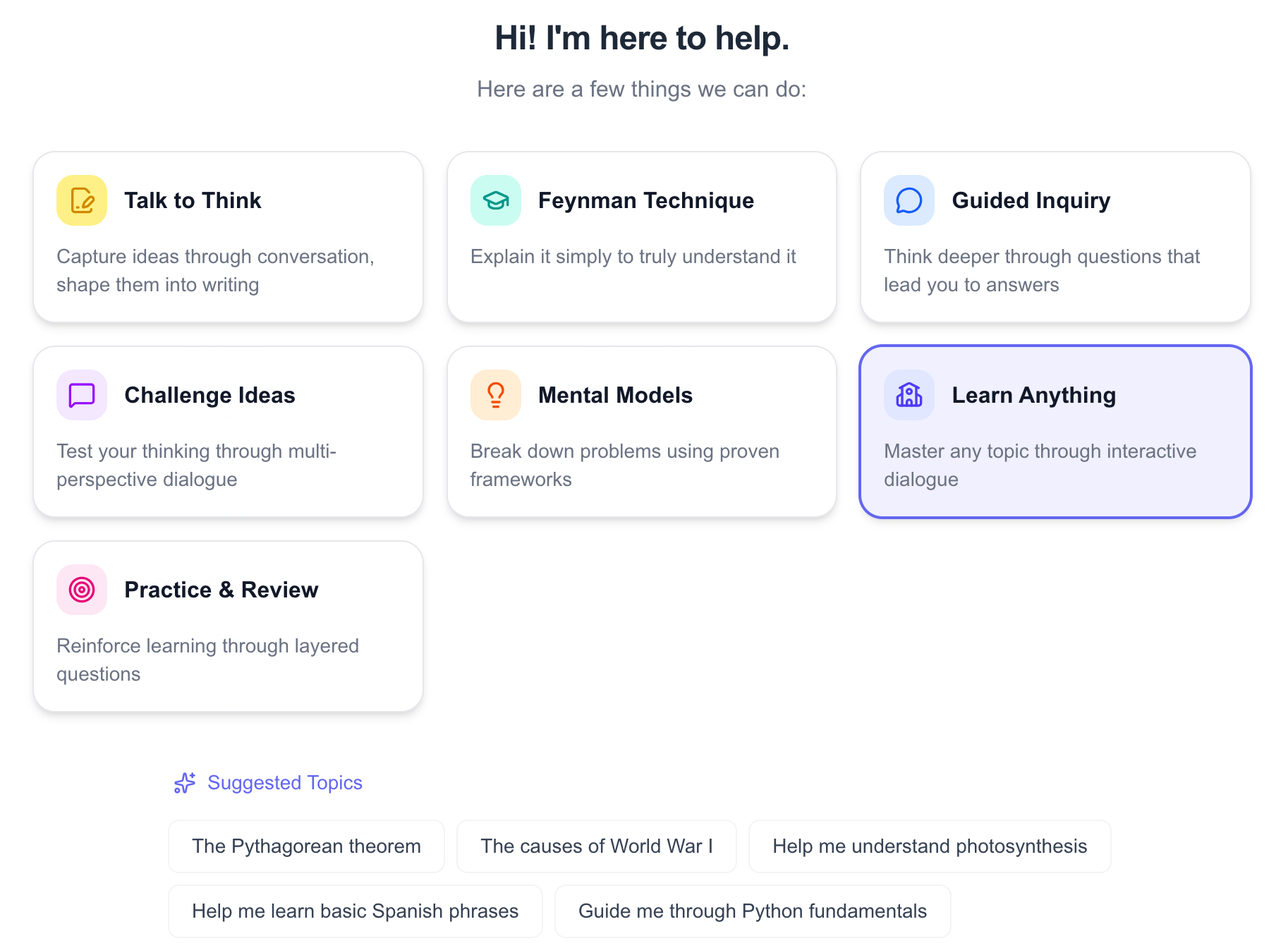
2. Define the Student Context:
- Specify Grade Level/Audience: Input the target audience (e.g., "9th Grade Algebra Students," "AP European History Juniors," or "Adult Learners New to Python"). This grounds the AI in the appropriate developmental and prior knowledge context.
3. Embed Your Pedagogy (Crucial Step):
- Select Educational Theory/Model: Choose the framework that guides your teaching style. Options might include:
- Bloom’s Taxonomy: To ensure students progress from basic recall to higher-order thinking (Analysis, Evaluation, Creation).
- Marzano’s Strategies: To focus on specific instructional elements known to boost achievement.
- 5E Model (Engage, Explore, Explain, Elaborate, Evaluate): Ideal for inquiry-based science and concept introduction.
- More options are available, each designed to align with different teaching philosophies and learning goals.
- Or leave it to AI to decide.
4. Set the Learning Objective & Topic:
- Topic: Clearly define the subject matter (e.g., "The concept of oxidation states in Chemistry").
- Learning Objectives: State what the student should be able to do by the end of the session. Example: "Students will be able to calculate the oxidation state for any element in a binary ionic compound."
Phase 2: Review and Approval
Socra will use the input from Phase 1 to automatically generate a preliminary Learning Plan.
- Review the Plan: Examine the proposed structure, pacing, and key discussion milestones.
- Edit if Necessary: Modify the plan to better suit a specific student group or timeline.
- Approve and Share: Once satisfied, approve the plan. Socra generates a unique sharing link or code for this specific dialogue instance.
Phase 3: Student Deployment and Learning
The sharing step is where the personalization scales across your class.
- Distribute the Link: Share the approved session link with the intended student or group via your LMS, email, or a dedicated classroom portal.
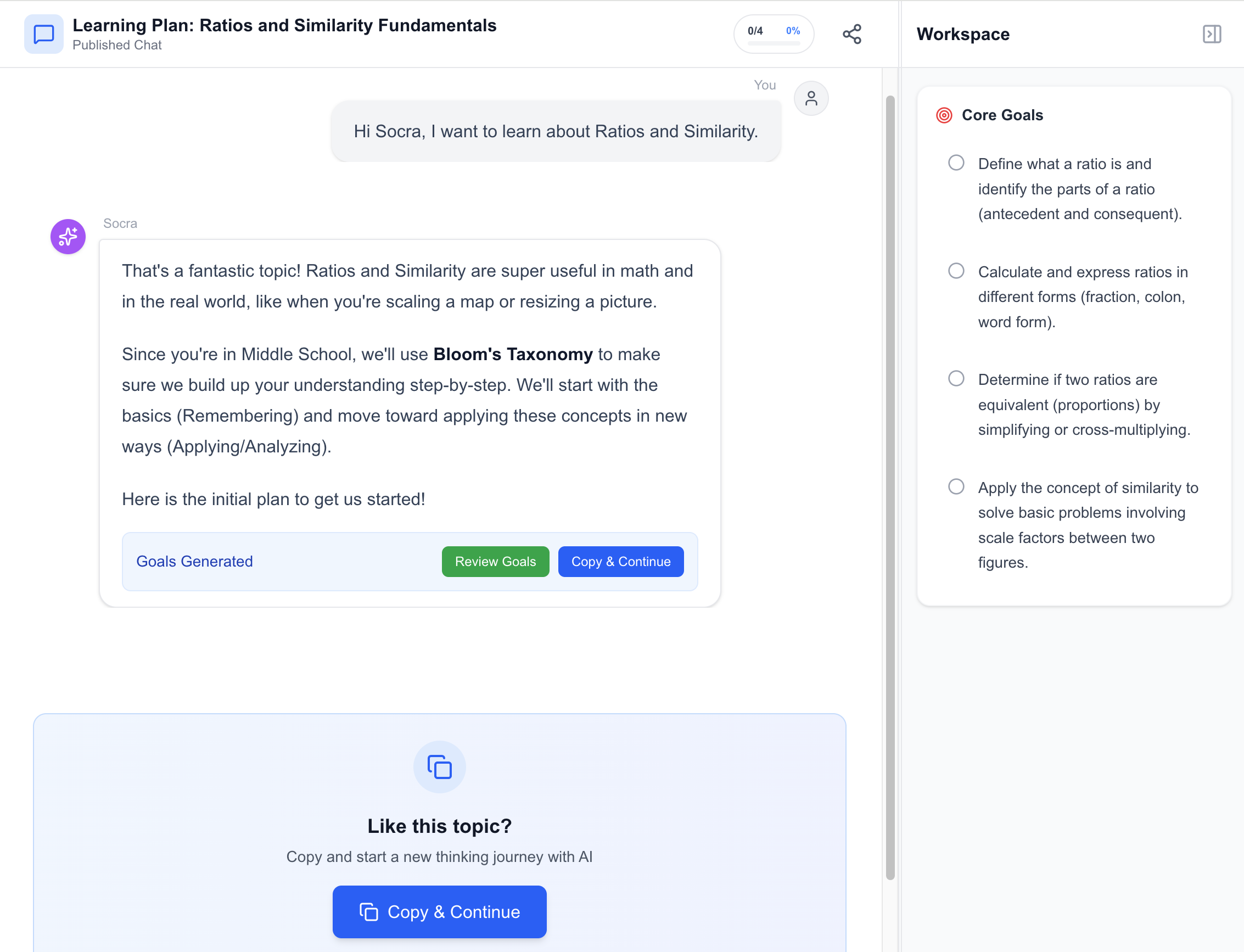
- Student Initiation: When the student clicks the link, they can "copy the dialogue" to start their personalized session. They are now engaging with your AI clone, trained on your preferred methods.
- Adaptive Socratic Dialogue: The clone will initiate the conversation based on the first step of the plan, using Socratic questioning to probe the student’s existing knowledge and guide them forward, adhering strictly to the chosen pedagogical framework.
Best Practices for Maximum Impact
To ensure your AI clones are effective teaching tools, adhere to these best practices:
| Area | Best Practice Guideline | Why It Works |
|---|---|---|
| Objective Specificity | Make objectives measurable and narrow. Avoid broad topics in a single session. | Narrow focus allows the Socratic dialogue to achieve deep comprehension (e.g., "Calculating net ionic equations" vs. "Chemistry"). |
| Pedagogical Alignment | Select the theory that best matches the concept. Use the 5E Model for initial concept building and Bloom's for complex problem-solving review. | This ensures the method of learning reinforces the content being taught. |
| Artifact Utilization | Encourage students to use the One-Click Artifact feature (e.g., Idea Memo) after completing a challenging section. | Transforming the messy dialogue into a clean summary solidifies learning and creates a personalized study guide. |
| Pilot Testing | Run the session yourself once before assigning it to students. | Verify that the AI's execution of your chosen theory (e.g., Marzano’s feedback loop) feels natural and effective. |
| Feedback Loop | Occasionally ask students for feedback on how the AI tutor helped them learn (not just what they learned). | This iterative refinement ensures your teaching clones continuously improve. |
Conclusion
Socra's "Learning Anything" mode empowers educators to break the one-to-many teaching bottleneck. By embedding your expertise, goals, and favored teaching theories into an AI partner, you equip every student with a tireless, personalized tutor available 24/7—allowing you to focus your in-person time on mentorship, complex problem-solving, and meaningful human connection. Start building your teaching clones today and watch personalized mastery scale across your classroom.
Try Socra for free at https://hisocra.com