Why How AI Talks to You Matters as Much as What It Says
Thariq posted a simple observation: AI models default to Markdown — a format designed for developers writing documentation, not for everyday people trying to learn or think. It's like printing a website as plain code and handing it to a reader. Technically complete. Practically painful.
Andrej Karpathy replied, and the conversation got interesting.
The Conversation That Started It
"Ask your LLM to 'structure your response as HTML', then view the generated file in your browser. Around a ~third of our brains are a massively parallel processor dedicated to vision. It is the 10-lane superhighway of information into the brain."
— Andrej Karpathy, AI researcher, former OpenAI & Tesla
Karpathy's reply laid out a clear progression — text, Markdown, HTML, and eventually something like interactive neural video — arguing that the gap between current AI output and human cognitive preference is enormous and largely unexplored.
His hot tip for today? Just ask for HTML.
We think HTML is a great start. But it's still just a start.
Why Vision Changes Everything
Karpathy's "10-lane superhighway" metaphor is grounded in real neuroscience. Visual information bypasses the slow, serial processing of language and goes directly into pattern recognition — the thing our brains do effortlessly and at speed.
When AI outputs text, it's asking your brain to translate code into meaning. When it outputs a well-designed visual — with hierarchy, color, and spatial layout — your brain can absorb it like a photograph.
The input/output mind meld between humans and AIs is ongoing — and there is a lot of work to do.
Some numbers that put this in perspective:
| Fact | Data |
|---|---|
| Picture Superiority Effect | People remember visual info 6× better than text alone |
| Image processing speed | The brain categorizes an image in as little as 13ms |
| Visual brain share | 40% of nerve fibers connecting to the brain are linked to the retina |
Vision isn't one sense among many — it's dominant. This is exactly why MindMax was built: not as a styling exercise, but as a cognitive design challenge.
Karpathy's Progression, Annotated
He sketched a clear ladder of output quality. Each step is a leap in how much information can be transferred per second of the reader's attention.
Step 1 — Raw Text
No formatting. Dense. Forces readers to build mental structure from scratch. This is where everything started.
Step 2 — Markdown ← current default
Headings and bold text help with scanning. But it renders poorly in many apps and has a limited visual range. It was designed for developer docs, not general communication.
Step 3 — HTML ← emerging now
Real layout. Color. Interactivity. A massive step — but it requires the user to explicitly ask for it. Most people don't know to do this.
Step 4 — MindMax ← this is our stage
Designed around cognitive load. Visual hierarchy matched to how humans actually remember and connect ideas. No prompt tricks needed — every response is visually intelligent by default.
Step N — Neural Video (the horizon)
Karpathy's extrapolation: interactive simulations generated directly by a diffusion neural net. The technology doesn't fully exist yet, but the direction is clear.
What MindMax Does Differently
ChatGPT, Claude, and Gemini are brilliant reasoning engines. But their default output is built for the interface, not the reader.
MindMax doesn't wrap AI answers in a CSS theme. It rethinks the output from the ground up — asking: what does this information look like when it's designed for understanding and memory?
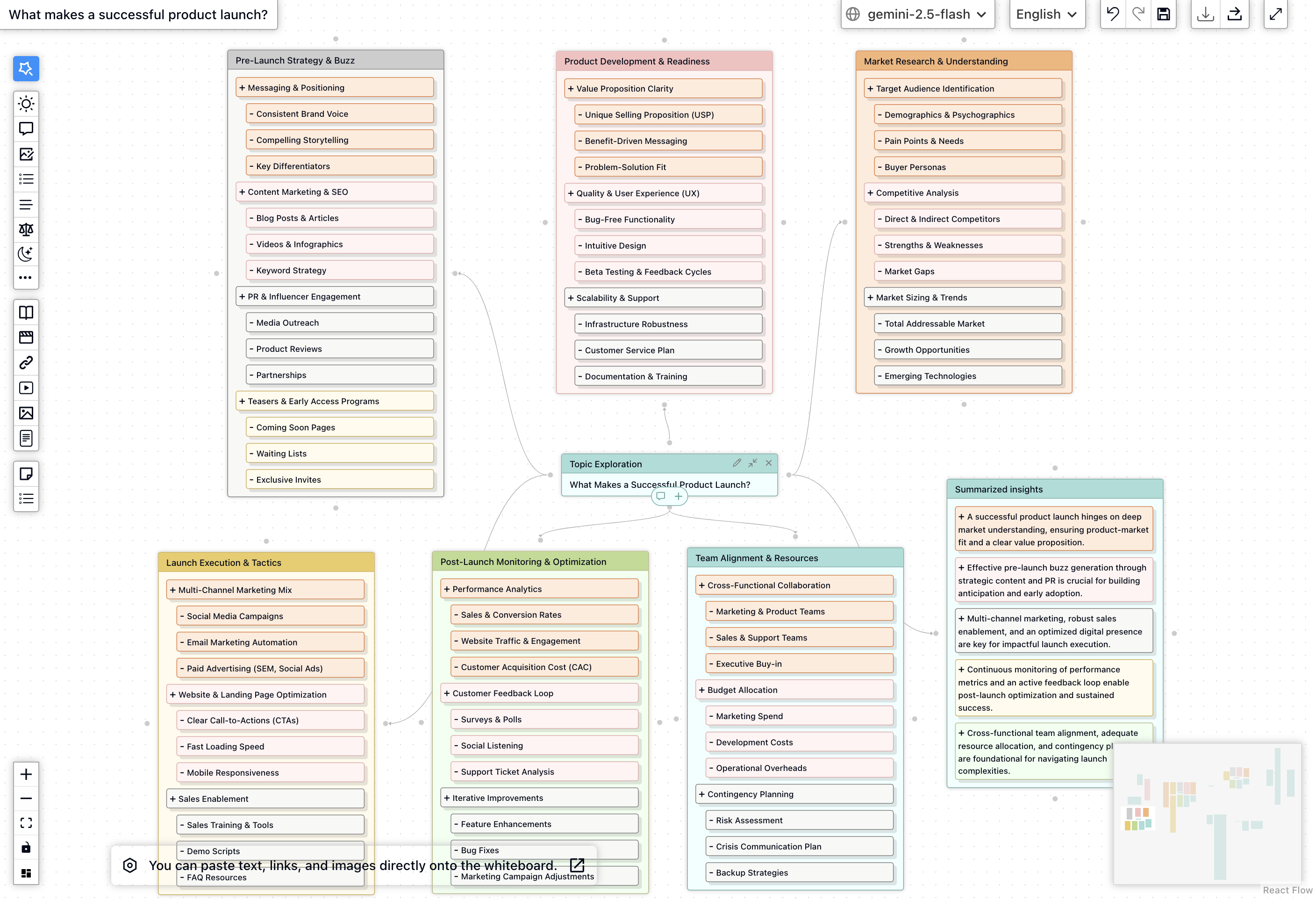
💡 Cognitive Load Design
Information is grouped, layered, and revealed in the order your brain naturally wants it. Less scanning. More understanding.
🗺️ Visual Knowledge Maps
Complex answers become spatial maps — not bullet lists. Relationships between ideas are shown, not described.
⚡ Zero-Config Richness
You don't need to ask for HTML or type special prompts. MindMax makes every response visually intelligent by default.
📈 Memory Retention Built In
Visual hierarchy, color coding, and spatial layout aren't decorative — they are proven memory aids, baked into every output.
Honest Comparison
| Capability | Raw Text | Markdown | HTML | MindMax |
|---|---|---|---|---|
| Visual hierarchy | ✕ | Partial | ✓ | ✓✓ |
| Designed for memory | ✕ | ✕ | Varies | ✓ |
| No prompt engineering needed | ✓ | ✓ | ✕ | ✓ |
| Spatial / relational layout | ✕ | ✕ | Possible | ✓ |
| Interactive elements | ✕ | ✕ | ✓ | ✓ |
| Consistent visual language | ✓ | Partial | ✕ | ✓ |
| Reduces reading effort | ✕ | A little | Mostly | Yes |
The Bigger Idea
Karpathy is right. And we're only at step three.
His extrapolation ends with "interactive neural videos generated directly by a diffusion neural net" — AI that produces not a document, but an experience. That future is genuinely exciting. But the gap between today's Markdown default and even step 3 (HTML) is already costing users enormous cognitive effort every single day.
MindMax's bet is simple: close that gap now. Don't wait for neural video. Use everything we already know about visual cognition, memory, and interface design to make AI responses feel less like reading a manual and more like having a great teacher draw something on a whiteboard.
"Audio is the human-preferred input to AIs. But vision — images, animations, video — is the preferred output from them. Around a third of our brains exist for exactly this purpose."
— Andrej Karpathy
The input/output mind meld Karpathy describes is a long journey. But the next step isn't a technology breakthrough. It's a design decision.
MindMax is designed around this single insight. Every response. Every day. Not because it's prettier — because your brain deserves better than a wall of asterisks.